Loading
Form preview
  • US Legal Forms
  • Other Templates
  • Tax Forms
  • Indiana Tax Forms
  • In Dor Np-20 2013

Get In Dor Np-20 2013

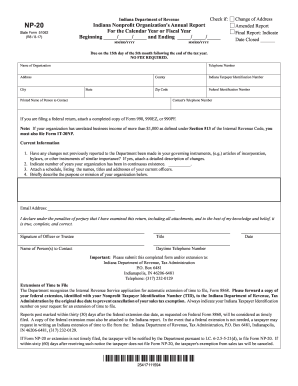
C. 6-2. 5-5-21 d to file Form NP-20. If within sixty 60 days after receiving such notice the taxpayer does not file Form NP-20 the taxpayer s exemption from sales tax will be canceled. 25413111594. O. Box 6481 Indianapolis IN 46206-6481 317 232-0129. If Form NP-20 or extension is not timely filed the taxpayer will be notified by the Department pursuant to I. NP-20 State Form 51062 R7 / 8-13 Check if Indiana Department of Revenue Indiana Nonprofit Organization s Annual Report For the Calendar Yea.

How it works

  1. Open form

    Open form follow the instructions

  2. Easily sign form

    Easily sign the form with your finger

  3. Share form

    Send filled & signed form or save

How to fill out the IN DoR NP-20 online

Filling out the Indiana Nonprofit Organization's Annual Report (IN DoR NP-20) online is a straightforward process. This guide provides step-by-step instructions to help users complete the form accurately and efficiently.

Follow the steps to fill out the IN DoR NP-20 online.

  1. Press the ‘Get Form’ button to acquire the form and open it in your preferred document editor.
  2. Begin by entering the organization’s name in the designated field. Ensure that the name matches the information registered with the Indiana Department of Revenue.
  3. Fill in the telephone number of the organization. This should be a contact number where the organization can be reached easily.
  4. Provide the complete address of the organization, including city, state, and zip code. Ensure all information is accurate to prevent any delays.
  5. Enter the Indiana Taxpayer Identification Number and the Federal Identification Number. If these numbers are not known, consult your organization’s tax documents.
  6. Indicate if there is a change of address, if this is an amended report, or if this is a final report. If marked as final, include the date the organization was closed.
  7. In the section labeled 'Current Information,' check if any changes have occurred in governing documents. If yes, attach a detailed description of these changes.
  8. State the number of years the organization has been in continuous existence. Provide the correct figure in the provided space.
  9. Attach a schedule that lists the names, titles, and addresses of current officers of the organization. This is essential for maintaining transparency.
  10. Briefly describe the purpose or mission of the organization in the provided section, ensuring clarity and conciseness.
  11. Complete the email address of the contact person for future correspondence. Make sure this is an active email.
  12. Affix the signature of an authorized officer or trustee of the organization, along with their title and date of signing.
  13. Submit the form by saving the changes, and use options to download, print, or share the completed document as required.

Complete your IN DoR NP-20 form online today to ensure your organization's compliance.

Get form

Experience a faster way to fill out and sign forms on the web. Access the most extensive library of templates available.

Related content

DOR: Nonprofit Tax Forms
The center must file Form NP-20R by May 15 every five years to remain registered. Form...
Learn more
One-dimensional multicomponent Fermi gas in a trap
by N Matveeva · Cited by 34 — In the LENS experiment[16] the number of particles in...
Learn more
XR20CH
1.1 LEIA ANTES DE USAR ESTE MANUAL. •. Este manual é parte do produto e deve ser...
Learn more

Related links form

DC PD(28)-1178A 1995 DC Probate Fiduciary Panel - Attorney Application DC Provisional ABA Approved Law School Certification DC Uniform Bar Exam Information 2018

Questions & Answers

Get answers to your most pressing questions about US Legal Forms API.

Contact support

Qualifying for tax exemption in Indiana generally means your organization must serve a charitable, educational, or similar purpose. Each category has specific criteria that must be met, and the completion of the IN DoR NP-20 can significantly help in documenting this qualification. You should consult with the Indiana Department of Revenue to ensure you follow all necessary steps for proper classification.

Obtaining tax-exempt status in Indiana involves completing the IN DoR NP-20 form and submitting it to the Indiana Department of Revenue. You must meet the eligibility requirements outlined by the state, which typically include being a nonprofit organization engaged in specific activities. Once your form is reviewed and approved, you can enjoy the benefits of tax exemption.

To acquire a nonprofit tax ID number, also known as an EIN, you can apply through the Internal Revenue Service online. After establishing your nonprofit status, you should complete the IN DoR NP-20 form to ensure you receive the specific tax benefits applicable to nonprofits in Indiana. This ID is crucial for opening a bank account and managing your organization’s finances.

To obtain a sales tax exemption certificate in Indiana, you need to apply through the Indiana Department of Revenue. Generally, this involves submitting forms that prove your exemption status, such as the IN DoR NP-20.Once your application is approved, you will receive your exemption certificate, allowing you to make purchases without paying sales tax.

Qualifications for tax exemption in Indiana typically depend on your organization’s type and purpose. Nonprofit organizations, charities, and certain educational institutions usually qualify for tax exemption. It's important to review the criteria outlined by the Indiana Department of Revenue and complete the necessary IN DoR NP-20 form to formalize your tax-exempt status.

To change your tax status to exempt in Indiana, you will need to submit the appropriate documentation to the Indiana Department of Revenue. This generally involves completing the IN DoR NP-20 form and providing additional information to support your request. It is essential to follow the state’s guidelines carefully to avoid delays in processing your application.

Filing the NP-20 form in Indiana is required annually for organizations that wish to maintain their tax-exempt status. This form must be submitted to the Indiana Department of Revenue on time to avoid penalties. Regular filing helps ensure compliance with state regulations and allows for continued benefits associated with tax exemption.

Yes, individuals and organizations can be exempt from Indiana state taxes under certain conditions. To qualify for such exemptions, you must meet specific requirements set by the Indiana Department of Revenue. It’s advisable to review the guidelines related to the IN DoR NP-20 form, as this will help ensure you have all the necessary documentation in order.

Claiming 3 allowances generally implies that you expect to have less withholding from your paycheck, indicating you might have multiple dependents or deductions. This affects the amount of tax collected throughout the year. It is crucial to assess your financial situation regularly to ensure that the number of allowances you claim on the IN DoR NP-20 aligns with your actual tax liabilities.

On the W-4 form, you'll indicate your withholding allowances in the section that specifies the number of allowances you are claiming. If claiming 0 or 1, simply place these numbers in the designated box. This will ensure that your employer withholds the correct amount in alignment with your IN DoR NP-20 filing needs.

Get This Form Now!

Use professional pre-built templates to fill in and sign documents online faster. Get access to thousands of forms.
If you believe that this page should be taken down, please follow our DMCA take down processhere.
Get IN DoR NP-20
  • Adoption
  • Bankruptcy
  • Contractors
  • Divorce
  • Home Sales
  • Employment
  • Identity Theft
  • Incorporation
  • Landlord Tenant
  • Living Trust
  • Name Change
  • Personal Planning
  • Small Business
  • Wills & Estates
  • Packages A-Z
  • Affidavits
  • Bankruptcy
  • Bill of Sale
  • Corporate - LLC
  • Divorce
  • Employment
  • Identity Theft
  • Internet Technology
  • Landlord Tenant
  • Living Wills
  • Name Change
  • Power of Attorney
  • Real Estate
  • Small Estates
  • Wills
  • All Forms
  • Forms A-Z
  • Other Templates
  • Legal Hub
  • About Us
  • Help Portal
  • Legal Resources
  • Blog
  • Affiliates
  • Contact Us
  • Delete My Account
  • Site Map
  • Industries
  • Forms in Spanish
  • Localized Forms
  • State-specific Forms
  • Forms Kit
  • Real Estate Handbook
  • All Guides
  • Notarize
  • Incorporation services
  • For Consumers
  • For Small Business
  • For Attorneys
  • USLegal
  • FormsPass
  • pdfFiller
  • signNow
  • altaFlow
  • DocHub
  • Instapage
Form Packages
  • Adoption
  • Bankruptcy
  • Contractors
  • Divorce
  • Home Sales
  • Employment
  • Identity Theft
  • Incorporation
  • Landlord Tenant
  • Living Trust
  • Name Change
  • Personal Planning
  • Small Business
  • Wills & Estates
  • Packages A-Z
Form Categories
  • Affidavits
  • Bankruptcy
  • Bill of Sale
  • Corporate - LLC
  • Divorce
  • Employment
  • Identity Theft
  • Internet Technology
  • Landlord Tenant
  • Living Wills
  • Name Change
  • Power of Attorney
  • Real Estate
  • Small Estates
  • Wills
  • All Forms
  • Forms A-Z
  • Other Templates
Customer Service
  • Legal Hub
  • About Us
  • Help Portal
  • Legal Resources
  • Blog
  • Affiliates
  • Contact Us
  • Delete My Account
  • Site Map
  • Industries
  • Forms in Spanish
  • Localized Forms
  • State-specific Forms
  • Forms Kit
Legal Guides
  • Real Estate Handbook
  • All Guides
Prepared for you
  • Notarize
  • Incorporation services
Our Customers
  • For Consumers
  • For Small Business
  • For Attorneys
Our Sites
  • USLegal
  • FormsPass
  • pdfFiller
  • signNow
  • altaFlow
  • DocHub
  • Instapage
Social Media
Call us now toll free:
+1 833 426 79 33
As seen in:
© Copyright 1999-2026 airSlate Legal Forms, Inc. 17 Station Street, Ste. 203, Brookline, MA 02445
  • Your Privacy Choices
  • Terms of Service
  • Privacy Notice
  • Content Takedown Policy
  • Bug Bounty Program
IN DoR NP-20
This form is available in several versions.
Select the version you need from the drop-down list below.
2021 IN DoR NP-20
Select form
  • 2021 IN DoR NP-20
  • 2020 IN DoR NP-20
  • 2019 IN DoR NP-20
  • 2018 IN DoR NP-20
  • 2017 IN DoR NP-20
  • 2013 IN DoR NP-20
  • 2012 IN DoR NP-20
  • 2007 IN DoR NP-20
Select form