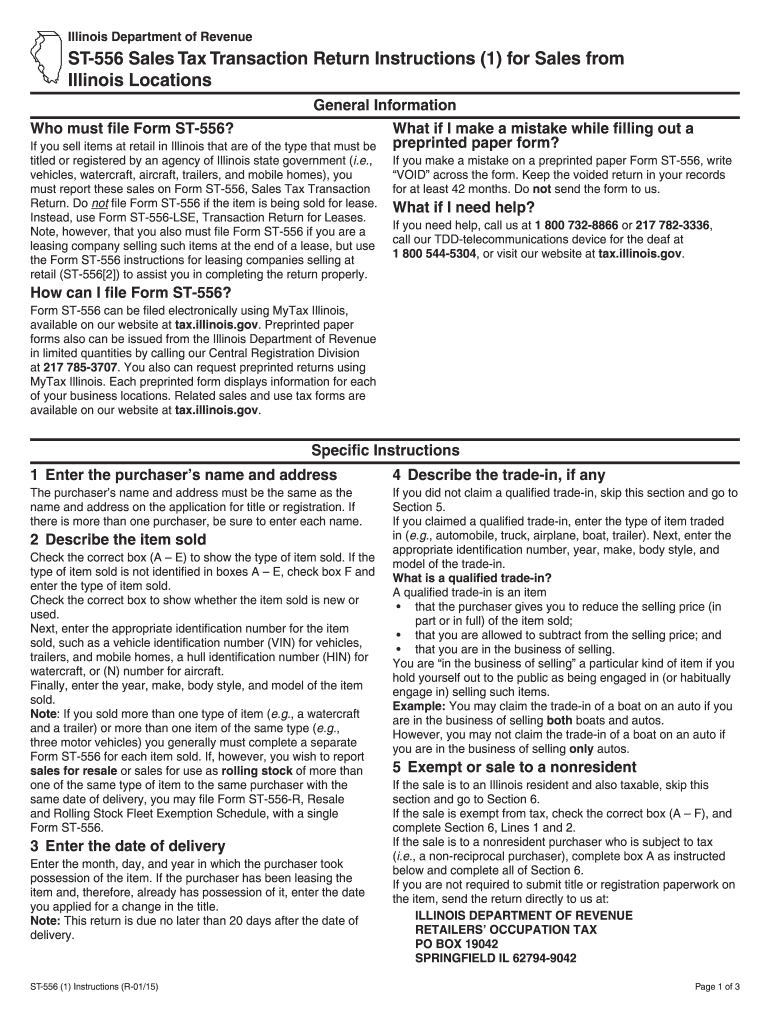
G such items. Example: You may claim the trade-in of a boat on an auto if you are in the business of selling both boats and autos. However, you may not claim the trade-in of a boat on an auto if you are in the business of selling only autos. 5 Exempt or sale to a nonresident If the sale is to an Illinois resident and taxable, skip this section and go to Section 6. If the sale is exempt, check the correct box (A-F), and complete Section 6, Lines 1 and 2. If the sale is to a nonresident who is su.

Open form follow the instructions

Easily sign the form with your finger

Send filled & signed form or save
How to use or fill out the IL ST-556 (1) Instructions online
Filling out the IL ST-556 (1) can be straightforward when you have a clear understanding of its components. This guide will provide step-by-step instructions to help you successfully complete the form online.
Follow the steps to fill out the IL ST-556 (1) Instructions online.
- Click 'Get Form' button to obtain the form and open it in the editor.
- Begin by entering the buyer's name and address. Ensure that this information matches the name on the application for title or registration. If there are multiple buyers, record each name.
- In this section, describe the item sold. If multiple items are sold, a separate form should be completed for each. Check the appropriate box to indicate the type of item sold (A-F), and note whether the item is new or used. Enter the relevant identification number (e.g., VIN, HIN) and provide the year, make, body style, and model of the item.
- Record the date of delivery, specifying the month, day, and year when the buyer took possession of the item.
- If applicable, describe the trade-in, including the item type, identification number, year, make, body style, and model.
- Determine if the sale is exempt or if it was made to a nonresident. Check the correct box and fill out Section 6 as needed.
- Enter the selling price, ensuring all components are included, and calculate the tax. Follow the instructions provided for each line to accurately complete the calculations.
- Finally, sign the return along with all buyers. If a qualified trade-in was claimed, confirm that the title has been assigned and surrendered.
Complete your documents online today for a seamless filing experience.
Experience a faster way to fill out and sign forms on the web. Access the most extensive library of templates available.
Related content
If you sold to an Illinois dealer, enter the dealer's account ID number in the space...
BGD is responsible for filing the following form ST-556-LSE. 52. Instructions for Form...
AVISO: Ajuste a faixa colorida do cabo ao pino 1 da unidade (o pino 1 é marcado como...
Get answers to your most pressing questions about US Legal Forms API.
What items are exempt from sales tax in Illinois?
In Illinois, several items are exempt from sales tax, including certain groceries, prescription medications, and some agricultural products. Understanding the full list of exemptions is crucial, so referring to the IL ST-556 (1) Instructions provides clarity on what qualifies for exemption. Always check current regulations to ensure you are up-to-date on any changes to the exemption list.
What is Illinois filing requirement?
Illinois filing requirements depend on your specific tax situation and the nature of your transactions. Generally, individuals and businesses must file tax returns annually, but there may be additional requirements based on sales transactions, such as those detailed in the IL ST-556 (1) Instructions. Keeping accurate records and staying informed about your obligations helps ensure compliance.
How do I file my St-1 online in Illinois?
Filing your ST-1 online in Illinois is simple and efficient, especially when you follow the IL ST-556 (1) Instructions. Begin by accessing the MyTax Illinois portal and logging into your account. From there, you can fill out the ST-1 form digitally, ensuring all necessary details are accurate before submitting it.
How to submit documents on MyTax Illinois?
To submit documents on MyTax Illinois, you must first create an account or log in to your existing one. Once logged in, navigate to the appropriate section for document submission following the IL ST-556 (1) Instructions. Upload your files as required, and ensure they meet the format and size requirements set by the portal.
How to file st 556 in Illinois?
Filing the ST-556 form in Illinois is straightforward if you follow the IL ST-556 (1) Instructions. First, complete the form with accurate vehicle details and seller information. Next, you can submit the form either in person at your local Department of Revenue office or online through MyTax Illinois, depending on your preference.
How do I avoid car sales tax in Illinois?
To avoid car sales tax in Illinois, you can explore various exemptions available under state law. For instance, certain vehicle transfers between family members or for specific government purposes are exempt. It’s essential to follow the IL ST-556 (1) Instructions carefully to ensure compliance when claiming any exemptions. Additionally, consulting with a tax professional can provide clarity on your situation.
How often do I need to file sales tax in Illinois?
In Illinois, the frequency of filing sales tax depends on your total sales volume. Some businesses may be required to file monthly, while others might file quarterly or annually. It’s important to check your specific filing requirements and refer to the IL ST-556 (1) Instructions for guidance. Consistently filing on time helps maintain compliance with state regulations and avoids penalties.
Can I file my Illinois tax return online?
Yes, you can file your Illinois tax return online, making the process quicker and more efficient. The Illinois Department of Revenue offers electronic filing options that simplify submission and provide immediate confirmation. Be sure to have your documents ready and refer to the IL ST-556 (1) Instructions for any special requirements. Utilizing online platforms like uslegalforms can further ease your filing experience.
Who must file an Illinois nonresident tax return?
Those who earn income in Illinois but reside in another state must file an Illinois nonresident tax return. If you have received income from sources in Illinois, such as wages or business income, filing is necessary according to state tax regulations. The IL ST-556 (1) Instructions provide clarity on what is required when filing as a nonresident. Make sure you report all relevant income accurately to avoid tax issues.
How do I file my ST 1 online in Illinois?
To file your ST 1 online in Illinois, begin by visiting the Illinois Department of Revenue's website. Create an account or log in if you already have one, then locate the ST 1 form. Follow the prompts to complete your filing electronically, referencing the IL ST-556 (1) Instructions for accurate data entry. Online filing helps streamline the process and offers convenience.
Use professional pre-built templates to fill in and sign documents online faster. Get access to thousands of forms.
If you believe that this page should be taken down, please follow our DMCA take down process here.
This form is available in several versions. Select the version you need from the drop-down list below.