Get Il Il-8655 2004
How it works
-

Open form follow the instructions
-

Easily sign the form with your finger
-

Send filled & signed form or save
How to fill out the IL IL-8655 online
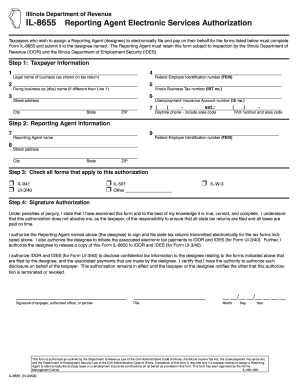
Completing the IL IL-8655 form allows taxpayers to authorize a Reporting Agent to electronically file and pay taxes on their behalf. This guide provides clear, step-by-step instructions to help you successfully fill out the form online.
Follow the steps to complete the IL IL-8655 form with ease.
- Click ‘Get Form’ button to obtain the form and open it in the editor.
- Enter the taxpayer information in Step 1. Provide the legal name of your business as it appears on your tax return. Include the Federal Employer Identification Number (FEIN), doing business as (dba) name if applicable, Illinois Business Tax number (IBT number), and your street address. Make sure to fill in the city, state, ZIP code, and your daytime phone number including area code, along with the FAX number and area code.
- Proceed to Step 2 to fill in the Reporting Agent information. Include the Reporting Agent's name and FEIN, along with their street address, city, state, and ZIP code.
- In Step 3, check all applicable forms that the Reporting Agent is authorized to handle. Options include IL-501, IL-941, UI-3/40, and IL-W-3, along with an option to specify other forms if needed.
- Move to Step 4 for the signature authorization. A designated individual must sign to authenticate the form, providing their title and date of signing. This individual needs to confirm their authority to grant access to confidential tax information.
- Once all sections are properly filled out, you can save changes to the document, download a copy for your records, print the completed form, or share it with the necessary parties.
Complete your IL IL-8655 form online today to ensure your Reporting Agent is authorized efficiently.
Get form
Related links form
To submit IL IL-8655, complete the form with accurate information and ensure all necessary signatures are present. You can file the form by mailing it directly to the IRS, following the guidelines on their website for the proper address. Alternatively, certain tax software and services, such as uslegalforms, allow for seamless electronic submission, which can save you time. Always check that your submission is complete before sending.