Loading
Get Il Rmp-14 2019-2026
How it works
-

Open form follow the instructions
-

Easily sign the form with your finger
-

Send filled & signed form or save
How to fill out the IL RMP-14 online
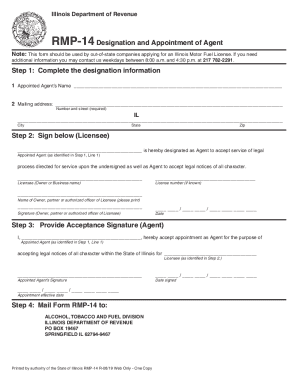
The IL RMP-14 form is essential for out-of-state companies seeking an Illinois Motor Fuel License. This guide will provide you with clear and supportive instructions to successfully complete this form online.
Follow the steps to accurately complete the IL RMP-14 form online.
- Click the ‘Get Form’ button to access the IL RMP-14 form and open it in your preferred editing tool.
- Complete the designation information by filling in the appointed agent’s name and mailing address. Ensure you provide the numeric street address, city, state, and zip code accurately.
- In this section, sign below where it indicates the licensee. This means that the person or entity responsible for the designation designates the appointed agent to accept legal processes and notices. Fill in the appointed agent's name as indicated in Step 1, Line 1, along with the license number if known and the date.
- The appointed agent must provide their acceptance signature in this next section. They will fill in their name, accept the appointment as the agent, and also indicate the licensee's name as identified in Step 2. The appointed agent should sign and provide the date signed, along with the effective appointment date.
- After completing all sections, ensure all information is reviewed for accuracy. Once confirmed, you can save any changes made or download, print, or share the form as required.
Begin completing your IL RMP-14 online today to ensure a smooth application process.