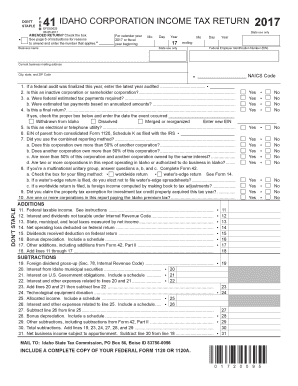
DON'T STAPLE.41 IDAHO CORPORATION INCOME TAX RETURN 2017F O R M EFO0002506052017AMENDED RETURN? Check the box. See page 6 of instructions for reasons to amend and enter the number that applies.Business.
Open form follow the instructions
Easily sign the form with your finger
Send filled & signed form or save
How to fill out the ID Form 41 online
This guide provides step-by-step instructions for completing the ID Form 41 online, ensuring a smooth and efficient filing process. Whether this is your first time filling out a tax return or you are a seasoned user, this comprehensive guide is designed to support your needs.
Follow the steps to fill out the ID Form 41 online.
- Click the ‘Get Form’ button to access the ID Form 41 and open it for editing. This allows you to begin populating the required fields with your information.
- Enter the business name in the designated field. Make sure the name matches the registration details on file with the state. This ensures accurate processing of your return.
- Provide your federal employer identification number (EIN). This is crucial as it links your business to the federal tax system.
- Fill in the current business mailing address, including city, state, and ZIP code. This information is necessary for official correspondence regarding your tax return.
- Indicate whether this is an amended return by checking the appropriate box if applicable. If you are amending your return, refer to the instructions for reasons to amend.
- Answer questions regarding federal audits, inactive corporation status, estimated tax payments, and other queries concerning your corporation's operational details. Each question typically requires a 'Yes' or 'No' response.
- Provide details on additions and subtractions as outlined in the form. This includes federal taxable income, any deductions applicable, and credits available to your corporation.
- After completing all sections, review your entries for accuracy. It is essential that every field is filled out completely and correctly to avoid delays in processing.
- Once you have finalized your entries, you can save your changes. Depending on your needs, you can also download a copy, print the form for physical submission, or share it via email.
Start completing the ID Form 41 online today to ensure your corporate income tax return is filed accurately and on time.
Experience a faster way to fill out and sign forms on the web. Access the most extensive library of templates available.
Related content
Oct 31, 2022 — This information is for general guidance only. Tax laws are complex and...
DEA Form 41 is a record of controlled substances destroyed, including inventory...
The 2021 Form 1040 asks whether at any time during 2021, I received, sold, exchanged, or...
Get answers to your most pressing questions about US Legal Forms API.
Where to file an Idaho tax return?
You should file your Idaho tax return with the Idaho State Tax Commission. When using the ID Form 41, you can submit it online or send a paper copy to the address provided on the form. For convenience, using platforms like US Legal Forms can help guide you in fulfilling your filing requirements accurately. Remember to verify the filing options available to ensure that your Idaho tax return is submitted properly.
Can I file my Idaho tax return online?
Yes, you can file your Idaho tax return online, which provides a quick and efficient way to submit your taxes. Many taxpayers choose to e-file through approved software that supports the ID Form 41 and other necessary documents. This method often results in faster processing and quicker refunds. Make sure to check that your chosen e-filing method accommodates the ID Form 41 to ensure a smooth experience.
What is Idaho form 41?
Idaho Form 41 is a tax extension form specifically designed for residents and businesses in Idaho. This form allows you to request an extension to file your state income tax return. By utilizing the ID Form 41, you can gain extra time to prepare your tax documents without rushing the process. For ease of use, you can find templates and tools on platforms like US Legal Forms to help you complete the ID Form 41 correctly.
How to file an extension form?
To file an extension form for your Idaho taxes, you will need to complete the ID Form 41. This form allows you to request additional time to submit your tax return without incurring penalties. You can easily find the ID Form 41 on the official Idaho State Tax Commission website, or you can use the US Legal Forms platform for quick access and guided assistance. Filing the ID Form 41 correctly will help you secure an extension while ensuring you meet all necessary deadlines.
How to fill out Employee Withholding Certificate form?
Filling out the Employee Withholding Certificate form begins with entering your personal details, including your name and social security number. Then, specify your filing status and any deductions or allowances relevant to your situation. To simplify this process, the US Legal Forms platform offers templates and guidance to ensure you complete the ID Form 41 correctly.
What do I put on my employee's withholding exemption certificate?
On your employee's withholding exemption certificate, you should indicate any exemptions you qualify for, which can reduce your tax burden. This includes providing accurate details such as your total monthly exemption amount. Utilizing the ID Form 41 can offer clarity on how to complete this section correctly, ensuring you interpret the requirements effectively.
Do I claim 0 or 1 on my W4?
Whether you should claim 0 or 1 on your W4 depends on your personal tax situation. Claiming 0 may result in more tax being withheld from your paycheck, while claiming 1 can reduce the amount withheld. To make the best decision, consider your expected deductions and consult the information available on ID Form 41 for clarity on your options.
Who completes the employee's withholding certificate?
The employee is responsible for completing the employee's withholding certificate. It is essential that employees provide accurate information to ensure proper tax withholding. Each employee should be encouraged to review the ID Form 41 and provide their details as this affects their paycheck and tax obligations.
How to fill out an employee's withholding certificate?
To fill out an employee's withholding certificate, begin by entering your personal information such as your name, address, and social security number. Next, indicate your filing status and any adjustments you wish to make, including withholding allowances. If you need assistance navigating the ID Form 41 or understanding the latest regulations, consider using the US Legal Forms platform for accurate and reliable guidance.
Where to mail Idaho Form 41?
You should mail your completed Idaho Form 41 to the address specified on the form itself. Depending on whether you are making a payment or not, the address may vary. Ensure that you check your form for the correct mailing details, as this helps avoid any processing delays. If you need guidance, uslegalforms provides helpful resources on submitting your Idaho Form 41.
Use professional pre-built templates to fill in and sign documents online faster. Get access to thousands of forms.
If you believe that this page should be taken down, please follow our DMCA take down process here.
This form is available in several versions. Select the version you need from the drop-down list below.