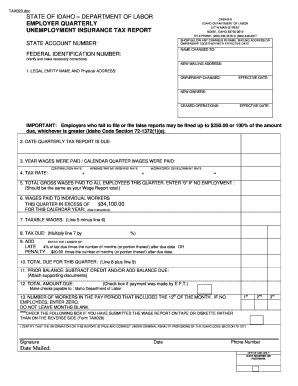
TAX020. doc STATE OF IDAHO DEPARTMENT OF LABOR EMPLOYER QUARTERLY UNEMPLOYMENT INSURANCE TAX REPORT CASHIER IDAHO DEPARTMENT OF LABOR 317 W MAIN STREET BOISE IDAHO 83735-0610 TELEPHONE 208 332-3576 or 800 448-2977 SHOW BELOW ANY CHANGES IN NAME MAILING ADDRESS OR OWNERSHIP TOGETHER WITH EFFECTIVE DATE STATE ACCOUNT NUMBER NAME CHANGED TO FEDERAL IDENTIFICATION NUMBER Verify and make necessary corrections NEW MAILING ADDRESS 1. LEGAL ENTITY NAME AND Physical ADDRESS OWNERSHIP CHANGED EFFECTIVE DA.
Open form follow the instructions
Easily sign the form with your finger
Send filled & signed form or save
How to fill out the ID DOL Tax020 online
The ID DOL Tax020 is a crucial document for employers in Idaho, serving as the employer quarterly unemployment insurance tax report. Accurate completion of this form helps ensure compliance with state regulations and avoids penalties.
Follow the steps to properly fill out the ID DOL Tax020 online.
- Click ‘Get Form’ button to obtain the form and open it in the editor.
- Enter your state account number in the field indicated. This number is crucial for identification purposes.
- If there are any changes in name or ownership, please provide the new name and effective date in the designated fields.
- Fill in the federal identification number, ensuring it is accurate and matches your records.
- Provide your new mailing address, if applicable. This ensures that all correspondence will reach you.
- Indicate the legal entity name and physical address where your business operates.
- Complete the section on ownership changes, including the effective date and information about new owners, if relevant.
- Enter the date the quarterly tax report is due, along with the year and calendar quarter during which wages were paid.
- Document the gross wages paid to all employees this quarter. If there were no employees, you should enter ‘0’.
- Complete the wages paid to individual workers in excess of $34,100. This figure is needed for the tax calculation.
- Calculate the taxable wages by subtracting the excess wages from the total gross wages.
- Determine the tax due by multiplying the taxable wages by the applicable tax rate.
- Calculate any late penalties, which could be based on the tax due and the number of months it is late.
- Add the total due for the quarter by combining the tax due and any penalties calculated.
- If there are any prior balances, subtract credits and add balances due to arrive at the total amount due.
- Check the box if payment was made electronically, and ensure to make any relevant corrections.
- Lastly, provide the number of workers employed during the pay period that included the 12th of the month. Enter zero if no employees were present.
- Review all entries for accuracy before proceeding to save, download, print, or share the completed form.
Complete your ID DOL Tax020 online today to ensure compliance and avoid penalties.
Experience a faster way to fill out and sign forms on the web. Access the most extensive library of templates available.
Related content
Our forms have moved. You can reach forms, handbooks, flyers, and other business related...
Sep 14, 2021 — Form TAX020 is filed quarterly through the Employer Portal and is due by...
Get answers to your most pressing questions about US Legal Forms API.
How much is Idaho unemployment tax?
Idaho unemployment tax rates can vary based on your business's experience rating. Typically, this rate applies to the first $45,000 of an employee's wages. To find your specific rate and ensure compliance, utilize resources like ID DOL Tax020 to gain insight and maximize your financial planning.
What is the taxable wage base for unemployment in Idaho 2025?
The taxable wage base for unemployment in Idaho for 2025 is crucial for employers to understand their tax obligations. As of the current guidelines, this base is subject to annual review and adjustment. For the latest updates on the ID DOL Tax020, we recommend checking the Idaho Department of Labor’s website for the most accurate information.
Can I get my Idaho 1099-G online?
Yes, you can obtain your Idaho 1099-G online through the ID DOL Tax020 portal. Simply visit the Idaho Department of Labor's website, navigate to the tax forms section, and follow the straightforward steps to access your document. This online service ensures that you receive your tax information efficiently and securely.
How do I find out my ID number?
Finding out your ID number can be accomplished by accessing online portals provided by your local Department of Licensing. If online access isn't available, you can also check your physical ID card or documentation. For further inquiries, using the ID DOL Tax020 as a reference when communicating with officials can help clarify any confusion.
How do I get my Oregon ID?
To get an Oregon ID, visit the Oregon Driver and Motor Vehicle Services website where you can apply online or find a nearby office. You'll need to provide proof of identity and residency, along with completing an application. After processing, you will receive an ID DOL Tax020 to facilitate your identification needs.
How to find your ID number online?
Finding your ID number online primarily involves visiting your relevant state agency's website. Use the search function to find areas dedicated to ID retrieval, and have your personal information ready for verification. This is where knowledge of your ID DOL Tax020 becomes beneficial, as it may help in pinpointing your specific record.
How to get L&I account ID?
To get your Labor and Industries (L&I) account ID, you need to register through the Washington State Department of Labor and Industries website. Completing the online registration form provides you with your L&I account ID linked to your business or personal information. After registration, keeping track of your ID DOL Tax020 will ensure seamless access to your details.
How to recover a lost ID number?
To recover a lost ID number, first check for any old documents or letters that might contain your ID information. If you still can't find it, visit your state's Department of Licensing website where you can follow the steps to recover it online. For specific instructions, referring to ID DOL Tax020 might streamline your process.
How do I check my ID number?
You can check your ID number by logging into your appropriate government agency's online portal, where you may have registered previously. Alternatively, look for your physical ID documents, as they usually feature your unique ID number prominently. If you require further help, reach out to your state department using the ID DOL Tax020.
How can I find my driver's license ID number?
To find your driver's license ID number, visit your state's Department of Licensing (DOL) website. Often, you can use their online portal to retrieve your ID information by entering personal details. If you cannot find it online, consider calling your local DOL office for assistance with your ID DOL Tax020.
Use professional pre-built templates to fill in and sign documents online faster. Get access to thousands of forms.
If you believe that this page should be taken down, please follow our DMCA take down process here.