Loading
Get Tn Rv-f1300501 2020-2025
How it works
-

Open form follow the instructions
-

Easily sign the form with your finger
-

Send filled & signed form or save
How to fill out the TN RV-F1300501 online
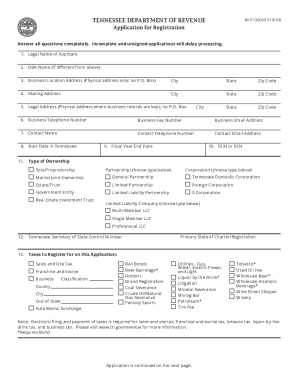
The TN RV-F1300501 is an application for registration used to register for various taxes applicable to businesses in Tennessee. This guide provides comprehensive, step-by-step instructions on how to accurately complete this form online, ensuring all necessary information is included for efficient processing.
Follow the steps to successfully complete and submit the TN RV-F1300501.
- Press the ‘Get Form’ button to obtain the application and open it in the editor.
- Enter the legal name of the applicant in the specified field.
- If applicable, provide the 'Doing Business As' (DBA) name, which is different from the legal name.
- Fill in the physical business location address, ensuring no post office box is included.
- Complete the mailing address field, which can include a post office box.
- Provide the legal address where business records are kept, avoiding a post office box.
- Enter the business telephone number, fax number, and email address.
- Include a contact name along with their telephone number and email address.
- Indicate the start date of the business operations in Tennessee.
- Fill in the fiscal year-end date accurately.
- Insert the Federal Employer Identification Number (FEIN) or Social Security Number (SSN).
- Select the type of ownership for the business, specifying any applicable details.
- If necessary, enter the Tennessee Secretary of State Control Number and the primary state of charter or registration.
- Choose the applicable taxes for which registration is being sought, providing the classification and relevant locations.
- If registering for sales tax, answer the gross sales and taxable services questions.
- Check the franchise and excise classification if applicable.
- If applicable, complete the series LLC entity information.
- Describe the nature of the business, including whether it is wholesale, retail, or another category.
- Detail the principal business activity and major products or services offered.
- Enter the NAICS code if known.
- List all owners, officers, members, or partners, providing their details, and attach additional sheets if necessary.
- Finally, ensure the application is signed by an authorized person without using a print or stamp.
- Once all fields are completed, save your changes, and download, print, or share the form as needed.
Complete your application and register your business online to ensure compliance with Tennessee tax regulations.
The number is 1-800-342-1003. If calling from Nashville or out-of-state, you may call (615) 253-0600.
Industry-leading security and compliance
US Legal Forms protects your data by complying with industry-specific security standards.
-
In businnes since 199725+ years providing professional legal documents.
-
Accredited businessGuarantees that a business meets BBB accreditation standards in the US and Canada.
-
Secured by BraintreeValidated Level 1 PCI DSS compliant payment gateway that accepts most major credit and debit card brands from across the globe.