Get Hi L-80 2016
How it works
-

Open form follow the instructions
-

Easily sign the form with your finger
-

Send filled & signed form or save
How to fill out the HI L-80 online
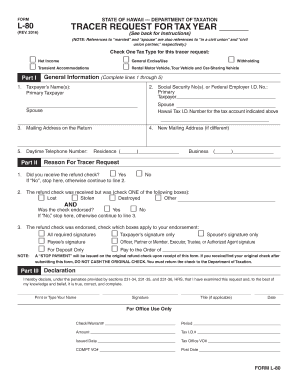
The HI L-80 form is a tracer request used by individuals to track their tax refund status in Hawaii. This guide provides a structured, step-by-step approach to help you accurately complete the HI L-80 online, ensuring all necessary details are included for efficient processing.
Follow the steps to accurately complete the HI L-80 online.
- Press the ‘Get Form’ button to access the HI L-80 form and open it in your preferred editing tool.
- In Part I, select one of the tax types related to your tracer request: either Net Income, Transient Accommodations, General Excise/Use, Withholding, or Rental Motor Vehicle, Tour Vehicle, and Car-Sharing Vehicle.
- Complete the general information section by filling out lines 1 through 5: Enter the taxpayer's names in line 1, and provide the appropriate Social Security Number or Federal Employer I.D. Number in line 2.
- In line 3, provide the mailing address that was used on the original return. If you have a new mailing address, fill in line 4.
- In line 5, include your daytime telephone number, specifying whether it is a residence or business number.
- In Part II, indicate the reason for your tracer request. Select ‘Yes’ or ‘No’ for whether you received the refund check in line 1.
- If 'No', stop here. If ‘Yes’, proceed to line 2 and choose from the options: Lost, Stolen, Destroyed, or Other, and indicate whether the check was endorsed in line 3.
- In line 3, check the applicable boxes regarding endorsements, such as if all required signatures were completed, or which specific signature was present.
- Review the ‘Note’ regarding stop payment on the original refund check. Ensure you understand that if the original check is found, it should not be cashed and must be returned to the Department of Taxation.
- In Part III, make your declaration by printing or typing your name, signing, and including your title if applicable. Also, add the date when completing the form.
- Once you have filled out the form, review it for any errors before it is finalized. You can then save changes, download, print, or share the completed form as needed.
Complete your HI L-80 form online today for a hassle-free experience!
Get form
Related links form
Certain organizations and individuals may qualify for exemptions from Hawaii's general excise tax. This typically includes non-profits, government entities, and specific transactions outlined by law. It’s essential to review the guidelines set by the Hawaii Department of Taxation, and using the HI L-80 form can help clarify your obligations. If you’re unsure about your status, consider consulting with a tax professional.