Loading
Get Ca Cdtfa-401-ez2 2017-2026
How it works
-

Open form follow the instructions
-

Easily sign the form with your finger
-

Send filled & signed form or save
How to fill out the CA CDTFA-401-EZ2 online
Filling out the CA CDTFA-401-EZ2 form online is a straightforward process designed to help users report their sales and use tax accurately. This guide provides step-by-step instructions to assist you in completing the form efficiently.
Follow the steps to fill out the CA CDTFA-401-EZ2 form correctly.
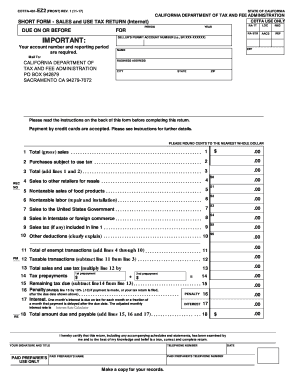
- Click ‘Get Form’ button to obtain the form and open it in the editor.
- In the designated fields, enter your seller's permit account number, reporting period, name, business address, city, state, and ZIP code. Ensure all information is accurate to avoid processing delays.
- For line 1, report your total gross sales including all sales related to your California business.
- On line 2, input the purchase price of any merchandise or equipment that is subject to use tax and was not acquired with California sales tax applied.
- Add the amounts from lines 1 and 2 for line 3, which gives you the total of your sales and purchases subject to tax.
- Enter any sales to other retailers for resale on line 4, ensuring you have valid resale certificates.
- For line 5, report nontaxable sales of food products intended for human consumption. Do not include alcoholic beverages or meals served at your facilities.
- On line 6, include any labor charges for installation or repairs that are nontaxable. Be careful not to mix fabrication or processing costs.
- If applicable, report sales to the United States Government on line 7.
- Document any interstate or foreign commerce sales on line 8.
- Enter the sales tax collected from customers, if applicable, on line 9.
- For any other deductions not listed on the previous lines, clearly explain and report them on line 10.
- Sum lines 4 through 10 for line 11 to find the total exempt transactions.
- Calculate your taxable transactions by subtracting line 11 from line 3 and enter the result on line 12.
- To find your total sales and use tax, multiply line 12 by the relevant tax rate and enter that amount on line 13.
- If you’re required to make tax prepayments, document those figures on line 14.
- Subtract the amount from line 14 from line 13 to find remaining tax due on line 15.
- If applicable, calculate and report any penalties on line 16.
- If your payment is past due, calculate interest owed and record it on line 17.
- Complete line 18 by adding lines 15, 16, and 17 to determine the total amount due.
- After reviewing your entries for accuracy, save your form, and proceed to print or share as needed.
Stay compliant and file your CA CDTFA-401-EZ2 form online today to ensure timely reporting.
Related links form
To print your California seller's permit, log into your CDTFA account. Navigate to the permits section, find your seller's permit, and select the print option. This will give you an official document that you can use for your business transactions.