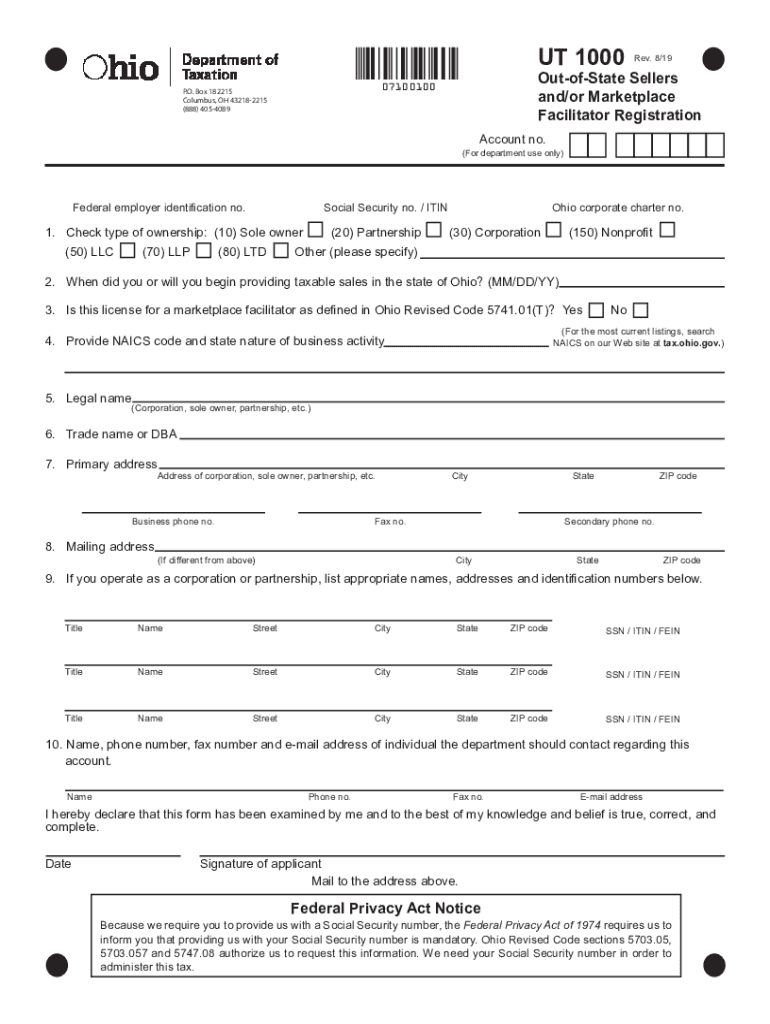
Clear FormUT 1000OutofState Sellers and/or Marketplace Facilitator Registration07100100P.O. Box 182215 Columbus, OH 432182215 (888) 4054089Rev. 8/19Account no.(For department use only)Federal employer.
Loading

Open form follow the instructions

Easily sign the form with your finger

Send filled & signed form or save
How to fill out the OH UT 1000 online
Filling out the OH UT 1000 form is essential for individuals and businesses engaging in taxable sales in Ohio. This guide provides clear and supportive instructions to help users accurately complete the form for submission.
Follow the steps to complete the OH UT 1000 form with ease.
- Click 'Get Form' button to obtain the OH UT 1000 form and access it in your preferred format.
- In the first section, select the type of ownership by checking the appropriate box. Options include sole owner, partnership, LLC, corporation, and others as specified.
- Indicate when you began or will begin providing taxable sales in Ohio by entering the date in the MM/DD/YY format.
- Determine if this license is for a marketplace facilitator as outlined in Ohio law. Select 'Yes' or 'No' accordingly.
- Provide your NAICS code and describe the nature of your business activity, ensuring to reference the current listings on the Ohio tax website if needed.
- Enter the legal name of the entity, whether it is a corporation, partnership, or sole owner.
- Include the trade name or 'doing business as' (DBA) name if applicable.
- Fill in your primary address, including street address, city, state, ZIP code, and business phone number.
- If your entity operates as a corporation or partnership, list the names, addresses, and identification numbers of relevant individuals in the given fields.
- Provide the name, contact number, fax number, and email address of the individual the department should contact regarding the account.
- After completing all sections, sign and date the form, affirming that the information provided is accurate to the best of your knowledge.
- Lastly, make sure to save your changes. You can download and print the form, or share it as needed for your records or submission.
Complete your OH UT 1000 form online today for efficient processing.
Experience a faster way to fill out and sign forms on the web. Access the most extensive library of templates available.
Related content
Mar 31, 2020 — Seller's Use accounts (UT-1000), Consumer's Use accounts (UT-1008), and...
Jul 21, 2020 — UT Austin faculty will be exploring their fields with students in new and...
Use professional pre-built templates to fill in and sign documents online faster. Get access to thousands of forms.
If you believe that this page should be taken down, please follow our DMCA take down process here.