Loading
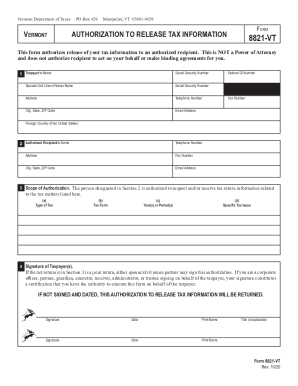
Get Vt 8821-vt 2020-2026
How it works
-

Open form follow the instructions
-

Easily sign the form with your finger
-

Send filled & signed form or save
How to fill out the VT 8821-VT online
Filling out the VT 8821-VT form is an important step in authorizing the release of your tax information to an authorized recipient. This guide provides step-by-step instructions to help you complete the form accurately online.
Follow the steps to fill out the VT 8821-VT online.
- Click ‘Get Form’ button to access the VT 8821-VT form and open it in the editor. This is the first step to obtaining the form.
- In Section 1, provide the taxpayer’s name and Social Security Number. If applicable, include the spouse or civil union partner’s name and Social Security Number as well. Fill in the address, telephone number, city, state, ZIP code, email address, Federal ID Number, and fax number.
- Continue with Section 2 by entering the name, address, and contact information of the authorized recipient who will receive your tax information. This is crucial for ensuring the correct individual is designated.
- In Section 3, clarify the scope of authorization by specifying the type of tax, tax form, and relevant periods. Be specific about the tax issues you wish to be disclosed. Avoid vague terms like 'all years' or 'all taxes'.
- In Section 4, sign and date the authorization. If you are filing a joint return, either spouse or civil union partner may sign. Ensure all required signatures are present and accurately reflect the signatories.
- Once you have completed the form, save your changes. You may then choose to download, print, or share the completed VT 8821-VT form as needed.
Begin filling out your VT 8821-VT online to facilitate the authorization of your tax information today.