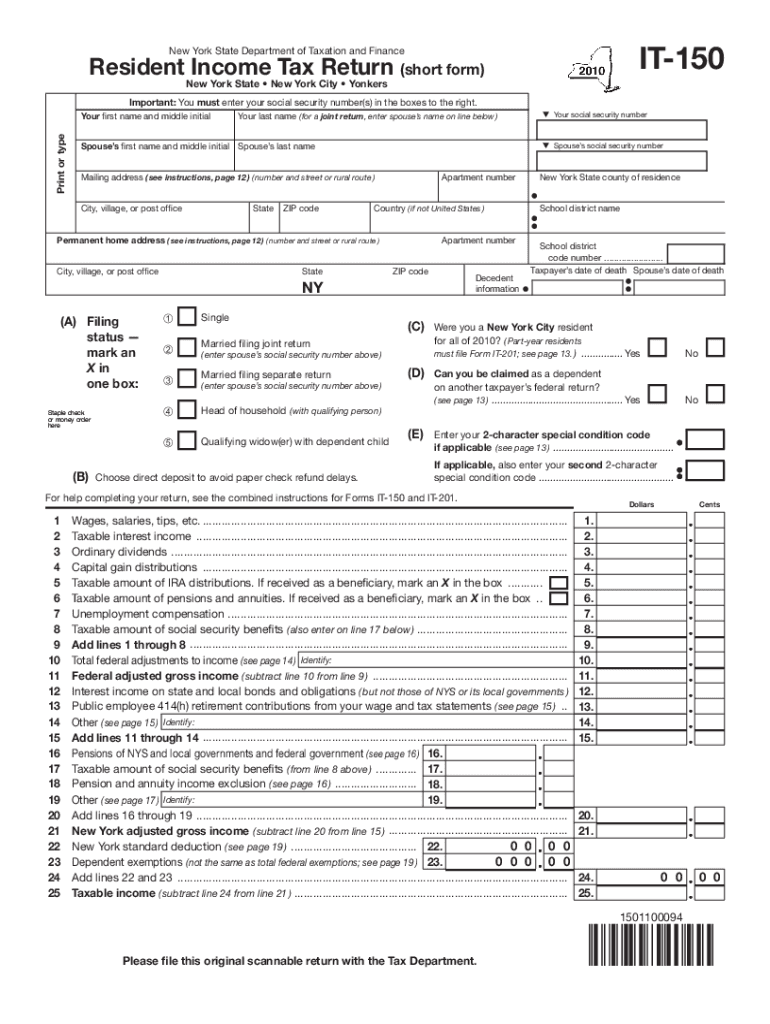
IT150New York State Department of Taxation and FinanceResident Income Tax Return (short form) New York State New York City YonkersImportant: You must enter your social security number(s) in the.

Open form follow the instructions

Easily sign the form with your finger

Send filled & signed form or save
How to fill out the NY DTF IT-150 online
Completing the NY DTF IT-150 form is an essential step for New York residents filing their income tax returns. This online guide will walk you through each section of the form with clear instructions to ensure a smooth filing process.
Follow the steps to fill out your NY DTF IT-150 online effectively.
- Press the ‘Get Form’ button to access the NY DTF IT-150 and open it in your chosen editor.
- Begin by entering your first name and middle initial in the designated fields, followed by your last name. If you are filing jointly, enter your partner’s name in the line below.
- Input your social security number in the provided box on the right. Make sure that it is accurate to avoid delays.
- Next, enter your spouse's first name, middle initial, last name, and their social security number if applicable.
- Indicate your mailing address, including your apartment number, street address, city, state, ZIP code, and country (if not from the United States).
- Fill in your permanent home address in the specified section, ensuring all details are complete.
- Select your filing status by marking an X in the appropriate box. Available options include single, married filing jointly, married filing separately, head of household, and qualifying widow(er) with a dependent child.
- Provide information about your residence and special conditions, if applicable. Check 'Yes' or 'No' for residency status in New York City during the tax year.
- Complete the income sections by entering amounts for wages, salaries, tips, and other income sources as instructed throughout the form.
- Work through the deductions, credits, and amounts owed sections, making sure to subtract and add where necessary to arrive at your final taxable income.
- At the end, review all entered information for accuracy before finalizing. You can save changes, download a copy, print the completed form, or share it as needed.
Complete your NY DTF IT-150 online to ensure a smooth and efficient filing experience.
Experience a faster way to fill out and sign forms on the web. Access the most extensive library of templates available.
Related content
We are authenticating your return, and we need copies of your tax documents to complete...
Sep 11, 2014 — To: address@hidden; Subject: [netCDF #BQN-318925]: tst_h_files fails;...
Feb 5, 2013 — 318925. 4. The above parts group applies to the following Mfg. Nos.:...
Use professional pre-built templates to fill in and sign documents online faster. Get access to thousands of forms.
If you believe that this page should be taken down, please follow our DMCA take down process here.