Loading
Get Mn Dor Barcode Label Sheet 2018-2026
How it works
-

Open form follow the instructions
-

Easily sign the form with your finger
-

Send filled & signed form or save
How to fill out the MN DoR Barcode Label Sheet online
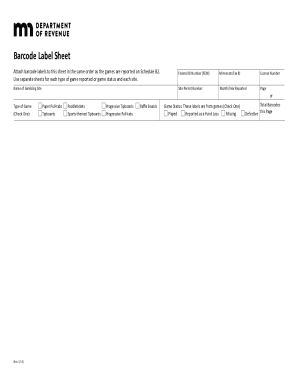
The MN DoR Barcode Label Sheet is an essential document for reporting gaming activities in Minnesota. This guide provides clear, step-by-step instructions to help you fill out the form accurately and efficiently online.
Follow the steps to complete the form effectively.
- Press the ‘Get Form’ button to access the MN DoR Barcode Label Sheet and open it in the editor.
- Enter the Federal ID Number (FEIN) in the designated field. This number is essential for tax identification purposes.
- Fill in your Minnesota Tax ID number, which helps confirm your registration within the state.
- Input your License Number to indicate your valid gaming license.
- Provide the name of the gambling site associated with the reported activities.
- Enter the Site Permit Number, which is required for reporting.
- Select the Month and Year Reported by choosing the respective month and entering the year.
- Indicate the total number of pages in your submission using the 'Page of' fields provided.
- Select the Type of Game being reported by checking one of the available options such as paper pull-tabs or sports-themed tipboards.
- Indicate the Game Status by checking one of the options: Played, Reported as a Fund Loss, or Missing.
- Enter the total number of barcodes and indicate how many were defective on this page, ensuring accuracy in reporting.
- Review your entries for completeness and accuracy. Once finalized, you can save changes, download, print, or share the form as needed.
Complete your MN DoR Barcode Label Sheet online today to ensure accurate reporting!