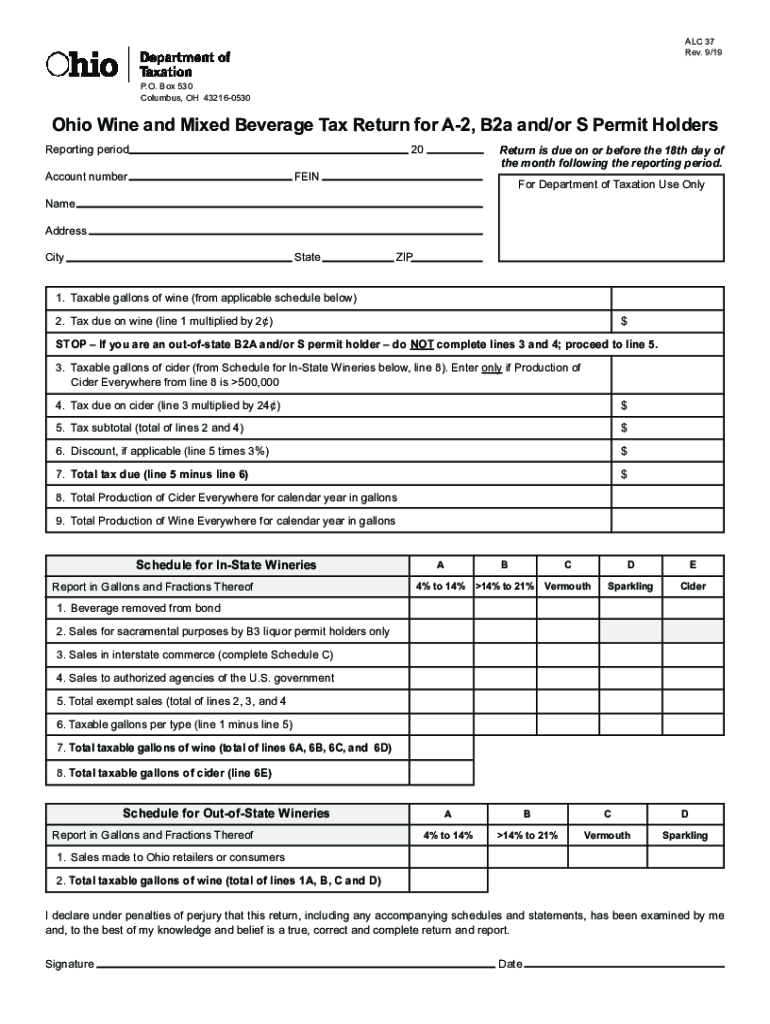
ALC 37 Rev. 9/19 P.O. Box 530 Columbus, OH 432160530Ohio Wine and Mixed Beverage Tax Return for A2, B2a and/or S Permit Holders Reporting period20Account numberReturn is due on or before the 18th.
Loading

Open form follow the instructions

Easily sign the form with your finger

Send filled & signed form or save
How to fill out the OH ALC 37 online
The OH ALC 37 is an essential form for individuals and businesses holding A-2, B2a, and/or S permits related to wine and mixed beverage taxation in Ohio. This guide provides clear and supportive instructions to help users navigate and fill out the form correctly and efficiently online.
Follow the steps to complete the OH ALC 37 online
- Click the ‘Get Form’ button to obtain the OH ALC 37 form and open it in your preferred online editor.
- In the reporting period field, enter the appropriate dates corresponding to the period you are reporting for tax purposes.
- Fill in your account number as assigned by the Department of Taxation.
- If applicable, provide your Federal Employer Identification Number (FEIN) in the designated field.
- Enter your name, address, city, state, and ZIP code in the respective fields provided.
- Report the taxable gallons of wine on line 1, using data from the applicable schedule.
- Calculate tax due on wine by multiplying the amount from line 1 by 2 cents and enter that figure on line 2.
- If you are an out-of-state B2a and/or S permit holder, skip lines 3 and 4. Otherwise, enter taxable gallons of cider on line 3, only if your total cider production exceeds 500,000 gallons.
- If you completed line 3, calculate the tax due on cider by multiplying line 3 by 24 cents and enter that amount on line 4.
- Calculate the tax subtotal by adding the amounts from lines 2 and 4, and place that total on line 5.
- If applicable, calculate any discount as 3% of the amount on line 5 and enter the result on line 6.
- Determine the total tax due by subtracting the discount in line 6 from the subtotal on line 5, and write that amount on line 7.
- Enter the total production of cider everywhere for the calendar year in gallons on line 8.
- Finally, report the total production of wine everywhere for the calendar year in gallons on line 9.
- Once all fields are completed, save your changes, and you may choose to download, print, or share the completed form as needed.
Complete the OH ALC 37 form online today to ensure timely filing and compliance.
Experience a faster way to fill out and sign forms on the web. Access the most extensive library of templates available.
Related content
ALC 37I. Rev. 5/15. Instructions for Completing the Ohio Wine and Mixed Beverage Tax...
Jan 9, 2020 — Chillicothe, OH: The Alice Lloyd Lady Eagles traveled to the Buckeye state...
The Cleveland Indians are an American professional baseball team based in Cleveland, Ohio...
Use professional pre-built templates to fill in and sign documents online faster. Get access to thousands of forms.
If you believe that this page should be taken down, please follow our DMCA take down process here.
This form is available in several versions. Select the version you need from the drop-down list below.