Loading
Get Ny Dtf-719-mn 2017-2026
How it works
-

Open form follow the instructions
-

Easily sign the form with your finger
-

Send filled & signed form or save
How to fill out the NY DTF-719-MN online
This guide provides detailed instructions on how to fill out the NY DTF-719-MN form online, ensuring a smooth renewal process for your registration as a retail dealer or vending machine operator. Follow these steps to complete your application accurately and efficiently.
Follow the steps to complete the NY DTF-719-MN form online.
- Press the ‘Get Form’ button to access the NY DTF-719-MN form and open it in the online editor.
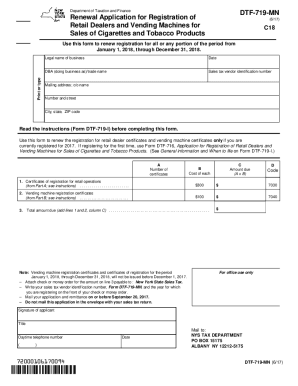
- Enter the legal name of your business in the appropriate field, ensuring that it is accurate as per your official documents.
- Provide the date on which you are completing the form. This helps in maintaining an accurate record of your application.
- Input your DBA (doing business as) or trade name, if different from the legal name, to ensure proper identification of your business.
- Enter your sales tax vendor identification number in the designated field to associate your application with your tax profile.
- Fill in your mailing address, including the name of the c/o (care of) person if necessary, to ensure the proper delivery of correspondence.
- Complete Part A by listing the number of certificates of registration required for retail operations, ensuring to calculate the total properly based on the number of certificates needed and their respective costs.
- In Part B, detail your vending machine registration certificates by entering the business name, physical address, and serial numbers of the vending machines.
- Add any additional information in the areas provided, attaching extra pages if necessary for more certificates.
- Review all the information entered for accuracy before saving your form. You can then download, print, or share your completed application.
Complete your NY DTF-719-MN form online today for a hassle-free renewal process!