Loading
Get Ct Tpg-169 2016-2026
How it works
-

Open form follow the instructions
-

Easily sign the form with your finger
-

Send filled & signed form or save
How to fill out the CT TPG-169 online
This guide provides a clear and supportive walkthrough for users on how to complete the CT TPG-169 form online. Whether you are new to tax documents or looking for a refresher, this step-by-step approach will assist you in filling out the form effectively.
Follow the steps to successfully complete the CT TPG-169 form online.
- Use the ‘Get Form’ button to access the form and open it in your preferred browser.
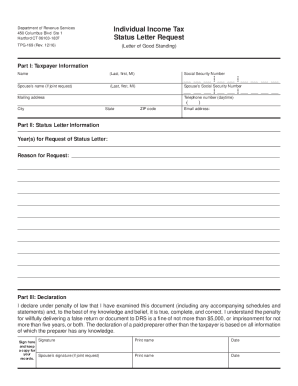
- In Part I: Taxpayer Information, provide your full name (last, first, middle initial), Social Security Number, and if applicable, your spouse's name and Social Security Number for joint requests. Additionally, fill in your mailing address, daytime telephone number, city, state, and ZIP code. Don't forget to include your email address.
- In Part II: Status Letter Information, indicate the year(s) for which you are requesting the status letter. Clearly explain the reason for your request in the space provided. Make sure to be thorough and detailed in this section.
- In Part III: Declaration, read the statement carefully. You must sign the document to affirm that the information is truthful and complete. If submitting a joint request, your spouse must also provide their signature. Print your names and dates next to the signatures.
- Once you have filled out the entire form, review your entries for any errors. After confirming that all information is accurate, you can save any changes you've made.
- Finally, download, print, or share the completed CT TPG-169 form as needed. Ensure you keep a copy for your records.
Complete your documents online today to ensure a smooth and efficient filing process.
ing to the Connecticut CT-1040 Instructions, you must file a CT resident tax return if: You had Connecticut income tax withheld.