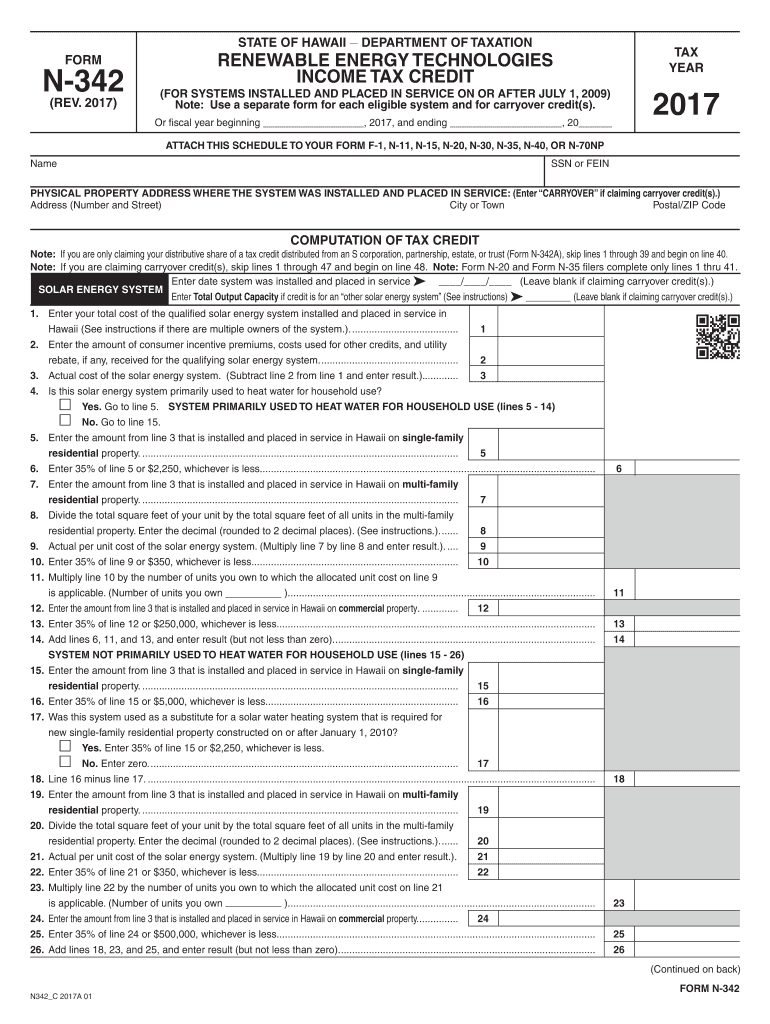
10 11. Multiply line 10 by the number of units you own to which the allocated unit cost on line 9 is applicable. (Number of units you own )............................................................................................................... 12. Enter the amount from line 3 that is installed and placed in service in Hawaii on commercial property............... 12 13. Enter 35% of line 12 or $250,000, whichever is le.
Loading

Open form follow the instructions

Easily sign the form with your finger

Send filled & signed form or save
How to fill out the HI DoT N-342 online
The HI DoT N-342 form is crucial for claiming the renewable energy technologies income tax credit in Hawaii. This guide provides clear, step-by-step instructions to help users fill out this form online accurately, regardless of their experience level.
Follow the steps to complete the HI DoT N-342 online
- Press the ‘Get Form’ button to access the HI DoT N-342 form and open it in your document editor.
- Fill in the tax year for which you are claiming the credit in the designated field.
- Provide your name and social security number (SSN) or federal employer identification number (FEIN) in the respective fields.
- Enter the physical property address where the renewable energy system was installed. If claiming a carryover credit, input ‘CARRYOVER’ instead.
- In the computation section, enter the date the renewable energy system was installed if not claiming a carryover.
- Provide the total costs associated with the qualified system in Hawaii as instructed.
- Deduct any consumer incentives or rebates received and enter the actual costs.
- If applicable, indicate whether the system is primarily used for heating water for household purposes and answer the subsequent questions as instructed.
- Calculate and enter the credit amount for single-family or multi-family properties based on specific lines as indicated in the form.
- Continue filling out the associated sections for wind-powered systems in a similar manner.
- Determine if you will elect for refundable tax credits by checking the appropriate box and following the subsequent instructions.
- Finalize your entries, ensuring all fields are accurately completed and calculations correctly executed.
- Save your filled form, and if needed, download or print a copy for your records.
Complete your HI DoT N-342 form online today for an efficient filing experience.
Experience a faster way to fill out and sign forms on the web. Access the most extensive library of templates available.
Related content
N-342, Renewable Energy Technologies Income Tax Credit for Systems Placed in ... 830...
This course explores American culture during the post World War II period through an...
Safety Guidelines. This manual contains notices you have to observe in order to ensure...
Get answers to your most pressing questions about US Legal Forms API.
Can you sell electricity back to the grid in Hawaii?
Yes, homeowners in Hawaii can sell electricity back to the grid through net metering programs. This arrangement allows you to offset your energy costs and even earn credits for excess energy. Engaging with this opportunity can complement your solar efforts linked to the HI DoT N-342.
What are Hawaii's non-refundable credits?
Hawaii offers various non-refundable credits, which can reduce your tax liability but do not result in refunds. Examples include the child and dependent care credit, as well as credits related to solar energy investments. Being aware of these credits can aid you in utilizing the HI DoT N-342 more effectively.
How to amend a Hawaii state tax return?
To amend a Hawaii state tax return, you need to complete and submit Form N-101A, along with any required documentation. This allows you to make changes for previous tax years. Should you need guidance, platforms like uslegalforms can simplify the amendment process, particularly when referencing the HI DoT N-342.
Does Hawaii have a corporate income tax?
Yes, Hawaii imposes a corporate income tax on businesses operating within the state. The current rate is based on the federal taxable income, and companies must file annually. Understanding this tax structure is essential, especially when navigating the HI DoT N-342.
How to get a Hawaii tax ID number?
To obtain a Hawaii tax ID number, you need to register with the Hawaii Department of Taxation. This process can usually be completed online, and requires your business details. Acquiring a tax ID is crucial for compliance and can support your endeavors related to the HI DoT N-342.
Is the solar tax credit refundable in Hawaii?
The solar tax credit is not refundable in Hawaii, meaning that it can only offset tax liability and cannot create a refund. However, residents can carry forward any unused credit to future tax years, allowing continued benefits. This approach can enhance your savings through the HI DoT N-342.
Does solar tax credit come as a refund?
The solar tax credit allows homeowners to reduce their federal tax liability, rather than receiving a refund directly. If your tax bill is less than the amount of the credit, you can carry over the unused portion to the following year. This process ensures that you maximize your benefits while utilizing the HI DoT N-342 effectively.
Can I file Hawaii state tax online?
Yes, you can file your Hawaii state tax online, which includes submitting your HI DoT N-342 form electronically. E-filing provides a quicker and more efficient way to manage your tax returns. You can also receive your refund faster through electronic submission. Consider using our platform to access e-filing options and ensure a smooth online experience.
How does solar tax credit work if I get a refund?
If you receive a tax refund, the solar tax credit can still apply, even reducing the tax you owe in future years. When you fill out the HI DoT N-342 form, it calculates how much credit you can apply to your taxes. If the credit exceeds your tax liability, you might carry the remainder over to next year's return. It’s a sensible strategy to maximize your financial benefits.
What form do I need to claim solar tax credit?
To claim your solar tax credit in Hawaii, you need to use the HI DoT N-342 form. This specific form is essential for detailing your solar energy installation expenses. Make sure to keep all your receipts and documentation handy while filling out the form. Our platform can assist you with the right resources to navigate this process smoothly.
Use professional pre-built templates to fill in and sign documents online faster. Get access to thousands of forms.
If you believe that this page should be taken down, please follow our DMCA take down process here.
This form is available in several versions. Select the version you need from the drop-down list below.