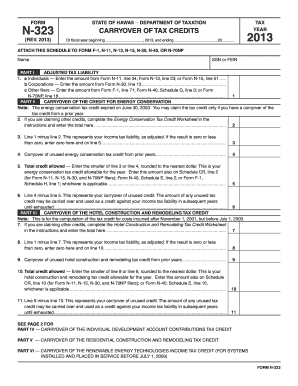
, 20 2013 ATTACH THIS SCHEDULE TO FORM F-1, N-11, N-13, N-15, N-30, N-40, OR N-70NP Name SSN or FEIN PART I ADJUSTED TAX LIABILITY 1. a Individuals Enter the amount from Form N-11, line 34; Form N-13, line 23; or Form N-15, line 51...... b Corporations Enter the amount from Form N-30, line 13...................................................................... c Other filers Enter the amount from Form F-1, line 71; Form N-40, Schedule G, line 3; or Form N-.
Open form follow the instructions
Easily sign the form with your finger
Send filled & signed form or save
How to fill out the HI DoT N-323 online
Filling out the HI DoT N-323 form can seem daunting, but with clear guidance, it can be a straightforward process. This comprehensive guide will walk you through each section of the form step-by-step to ensure that you can complete it efficiently and accurately.
Follow the steps to fill out the HI DoT N-323 online with ease
- Press the ‘Get Form’ button to access the HI DoT N-323 form and open it for editing. This will provide you with the latest version of the document.
- Begin by entering the tax year and the applicable fiscal year range in the designated areas at the top of the form. Ensure accuracy to avoid delays.
- In Part I, adjusted tax liability, follow the instructions for individuals, corporations, or other filers by entering the corresponding amount from the relevant tax form.
- Proceed to Part II, where you will assess any carryover of the energy conservation credit. Complete the worksheet provided in the instructions if applicable and enter the total on the specified line.
- Calculate your income tax liability by subtracting the amount from Part II from your adjusted tax liability. Enter the result or zero, as applicable, on the appropriate line.
- Continue through each section of the form, including Parts III to VII, entering amounts as directed, calculating totals, and noting any carryovers as necessary.
- Once all sections are complete, review the form for accuracy. Make sure all necessary attachments are referenced.
- Finally, save your changes, and use the options provided to download, print, or share the completed form as needed.
Start filling out your HI DoT N-323 online today to ensure your tax credits are properly claimed!
Experience a faster way to fill out and sign forms on the web. Access the most extensive library of templates available.
Related content
N-312, Capital Goods Excise Tax Credit, Rev. 2024 ; N-323, Carryover of Tax Credits, Rev...
projects at DOT Materials Testing and Research Branch, submit test. 122 ... 323. 324...
Apr 3, 2016 — Como líderes em campos específicos no mercado automotivo, a HELLA...
Get answers to your most pressing questions about US Legal Forms API.
Can I file a state return online?
Yes, you can file a state return online for Hawaii. This method is efficient and usually faster than mailing paper returns. By using platforms like US Legal Forms, you can ensure compliance with all requirements related to the HI DoT N-323 and expedite your filing process.
Where do I mail Hawaii tax forms?
You should mail Hawaii tax forms to the address indicated on the form instructions. Different forms may have different mailing addresses, so it's important to double-check. If you're unsure, US Legal Forms can help guide you regarding the correct mailing procedures related to the HI DoT N-323.
How do I file an amended Hawaii tax return?
To file an amended Hawaii tax return, you need to complete the appropriate form and specify why you are making changes. The form can be submitted electronically or via mail, depending on your preference. For clear guidance on the HI DoT N-323, US Legal Forms can provide valuable resources.
Can I file my taxes electronically myself?
Yes, you can file your taxes electronically by yourself. Many online platforms provide user-friendly interfaces to assist you in this process. Using US Legal Forms can further simplify your electronic filing, especially when dealing with the HI DoT N-323.
Can I file Hawaii state tax online?
Yes, you can file your Hawaii state taxes online. This method provides a quick and efficient way to submit your tax returns. Services like US Legal Forms ensure that you address all necessary aspects of the HI DoT N-323 and comply with state regulations.
Who must file a Hawaii income tax return?
Generally, all residents and part-year residents who earn income must file a Hawaii income tax return. Specific income thresholds trigger this requirement, so it’s essential to assess your financial situation. For detailed guidance on HI DoT N-323, consider using US Legal Forms to help you determine your obligations.
Does Hawaii have an efile form?
Hawaii does offer an e-file form for state tax submissions. This option simplifies the filing process, allowing users to submit their tax forms electronically. With resources such as US Legal Forms, you can easily navigate the requirements related to the HI DoT N-323.
Can you file Hawaii state taxes online?
Yes, you can file Hawaii state taxes online. Many taxpayers prefer this method for its convenience and speed. Utilizing services like US Legal Forms makes the process straightforward, ensuring you meet all requirements associated with the HI DoT N-323.
How do I get a copy of my Hawaii state tax return?
To obtain a copy of your Hawaii state tax return, contact the Department of Taxation directly or use their online services. Having your documentation handy will expedite the retrieval process. Additionally, using the HI DoT N-323 may guide you through the steps necessary to secure your records efficiently.
What income is not taxed in Hawaii?
Hawaii does not tax certain types of income, including Social Security benefits and some retirement account distributions. Additionally, specific educational grants and scholarships may also be exempt. When preparing your tax documents, using the HI DoT N-323 will help you identify which income sources do not incur tax.
Use professional pre-built templates to fill in and sign documents online faster. Get access to thousands of forms.
If you believe that this page should be taken down, please follow our DMCA take down process here.
This form is available in several versions. Select the version you need from the drop-down list below.