Loading
Form preview
  • US Legal Forms
  • Other Templates
  • Tax Forms
  • Hawaii Tax Forms
  • Hi Dot N-323 2014

Get Hi Dot N-323 2014

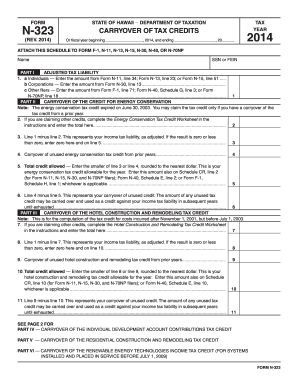
, 20 2014 ATTACH THIS SCHEDULE TO FORM F-1, N-11, N-13, N-15, N-30, N-40, OR N-70NP Name SSN or FEIN PART I ADJUSTED TAX LIABILITY 1. a Individuals Enter the amount from Form N-11, line 34; Form N-13, line 23; or Form N-15, line 51...... b Corporations Enter the amount from Form N-30, line 13...................................................................... c Other filers Enter the amount from Form F-1, line 71; Form N-40, Schedule G, line 3; or Form N-.

How it works

  1. Open form

    Open form follow the instructions

  2. Easily sign form

    Easily sign the form with your finger

  3. Share form

    Send filled & signed form or save

How to fill out the HI DoT N-323 online

The HI DoT N-323 form is used to carry over various tax credits in the state of Hawaii. This guide provides clear, step-by-step instructions on how to fill out the form online, ensuring you can effectively manage your tax credits with ease.

Follow the steps to fill out the HI DoT N-323 online

  1. Press the ‘Get Form’ button to access the HI DoT N-323 document and open it for editing.
  2. Enter the tax year at the top of the form. Make sure to indicate the correct fiscal year you are filing for.
  3. In the Name and SSN or FEIN fields, provide your legal name and social security number or federal employer identification number.
  4. Complete Part I by selecting the appropriate line for your filing type (individual, corporation, or other) and entering the corresponding adjusted tax liability amount.
  5. Navigate to Part II for the Carryover of the Credit for Energy Conservation. If applicable, complete the Energy Conservation Tax Credit Worksheet and enter the total amount.
  6. Calculate Line 3 by subtracting Line 2 from Line 1, then enter this adjusted income tax liability or zero if negative.
  7. Input the carryover of unused energy conservation tax credit from prior years on Line 4.
  8. Enter the smaller amount between Line 3 or Line 4 on Line 5 to determine the total credit allowed for that category.
  9. Continue filling out Part III for the Carryover of the Hotel Construction and Remodeling Tax Credit by following the same logic for its related lines.
  10. Proceed to Parts IV through VII to fill out additional carryover credits as required, ensuring accurate calculations and entries for each section.
  11. Once all parts are completed, review your entries for accuracy. You can then save your changes, download the completed form, print it, or share it as needed.

Start completing your HI DoT N-323 form online today!

Get form

Experience a faster way to fill out and sign forms on the web. Access the most extensive library of templates available.

Related content

Hawaii Tax Forms (Alphabetical Listing)
N-312, Capital Goods Excise Tax Credit, Rev. 2024 ; N-323, Carryover of Tax Credits, Rev...
Learn more
601.03 601-1 division 600 - miscellaneous...
projects at DOT Materials Testing and Research Branch, submit test. 122 ... 323. 324...
Learn more
Catálogo Lâmpadas Automotivas
Apr 3, 2016 — Como líderes em campos específicos no mercado automotivo, a HELLA...
Learn more

Related links form

CA MC-703 2014 CA MC-800 2002 CA MD-100 2018 CA MD-130 (formerly MC-602) 2018

Questions & Answers

Get answers to your most pressing questions about US Legal Forms API.

Contact support

Hawaii Form N-15, which is used for non-resident income tax filings, should be sent to the specific address noted on the form itself. This may differ based on the filing method, such as paper or electronic submission. In case you need further assistance, consider using the HI DoT N-323 for corrections or inquiries related to past filings. Check the Hawaii Department of Taxation website for the most current mailing information.

Your Hawaii federal tax return should be mailed to the address specified by the IRS, which is separate from any state tax returns, including those filed using HI DoT N-323. The mailing address may change based on whether you are including a payment or not, so check the latest IRS instructions. Always ensure your return is complete and accurate before sending it.

Yes, you can file your Hawaii state taxes online through the Hawaii Department of Taxation's e-filing system. This method is convenient and allows you to submit your HI DoT N-323 quickly and securely. You may also find various tax preparation software that supports online filing for Hawaii taxes. Look for options that integrate well with Hawaii's tax processing requirements to ensure a smooth experience.

To send tax documents in the mail, first organize all necessary forms such as the HI DoT N-323. Use an envelope that securely fits your papers and ensure that they are placed in the correct order. Address the envelope properly, including any PO Box or special instructions, and apply sufficient postage before dropping it off at the post office. It’s a good idea to get a tracking number to monitor its delivery.

You mail Hawaii tax forms to the specific addresses indicated on the forms, such as the HI DoT N-323, which may have different addresses based on your payment status. If you're mailing a return with a payment, it will go to one address, while returns without payments go elsewhere. Ensure that you double-check the guidelines provided by the Hawaii Department of Taxation for the most current mailing instructions.

Generally, residents of Hawaii must file an income tax return if their income exceeds certain thresholds. In particular, if you earn income or have taxable income sources, you should consider filing a return using Form N-323. Non-residents with Hawaii-sourced income also have a filing obligation. Always verify your specific situation on the Hawaii Department of Taxation website for thorough guidance.

To file an amended Hawaii tax return, you should use Form N-323, which is specifically designed for this purpose. Fill out the form with accurate information and clearly indicate the changes you are making. After completing it, mail the amended return to the appropriate address listed on the form, ensuring you keep a copy for your records. This process helps you correct any previous discrepancies in your tax filings.

To mail your Hawaii state tax forms, you need to send them to the address specified for the HI DoT N-323. This address varies depending on whether you are enclosing a payment or not. For returns with a payment, use the specified payment address, while returns without payment go to the general filing address. Always check the official Hawaii Department of Taxation website for the most accurate mailing information.

The address for sending your Hawaii state tax return depends on whether you are filing electronically or by mail. If mailing, the HI DoT N-323 outlines the correct address based on your specific situation. Ensure that you use the latest information provided in the guidelines to avoid delays in processing. This attention to detail is crucial for timely tax returns.

Filing an amended Hawaii state tax return involves obtaining the appropriate amendment form and filling it out accurately. You can find detailed steps in the HI DoT N-323. After completing your amendment, submit it to the specified address, ensuring that it is sent before any deadlines. It's crucial to stay up-to-date with your tax obligations.

Get This Form Now!

Use professional pre-built templates to fill in and sign documents online faster. Get access to thousands of forms.
If you believe that this page should be taken down, please follow our DMCA take down processhere.
Get HI DoT N-323
  • Adoption
  • Bankruptcy
  • Contractors
  • Divorce
  • Home Sales
  • Employment
  • Identity Theft
  • Incorporation
  • Landlord Tenant
  • Living Trust
  • Name Change
  • Personal Planning
  • Small Business
  • Wills & Estates
  • Packages A-Z
  • Affidavits
  • Bankruptcy
  • Bill of Sale
  • Corporate - LLC
  • Divorce
  • Employment
  • Identity Theft
  • Internet Technology
  • Landlord Tenant
  • Living Wills
  • Name Change
  • Power of Attorney
  • Real Estate
  • Small Estates
  • Wills
  • All Forms
  • Forms A-Z
  • Other Templates
  • Legal Hub
  • About Us
  • Help Portal
  • Legal Resources
  • Blog
  • Affiliates
  • Contact Us
  • Delete My Account
  • Site Map
  • Industries
  • Forms in Spanish
  • Localized Forms
  • State-specific Forms
  • Forms Kit
  • Real Estate Handbook
  • All Guides
  • Notarize
  • Incorporation services
  • For Consumers
  • For Small Business
  • For Attorneys
  • USLegal
  • FormsPass
  • pdfFiller
  • signNow
  • altaFlow
  • DocHub
  • Instapage
Form Packages
  • Adoption
  • Bankruptcy
  • Contractors
  • Divorce
  • Home Sales
  • Employment
  • Identity Theft
  • Incorporation
  • Landlord Tenant
  • Living Trust
  • Name Change
  • Personal Planning
  • Small Business
  • Wills & Estates
  • Packages A-Z
Form Categories
  • Affidavits
  • Bankruptcy
  • Bill of Sale
  • Corporate - LLC
  • Divorce
  • Employment
  • Identity Theft
  • Internet Technology
  • Landlord Tenant
  • Living Wills
  • Name Change
  • Power of Attorney
  • Real Estate
  • Small Estates
  • Wills
  • All Forms
  • Forms A-Z
  • Other Templates
Customer Service
  • Legal Hub
  • About Us
  • Help Portal
  • Legal Resources
  • Blog
  • Affiliates
  • Contact Us
  • Delete My Account
  • Site Map
  • Industries
  • Forms in Spanish
  • Localized Forms
  • State-specific Forms
  • Forms Kit
Legal Guides
  • Real Estate Handbook
  • All Guides
Prepared for you
  • Notarize
  • Incorporation services
Our Customers
  • For Consumers
  • For Small Business
  • For Attorneys
Our Sites
  • USLegal
  • FormsPass
  • pdfFiller
  • signNow
  • altaFlow
  • DocHub
  • Instapage
Social Media
Call us now toll free:
+1 833 426 79 33
As seen in:
© Copyright 1999-2026 airSlate Legal Forms, Inc. 17 Station Street, Suite 303, Brookline, MA 02445
  • Your Privacy Choices
  • Terms of Service
  • Privacy Notice
  • Content Takedown Policy
  • Bug Bounty Program
HI DoT N-323
This form is available in several versions.
Select the version you need from the drop-down list below.
2022 HI DoT N-323
Select form
  • 2022 HI DoT N-323
  • 2021 HI DoT N-323
  • 2020 HI DoT N-323
  • 2019 HI DoT N-323
  • 2018 HI DoT N-323
  • 2017 HI DoT N-323
  • 2015 HI DoT N-323
  • 2014 HI DoT N-323
  • 2013 HI DoT N-323
Select form