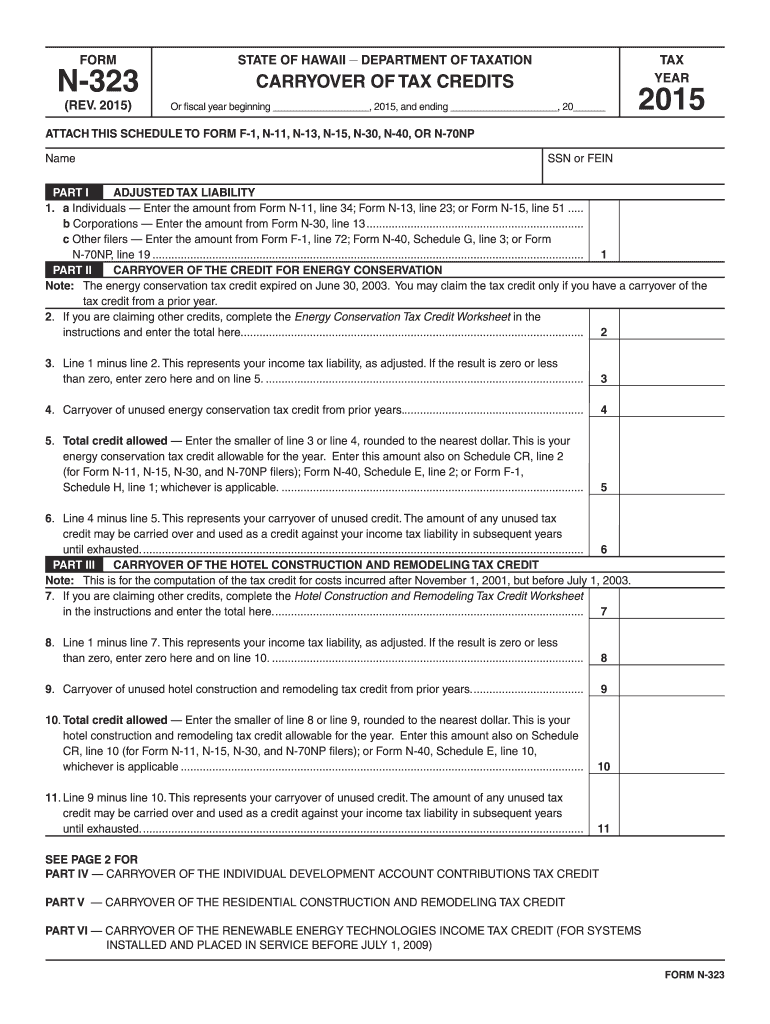
0..................................................................................................... 8 9. Carryover of unused hotel construction and remodeling tax credit from prior years..................................... 9 10. Total credit allowed Enter the smaller of line 8 or line 9, rounded to the nearest dollar. This is your hotel construction and remodeling tax credit allowable for the year. Enter this amount also on Schedule CR, line 10 (for Form N-11, N-15, N-30, an.
Loading

Open form follow the instructions

Easily sign the form with your finger

Send filled & signed form or save
How to fill out the HI DoT N-323 online
Filing the HI DoT N-323 form online can be a straightforward process with the right guidance. This document is essential for reporting the carryover of tax credits in the state of Hawaii.
Follow the steps to complete the HI DoT N-323 form online.
- Click ‘Get Form’ button to obtain the HI DoT N-323 form and open it in the editor.
- Begin by entering your name and Social Security Number (SSN) or Federal Employer Identification Number (FEIN) in the designated fields. This information is essential for identification purposes.
- Navigate to Part I, where you will report your adjusted tax liability. Select the appropriate line based on your filing status: individuals, corporations, or other filers. Input the relevant amounts from the specified forms.
- Proceed to Part II, which concerns the carryover of the credit for energy conservation. If you are claiming other credits, complete the Energy Conservation Tax Credit Worksheet as instructed and enter the total amount on line 2. Calculate line 3 by subtracting line 2 from line 1.
- Continue calculating as instructed in Part II for lines 4, 5, and 6 to determine your total credit allowed and any carryover of unused credit.
- Advance to the subsequent Parts (III, IV, V, VI, and VII) to report all additional carryover tax credits by following the same structure as outlined in previous steps. For each part, complete the necessary calculations to ascertain total credits and carryovers.
- Once you have completed all necessary fields and calculated your credits, review the entire form for accuracy. Ensure all required attachments as per instructions are included.
- Finally, save your changes, and from here you can download, print, or share the form as needed.
Complete your forms online with confidence and efficiency.
Experience a faster way to fill out and sign forms on the web. Access the most extensive library of templates available.
Related content
N-312, Capital Goods Excise Tax Credit, Rev. 2024 ; N-323, Carryover of Tax Credits, Rev...
projects at DOT Materials Testing and Research Branch, submit test. 122 ... 323. 324...
Apr 3, 2016 — Como líderes em campos específicos no mercado automotivo, a HELLA...
Get answers to your most pressing questions about US Legal Forms API.
How do I get a copy of my Hawaii state tax return?
To receive a copy of your Hawaii state tax return, submit a request through the Hawaii Department of Taxation’s online services or by mail. Ensure you specify your need for the HI DoT N-323 form when making your request, as this will help streamline the process.
Can I get copies of my tax return online?
Yes, you can obtain copies of your tax return online through the Hawaii Department of Taxation's official website. Follow their secure portal for requests, particularly if you need the HI DoT N-323 form. This digital option simplifies access to your documents from anywhere.
Where do I mail Hawaii tax forms?
Mail your Hawaii tax forms to the address specified on the forms or the Hawaii Department of Taxation's website. Typically, returns must be sent to a designated P.O. Box for processing. For clarity, check that you're mailing your HI DoT N-323 to the correct location to avoid delays.
Where is my Hawaii state tax return?
You can track the status of your Hawaii state tax return online using the Hawaii Department of Taxation's tracking system. Simply enter the required information to see where your return stands. If you filed using form HI DoT N-323, ensure you have that ready for reference.
What is the residential construction and remodeling tax credit in Hawaii?
The residential construction and remodeling tax credit in Hawaii is designed to encourage home improvement projects. This credit can help homeowners offset some costs associated with renovations. For detailed information on eligibility and application, refer to the HI DoT N-323 guidelines on the tax department's website.
Who must file a Hawaii income tax return?
Individuals who earn income in Hawaii are generally required to file a state income tax return. If your income exceeds the established thresholds, you must submit your HI DoT N-323 form. Check the latest requirements to ensure compliance and avoid penalties.
How to get a PDF copy of a tax return?
Getting a PDF copy of your tax return is straightforward. Navigate to the Hawaii Department of Taxation's online services page where you can request the document. Make sure you specify that you need the HI DoT N-323 form to receive the correct version.
How do I download a copy of my tax return?
To download a copy of your tax return, visit the Hawaii Department of Taxation website. There, you can access forms and instructions for retrieving your documents. If you're looking for your HI DoT N-323 form, ensure you follow the guidelines specific to your situation for accurate results.
How do I file an amended Hawaii tax return?
Filing an amended Hawaii tax return requires you to complete the appropriate form, which is often the N-20, related to your original filing. Review instructions carefully to ensure all required details are accurate. Utilize the HI DoT N-323 as a reference for specific steps necessary for amending your tax returns.
How do I write a check to the Hawaii state tax collector?
When writing a check to the Hawaii state tax collector, be sure to include the correct payee name, amount, and your tax identification number. Using a permanent ink pen ensures clarity. For specific instructions on how to fill out your tax payment and direct it properly, check the relevant details in the HI DoT N-323.
Use professional pre-built templates to fill in and sign documents online faster. Get access to thousands of forms.
If you believe that this page should be taken down, please follow our DMCA take down process here.
This form is available in several versions. Select the version you need from the drop-down list below.