Loading
Get Mo Dor 1275 2019-2026
How it works
-

Open form follow the instructions
-

Easily sign the form with your finger
-

Send filled & signed form or save
How to use or fill out the MO DoR 1275 online
Filling out the MO DoR 1275 form online can be straightforward with the right guidance. This comprehensive guide will walk you through each section of the form, ensuring that you provide accurate information for your special permits application.
Follow the steps to successfully complete your application.
- Click the ‘Get Form’ button to obtain the form and access it in the online editor.
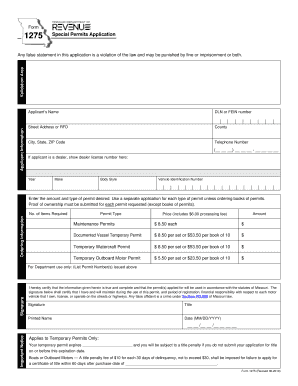
- Fill in the applicant's information, including the applicant's name, DLN or FEIN number, street address or RFD, county, city, state, ZIP code, and telephone number. If the applicant is a dealer, do not forget to provide the dealer license number.
- If the applicant is a vehicle owner, complete the vehicle information section, including the year, make, body style, and vehicle identification number.
- Specify the amount and type of permit desired. Note that you must utilize a separate application for each permit type, unless you are ordering books of permits. Ensure you have proof of ownership for each permit requested, except for orders of books of permits.
- In the ordering information section, indicate the number of items required, permit type, amount, and total price, which includes a $6.00 processing fee. Be mindful of the specific costs associated with maintenance permits and temporary permits.
- Sign the application where indicated to certify that the information is accurate and that the permits will be used in compliance with Missouri statutes.
- Include your title, printed name, and date in the respective fields. Ensure that you complete the expiration date section for temporary permits.
- Review your form for completeness and accuracy. Upon confirmation, proceed to save changes, download, print, or share your completed application as needed.
Complete your documents online today for a smooth filing experience.