Loading
Get Mo Dor 4811 2014-2026
How it works
-

Open form follow the instructions
-

Easily sign the form with your finger
-

Send filled & signed form or save
How to fill out the MO DoR 4811 online
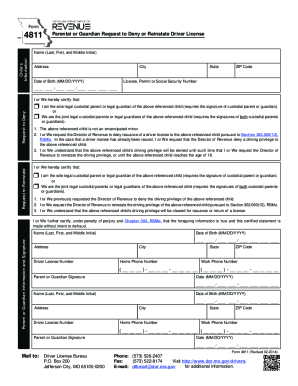
The MO DoR 4811 form is designed for parents or guardians requesting to deny or reinstate a driver's license for their child. This guide provides a step-by-step approach to help you complete the form accurately and efficiently online.
Follow the steps to fill out the form online.
- Click ‘Get Form’ button to access the MO DoR 4811 and open it in the editor.
- Fill in the child’s information, including their name, address, city, date of birth, state, and ZIP code. Ensure that all details are accurate to avoid processing delays.
- Enter the child's license, permit, or social security number in the designated field.
- Indicate whether you are requesting to deny or reinstate the driver's license by selecting the appropriate option.
- Certify your status as the sole legal custodial parent or joint legal custodial parent/guardian by checking the respective boxes.
- Review and confirm the child’s status, ensuring that you understand the implications of denying or reinstating the driving privilege.
- Provide your name, date of birth, address, driver license number, home phone number, work phone number, and signature as the parent or guardian.
- If applicable, repeat the previous step for a joint legal parent or guardian, including their details and signature.
- Once you have completed all sections and verified the information, save your changes. You may download, print, or share the form for submission.
Complete the MO DoR 4811 form online today to ensure the timely processing of your request.
Contact the Missouri Department of Revenue or call 573-751-9268, for assistance.