Loading
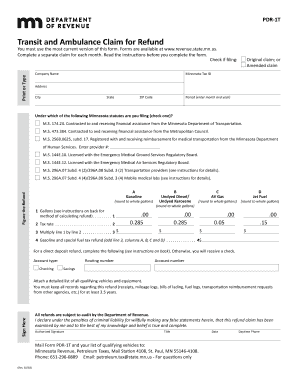
Get Mn Pdr-1t 2018
How it works
-

Open form follow the instructions
-

Easily sign the form with your finger
-

Send filled & signed form or save
How to fill out the MN PDR-1T online
Filling out the MN PDR-1T form online is a straightforward process that allows users to claim a refund for excise taxes paid on gasoline or special fuels used for qualified transportation services. This guide provides clear, step-by-step instructions to assist users in completing the form accurately and effectively.
Follow the steps to successfully complete the MN PDR-1T form online.
- Click ‘Get Form’ button to obtain the form and open it in your editor of choice.
- Indicate whether you are filing an original or amended claim by selecting the appropriate checkbox.
- Enter your Minnesota Tax ID number, and provide your company's name, address, city, state, and ZIP code.
- Specify the period for which you are claiming the refund by entering the month and year.
- Select the applicable Minnesota statute under which you are filing by checking the relevant box.
- Calculate the refund by filling in the number of gallons of fuel used in qualified vehicles during the month as per the specified sections, then multiply this by the tax rate.
- If opting for a direct deposit refund, provide your banking information, including account type, routing number, and account number.
- Attach a detailed list of all qualifying vehicles and equipment, as required.
- Review the completed form for accuracy, then sign and date it, ensuring all information is correct.
- Once finalized, save the changes, and you can choose to download, print, or share the form as needed.
Complete your MN PDR-1T form online today and ensure you receive your refund efficiently.
Get form
Experience a faster way to fill out and sign forms on the web. Access the most extensive library of templates available.
Get This Form Now!
Use professional pre-built templates to fill in and sign documents online faster. Get access to thousands of forms.