Loading
Get Ks Dor Do-10 2020-2026
How it works
-

Open form follow the instructions
-

Easily sign the form with your finger
-

Send filled & signed form or save
How to fill out the KS DoR DO-10 online
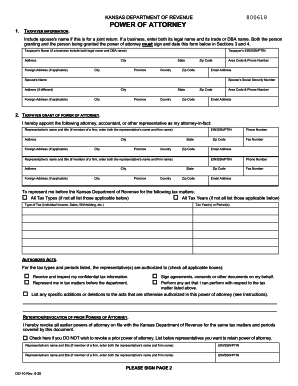
Filling out the KS DoR DO-10 form online is a straightforward process designed to empower users to grant power of attorney for tax matters efficiently. This guide provides step-by-step instructions to ensure that all necessary information is captured accurately and comprehensively.
Follow the steps to complete the KS DoR DO-10 form online:
- Click the ‘Get Form’ button to obtain the form and open it in the editor.
- In Section 1, enter the taxpayer information, including the taxpayer's name, address, phone number, and email address. If applicable, include the spouse’s name and details if this is for a joint return.
- In Section 2, appoint your representative by filling in their name, title, address, and contact details. If the representative belongs to a firm, ensure to include both their name and the firm's name.
- Specify the tax matters for which you are granting power of attorney by selecting the applicable tax types and years. If the power of attorney covers all tax types and years, check the relevant boxes.
- Indicate the authorized acts by selecting the boxes that pertain to what your representative can do on your behalf, such as receiving confidential information or signing documents.
- In the retention/revocation of prior powers of attorney section, indicate if you wish to revoke any prior powers of attorney on file. Provide details if you wish to retain any existing representatives.
- Proceed to Section 3 and sign the form. If this is a joint return, both partners must sign the form.
- Finally, in Section 4, ensure that the designated representatives sign and date the form. Review all entries for accuracy.
- Save your changes, then download, print, or share the completed form as needed.
Complete your KS DoR DO-10 form online today to ensure your tax representation is authorized.