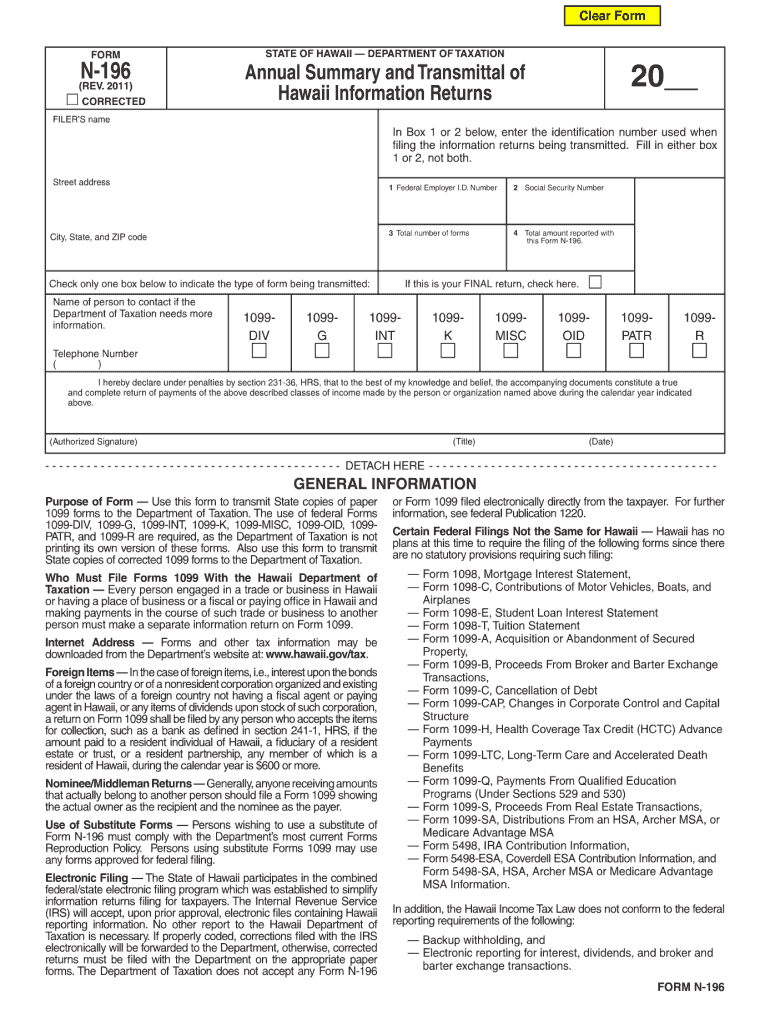
Clear Form Category List Alpha List Main Menu (REV. 2011) CORRECTED FILER'S name N-196 FORM Annual Summary and Transmittal of Hawaii Information Returns STATE OF HAWAII -- DEPARTMENT OF TAXATION 20.
Loading

Open form follow the instructions

Easily sign the form with your finger

Send filled & signed form or save
How to fill out the HI DoT N-196 online
The HI DoT N-196 is an essential form used for various administrative purposes. Completing this form accurately online can streamline your process and ensure timely submission.
Follow the steps to successfully complete the HI DoT N-196 online.
- Click ‘Get Form’ button to obtain the form and open it in the editor.
- Review the form's instructions carefully to understand the required information. Ensure you have all necessary documents ready before you start filling out the form.
- Begin with Section A, where you will enter your personal details such as name, address, and contact information. Make sure to double-check for accuracy.
- Move on to Section B, which may require you to provide information related to your eligibility or specific circumstances that apply to you. Be thorough and clear.
- In Section C, you might need to provide additional documentation or details supporting your application. List these documents as instructed.
- Once all sections are completed, review the entire form for any errors or omissions. Make sure all fields are filled out correctly.
- Save your changes, and once you are satisfied with the completed form, you can download, print, or share it according to your needs.
Start completing your HI DoT N-196 online today for seamless processing.
Experience a faster way to fill out and sign forms on the web. Access the most extensive library of templates available.
Related content
N-196, Annual Summary and Transmittal of Hawaii Annual Information Returns ; N-200V...
by S Molinari · 2016 · Cited by 324 — It delivers images of exquisite quality and...
Bem-vindo à crescente família de novos proprietários de veículos Nissan. Este veículo...
Get answers to your most pressing questions about US Legal Forms API.
How do I write a check to Hawaii State Tax Collector?
Writing a check to the Hawaii State Tax Collector requires you to include essential details such as the amount and the correct payee. Make sure that your check has the correct address if you are mailing it. Reference the HI DoT N-196 in the memo to ensure it is applied to the appropriate account.
What address do I send my Hawaii state tax return?
You should send your Hawaii state tax return to the address detailed in the filing instructions for the Hawaii Department of Taxation. Ensure that your envelope is correctly addressed to avoid any issues. Using the HI DoT N-196 can assist in ensuring all necessary paperwork is included.
How do I write a check to the Hawaii state tax collector?
To write a check to the Hawaii state tax collector, ensure you address the check correctly with the department’s name and the total amount. Include your identification information in the memo for clarity. Always reference the HI DoT N-196 to facilitate processing.
How do you fill out a W9 step by step?
To fill out a W9 step by step, begin with your name and business name, if applicable. Next, provide your taxpayer identification number, check the right federal tax classification, and sign the form. This ensures compliance with requirements related to the HI DoT N-196.
Where to mail Hawaii N-15?
The Hawaii N-15 form should be mailed to the Hawaii Department of Taxation at the address specified in the form instructions. This mailing address may change, so double-check on their official site. Make sure to keep your documents organized in line with the HI DoT N-196.
How do you address an envelope to a tax return?
To address an envelope for a tax return, start with the recipient's name, followed by the appropriate department and street address of the tax office. Include the city, state, and zip code. Don’t forget to reference the HI DoT N-196 both in your documents and on the envelope.
How to calculate tax on W-9 income?
Calculating tax on W-9 income involves determining the amount earned and applying the appropriate tax rate for your filing status. You can reference the latest tax tables provided by the Hawaii Department of Taxation. For accurate calculations, using tools available from uslegalforms can be beneficial, especially for the HI DoT N-196.
Where do I mail my Hawaii state tax return to?
To mail your Hawaii state tax return, check the instructions on the Hawaii Department of Taxation website for the correct address. The mailing address may vary depending on whether you are including payment or not. Always ensure you reference the HI DoT N-196 to avoid delays.
How do you write a check for tax payment?
When writing a check for tax payment, include the amount in both numbers and letters. Make sure to address the check to the appropriate entity, such as the Hawaii State Tax Department. Don't forget to reference the HI DoT N-196 in the memo line for proper processing.
Do I fill out a W9 myself?
Yes, you need to fill out a W9 form yourself, ensuring that all information is accurate and complete. If you're unsure about certain fields, consider using online resources from uslegalforms for guidance. This ensures that everything aligns with requirements like the HI DoT N-196.
Use professional pre-built templates to fill in and sign documents online faster. Get access to thousands of forms.
If you believe that this page should be taken down, please follow our DMCA take down process here.
This form is available in several versions. Select the version you need from the drop-down list below.