Y person who accepts the items for collection, such as a bank as defined in section 241-1, HRS, if the amount paid to a resident individual of Hawaii, a fiduciary of a resident estate or trust, or a resident partnership, any member of which is a resident of Hawaii, during the calendar year is $600 or more. Nominee/Middleman Returns Generally, anyone receiving amounts that actually belong to another person should file a Form 1099 showing the actual owner as the recipient and the nominee as th.
Loading

Open form follow the instructions

Easily sign the form with your finger

Send filled & signed form or save
How to fill out the HI DoT N-196 online
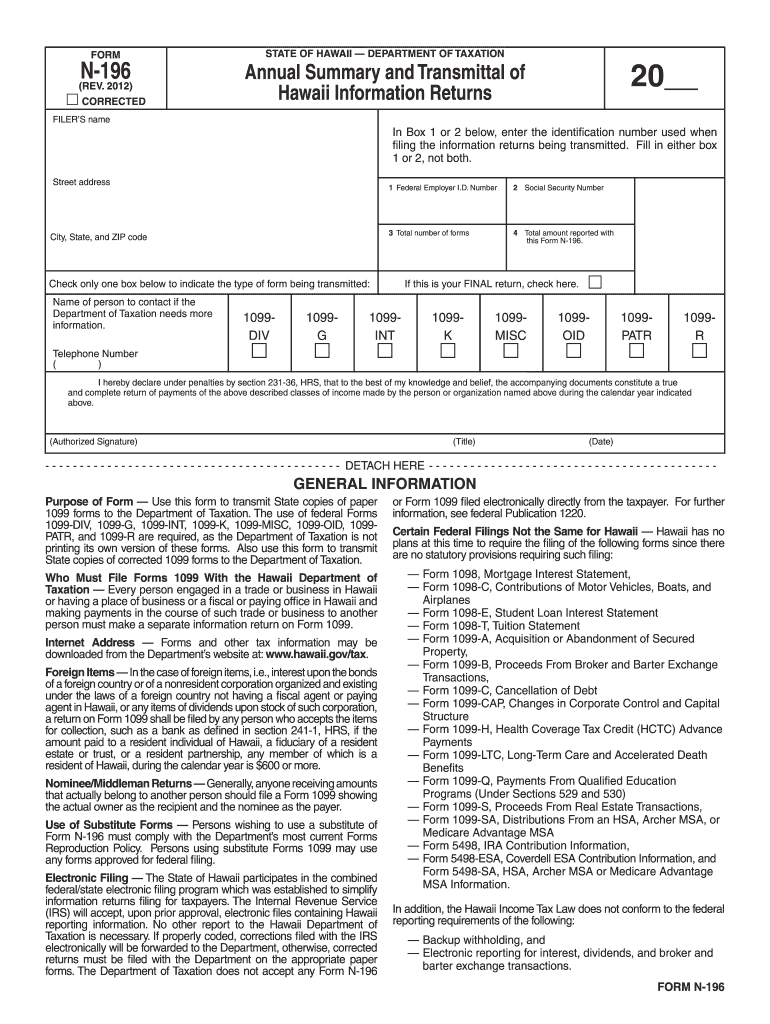
The HI DoT N-196 form is a crucial document used for transmitting annual summaries of Hawaii information returns. This guide will provide you with a clear and detailed approach to filling it out online, ensuring you meet all necessary requirements effectively.
Follow the steps to complete the HI DoT N-196 online
- Click ‘Get Form’ button to obtain the form and open it in the editor.
- Start by entering the last two digits of the calendar year in the upper right corner. This indicates the relevant year for your submission.
- Fill in the filer's name and address in the designated fields on the form.
- In either Box 1 or Box 2, enter the taxpayer identification number. Use Box 1 for the Federal Employer Identification Number or Box 2 for the Social Security Number. Ensure you select only one box.
- In Box 3, input the total number of correctly completed 1099 forms being submitted. Do not include blank or voided forms.
- Enter the total amount reported with the forms in Box 4. Refer to the specific form guidance for what constitutes this total.
- Check the appropriate box to indicate the type of 1099 form being transmitted. If multiple types are being filed, a separate Form N-196 for each type is required.
- If this is the final return, mark the designated box in Box 4.
- Provide the contact person's name and telephone number in case further information is needed by the Department of Taxation.
- The form must be signed by an authorized individual. Ensure you meet the necessary conditions if a third party signs on behalf of the payer.
- If submitting corrected forms, mark the ‘CORRECTED’ box and complete all required information on the corrected forms.
- Once all information is entered, save changes, download the completed form, and prepare to print or share as required.
Complete your documents online today for a seamless filing experience.
Experience a faster way to fill out and sign forms on the web. Access the most extensive library of templates available.
Related content
N-196, Annual Summary and Transmittal of Hawaii Annual Information Returns ; N-200V...
by S Molinari · 2016 · Cited by 324 — It delivers images of exquisite quality and...
Bem-vindo à crescente família de novos proprietários de veículos Nissan. Este veículo...
Get answers to your most pressing questions about US Legal Forms API.
What address do I send my Hawaii state tax return?
The address for sending your Hawaii state tax return generally depends on your filing method and whether you are sending a payment. If you need specific details on the address, it’s wise to refer to the latest guidelines available regarding HI DoT N-196 to ensure you have the correct mailing information for your tax return.
What is the payer's state number Hawaii?
The payer's state number in Hawaii is a unique identifier assigned to employers for tax filing purposes. This number is essential for reporting wage and tax information to the Department of Taxation. If you are unfamiliar with obtaining this number, consider researching steps outlined under HI DoT N-196 to assist you in this area.
Do I have to mail my state tax return?
Yes, you generally need to mail your state tax return unless you choose to file electronically. Filing electronically can simplify the process and often speeds up the receipt of any refund due. However, if you prefer to mail your return, understanding how to utilize resources related to HI DoT N-196 can ease the mailing process.
Where to mail Hawaii N-15?
The Hawaii N-15 form, similar to the income tax return, should be mailed directly to the Hawaii Department of Taxation. The specific address may depend on whether enclosed payments are included, so it’s important to check the guidelines for mailing addresses based on your tax situation. For clarity, refer to HI DoT N-196 for comprehensive instructions on handling tax forms in Hawaii.
Where do I mail my Hawaii state tax return to?
You should mail your completed Hawaii state tax return to the Department of Taxation for processing. The address varies depending on whether you are expecting a refund or you owe taxes. If you are uncertain about the correct destination for your return, obtaining the latest information on HI DoT N-196 can ensure your mailing process is straightforward and compliant.
What is an N11 form Hawaii used for?
The N11 form in Hawaii serves as a personal income tax return for residents with an income level that qualifies for a simplified tax filing. Taxpayers can use this form to report their income, deductions, and tax credits succinctly. If you are unsure about your eligibility to use this form, exploring resources on HI DoT N-196 can provide valuable insights.
Who must file a Hawaii income tax return?
Residents of Hawaii who earn income must file a Hawaii income tax return, particularly if your income exceeds the state's minimum filing thresholds. This requirement also applies to non-residents who earn income sourced in Hawaii. To ensure compliance with all tax obligations, review the latest guidelines or consider utilizing platforms like uslegalforms to help guide you through the process.
Does Hawaii require 1099 filing?
Yes, Hawaii requires filing 1099 forms for certain payments made throughout the year. If you are a business or individual making qualifying payments, you must file the appropriate 1099 forms with the Hawaii Department of Taxation. Ensure you keep accurate records and submit your filings on time to avoid penalties. Check resources like uslegalforms for more information on filing requirements.
How do I send my tax forms by mail?
To send your tax forms by mail, first, ensure that you have signed and completed all necessary documents. Use a secure envelope and consider tracking your mail for peace of mind. If you’re submitting forms like the HI DoT N-196, verify that all attachments are included. Uslegalforms provides templates and mailing instructions to aid in correct submissions.
What is the easiest way to file your own taxes?
Filing your own taxes can be straightforward with the right resources. You can use online tax software that guides you through the filing process, often including forms like the HI DoT N-196. Alternatively, you can seek help from a tax professional to simplify the process further. It’s wise to gather all necessary documents before starting to ensure a smooth filing experience.
Use professional pre-built templates to fill in and sign documents online faster. Get access to thousands of forms.
If you believe that this page should be taken down, please follow our DMCA take down process here.
This form is available in several versions. Select the version you need from the drop-down list below.