Loading
Get Hi Dot N-139 2013
How it works
-

Open form follow the instructions
-

Easily sign the form with your finger
-

Send filled & signed form or save
How to fill out the HI DoT N-139 online
Filling out the HI DoT N-139 form online can be a straightforward process if you follow the right steps. This guide will walk you through each section of the form to ensure you complete it accurately and efficiently.
Follow the steps to complete the HI DoT N-139 form online.
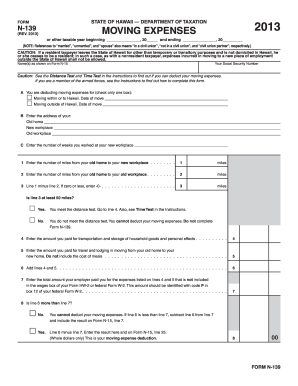
- Press the ‘Get Form’ button to access the HI DoT N-139 form and open it for editing.
- Begin by entering the taxable year at the top of the form, indicating the start and end dates.
- Fill in your name as it appears on Form N-15 and provide your Social Security Number.
- In section A, select only one box to indicate whether you are deducting moving expenses for a move within or to Hawaii or moving outside of Hawaii, and provide the date of the move.
- Proceed to section B and enter the addresses for your old home, new workplace, and old workplace.
- In section C, enter the number of weeks you worked at your new workplace.
- In the next fields, calculate and enter the number of miles from your old home to your new workplace and your old workplace.
- Subtract the number of miles from line 2 from line 1 and enter the result in line 3. If the result is less than 50 miles, you cannot deduct your moving expenses.
- Enter the amounts you paid for transportation and storage of household goods on line 4 and travel and lodging expenses on line 5.
- Add the total from lines 4 and 5, and enter that amount on line 6.
- Enter any reimbursements you received from your employer for moving expenses on line 7.
- Determine if line 6 is greater than line 7. If it is, carry the difference to line 8 and include it in your Form N-15.
- Finally, review all provided information for accuracy, save your changes, and proceed to download or print the completed form.
Complete the HI DoT N-139 form and ensure your moving expenses are accurately filed online.
Get form
Experience a faster way to fill out and sign forms on the web. Access the most extensive library of templates available.
Related links form
The form N-139 is a special document used for declaring moving expenses on your Hawaii tax return. This form helps taxpayers claim eligible moving deductions, contributing to potential tax savings. If you're considering using the HI DoT N-139, it's crucial to gather all required information to support your claims.
Get This Form Now!
Use professional pre-built templates to fill in and sign documents online faster. Get access to thousands of forms.