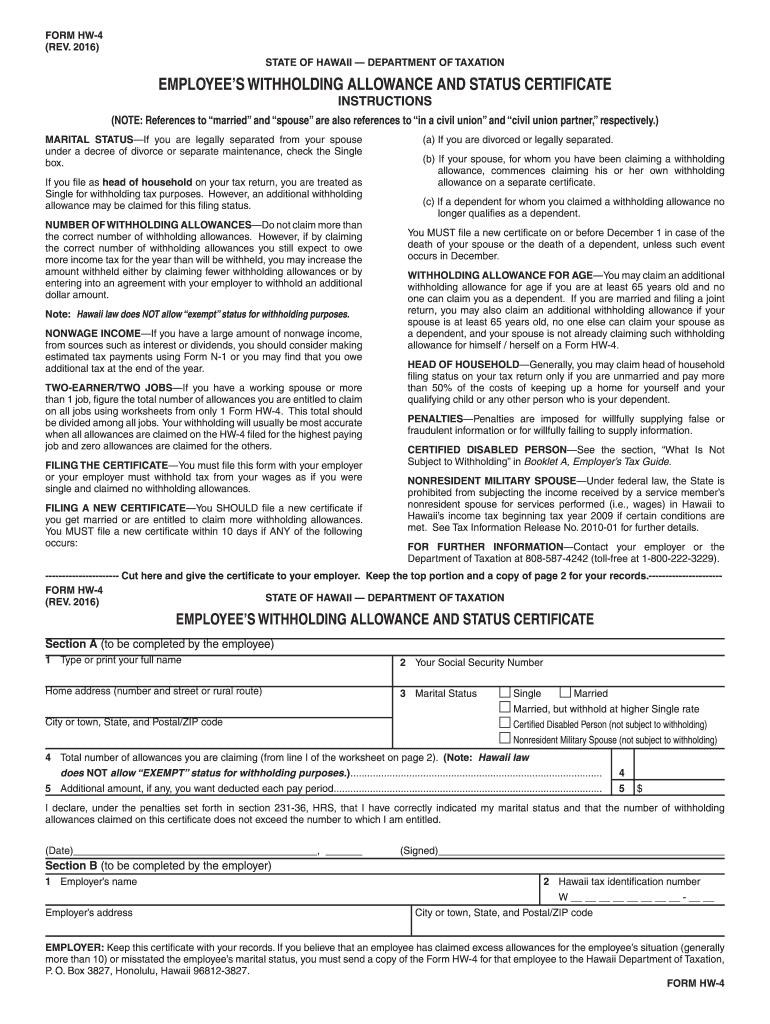
Lso references to in a civil union and civil union partner, respectively.) MARITAL STATUS If you are legally separated from your spouse under a decree of divorce or separate maintenance, check the Single box. If you file as head of household on your tax return, you are treated as Single for withholding tax purposes. However, an additional withholding allowance may be claimed for this filing status. NUMBER OF WITHHOLDING ALLOWANCES Do not claim more than the correct number of with.
Loading

Open form follow the instructions

Easily sign the form with your finger

Send filled & signed form or save
How to fill out the HI DoT HW-4 online
Filling out the HI DoT HW-4 form is essential for determining your withholding allowances and tax status in Hawaii. This guide provides clear, step-by-step instructions to help you complete the form accurately and efficiently.
Follow the steps to successfully fill out the HI DoT HW-4 online.
- Click the 'Get Form' button to access the HI DoT HW-4 online form and open it in the online editor.
- In Section A, type or print your full name in the designated field. This is important for the identification of your tax records.
- Enter your Social Security Number in the corresponding field to ensure proper reporting of your income.
- Complete your home address including the street number, city, state, and postal/ZIP code. This information is crucial for your employer and future correspondence.
- Select your marital status by checking one of the boxes: Single, Married, Married but withhold at higher Single rate, Certified Disabled Person, or Nonresident Military Spouse.
- Enter the total number of withholding allowances you are claiming as calculated from the worksheet on page 2 of the form.
- If you wish, you can also specify any additional amount you want deducted each pay period in the provided field.
- Review the declaration statement to confirm all entries are accurate. You must sign and date the form to validate your information.
- Once completed, submit the form to your employer and keep a copy for your records. Ensure you retain the top portion for your personal files.
Complete and submit your HI DoT HW-4 form online today to ensure your tax withholdings are accurate!
Experience a faster way to fill out and sign forms on the web. Access the most extensive library of templates available.
Related content
Employers need to withhold Hawaii income taxes on employee wages. Employers then pay the...
Jan 12, 2016 — This DDL file should be executable as a script using the Oracle DBMS...
Multi-user MIMO technology allows to distribute the router's resources to let multiple...
Get answers to your most pressing questions about US Legal Forms API.
How do I fill out a withholding status?
Filling out your withholding status involves completing the HI DoT HW-4 form and providing accurate information on your personal circumstances. Ensure that you indicate the correct number of allowances you are eligible for to optimize your withholding. After finishing the form, submit it to your employer, who will process your withholding status accordingly.
How do I check the status of my Hawaii state tax refund?
To check the status of your Hawaii state tax refund, visit the Hawaii Department of Taxation's website. They offer an online service where you can enter your information to track your refund status. Make sure you have your social security number and other identifying details handy for a quick lookup.
How do I register for Hawaii get tax?
Registering for Hawaii Get Tax involves visiting the Hawaii Department of Taxation website to find the necessary registration forms. You may complete these forms online or download them for paper submission. Make sure to provide all required details accurately to avoid delays in processing your registration.
How do I set up tax withholding?
To set up tax withholding, begin by completing the HI DoT HW-4 form accurately. Submit this form to your employer so they can calculate the appropriate amount to withhold from your paycheck. Regularly review your withholding amounts, especially if your situation changes, to ensure you're not overpaying or underpaying your taxes.
How to fill out hw4 form?
Filling out the HI DoT HW-4 form requires attention to detail. Start by entering your personal information, including your name and address. Next, provide your withholding allowances and any additional tax you wish to withhold. Finally, review your form to ensure accuracy before submitting it to your employer or payroll department.
Is Hawaii a mandatory withholding state?
Yes, Hawaii is a mandatory withholding state. Employers must withhold income tax from employee wages, ensuring that the correct amount is remitted to the state. It's crucial to stay compliant with these regulations to avoid penalties. The HI DoT HW-4 form is an important resource that helps employers determine the correct withholding amounts.
How to get a Hawaii tax ID number?
To obtain a Hawaii tax ID number, visit the Hawaii Department of Taxation website. Here, you can find the application form and complete it online or print it for submission by mail. Make sure to have your business formation documents, as you will need to provide essential information. Once you submit the application, your tax ID number will be issued relatively quickly.
How do I register for Hawaii withholding tax?
To register for Hawaii withholding tax, you must complete the appropriate application process through the Hawaii Department of Taxation. You can do this online or by mail. It's essential to gather all required information, including your business details, before starting your registration. Utilizing resources like the HI DoT HW-4 form can help streamline this process.
Where do I send my Hawaii tax return?
You should send your Hawaii tax return to the address indicated on the return form. This address may vary depending on whether you are filing electronically or by mail. It's crucial to follow the instructions closely and ensure you send your completed form to the correct location, especially if you have referenced the HI DoT HW-4 for your withholding allowances.
How to fill out Hawaii HW 4?
To fill out Hawaii HW 4, begin by entering your name, address, and Social Security number. Follow this with your withholding allowance calculations, which should be based on your financial situation and dependents. Be sure to sign and date the HI DoT HW-4 before submitting it to your employer to ensure proper withholding from your paycheck.
Use professional pre-built templates to fill in and sign documents online faster. Get access to thousands of forms.
If you believe that this page should be taken down, please follow our DMCA take down process here.
This form is available in several versions. Select the version you need from the drop-down list below.