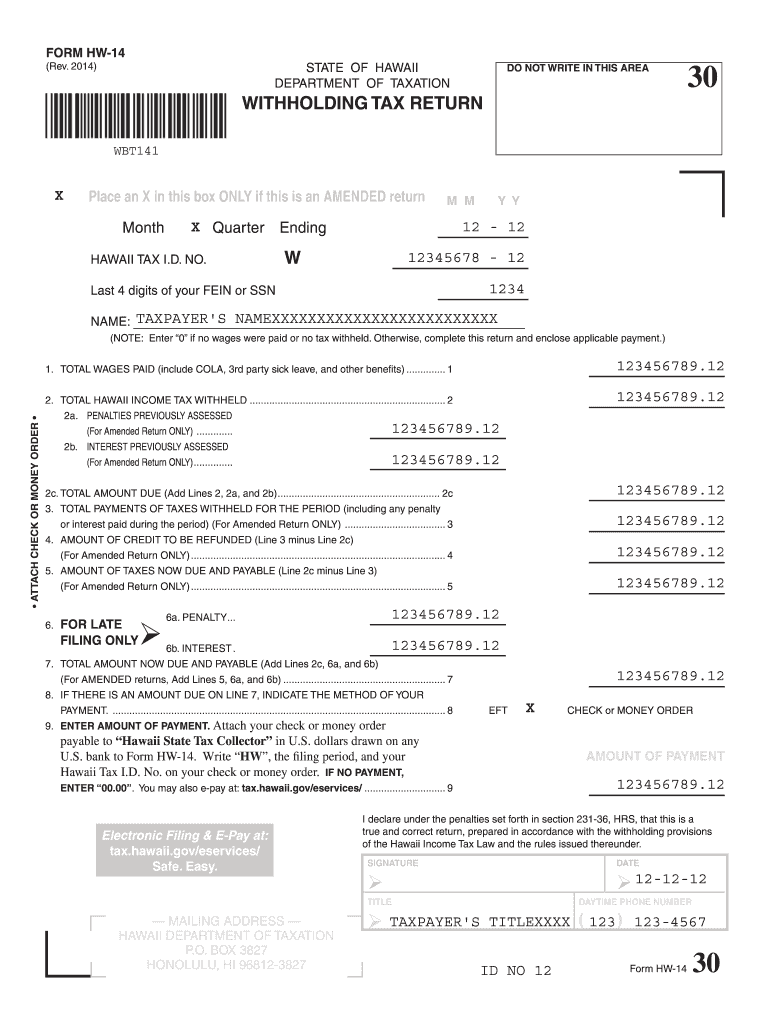
Attach your check or money order payable to Hawaii State Tax Collector in U.S. dollars drawn on any U.S. bank to Form HW-14. FORM HW-14 Rev. 2014 STATE OF HAWAII DEPARTMENT OF TAXATION DO NOT WRITE IN THIS AREA YOUR COPY WITHHOLDING TAX RETURN DO NOT FILE KEEP FOR YOUR RECORDS WBT141 X Place an X in this box ONLY if this is an AMENDED return Month M M Y Y 12 - 12 X Quarter Ending HAWAII TAX I. Easy. MAILING ADDRESS HAWAII DEPARTMENT OF TAXATION P. O. BOX 3827 HONOLULU HI 96812-3827 CHECK or MONE.
Loading

Open form follow the instructions

Easily sign the form with your finger

Send filled & signed form or save
How to fill out the HI DoT HW-14 online
This guide provides clear and concise instructions on correctly completing the HI DoT HW-14 form online. Whether you are a first-time user or need a refresher, this guide will support you in accurately providing the required information.
Follow the steps to efficiently complete your HI DoT HW-14 form online.
- Click ‘Get Form’ button to access the HI DoT HW-14 form and open it in your preferred online editor.
- Indicate whether this is an amended return by placing an ‘X’ in the designated box if applicable. If not, leave it blank.
- Enter the month and year for the quarter you are reporting in the appropriate sections.
- Input your Hawaii Tax I.D. number in the provided field, ensuring it is accurate.
- Provide your name as it should appear on the form. Make sure to follow instructions regarding entering '0' if there were no wages paid or taxes withheld.
- Complete the total wages paid, which includes all relevant wages, benefits, and other amounts as noted on the form.
- Fill out the total Hawaii income tax withheld in the specified field.
- If filing an amended return, enter any penalties or interest previously assessed in the corresponding areas.
- Calculate the total amount due by following the lines indicated on the form, particularly for any amended return entries.
- Indicate the payment method for any amounts due, ensuring to follow the instructions closely.
- Review all entered information for accuracy, then save your changes, download, or print the completed form as required.
Complete your HI DoT HW-14 online today to ensure accurate tax reporting and compliance.
Experience a faster way to fill out and sign forms on the web. Access the most extensive library of templates available.
Related content
All withholding taxpayers need to file returns quarterly (due April 15, July 15, October...
object at its second focal point Objective. F, which is also the first focal point F₂ of...
Safety Guidelines. This manual contains notices you have to observe in order to ensure...
Get answers to your most pressing questions about US Legal Forms API.
Do I need a GE license in Hawaii?
Yes, businesses operating in Hawaii typically need a General Excise (GE) license. This license allows you to conduct a wide range of business activities while complying with state tax requirements. Utilizing the resources available on the uslegalforms platform can guide you through the application process for obtaining your GE license and managing your tax responsibilities effectively.
What is HW 4 Hawaii tax?
HW-4 is a form used in Hawaii for withholding allowance. This form helps determine how much state tax to withhold from employees' paychecks. By filling out your HW-4 accurately, you ensure proper withholding according to your tax situation, which can be managed efficiently with the help of the HI DoT HW-14.
What is tax form HW 14?
Tax form HW-14 is the Hawaii Department of Taxation's form for reporting excise tax withholding. This form allows businesses to accurately report the amount withheld from employees' wages. Completing the HI DoT HW-14 correctly helps ensure compliance with state regulations and minimizes errors in reporting.
What vehicles are exempt from excise tax?
In Hawaii, vehicles that serve specific purposes may be exempt from excise tax. Examples include certain government vehicles and those used primarily for public transportation. Reviewing the guidelines can clarify eligibility, and the HI DoT HW-14 form can assist you in confirming your exemptions.
Who is exempt from Hawaii general excise tax?
Certain organizations like nonprofits and government entities may qualify for exemption from the Hawaii general excise tax. Additionally, there are specific activities that allow for exemptions. Understanding the conditions can help you determine if your business qualifies, and utilizing the HI DoT HW-14 can streamline this process.
Is Hawaii a mandatory withholding state?
Yes, Hawaii is a mandatory withholding state. This means that employers must withhold income taxes from employees' wages. If you are unsure about the withholding requirements for your business, consider using the HI DoT HW-14 form to help you navigate the necessary steps.
How to calculate state withholding tax?
Calculating state withholding tax involves determining your total income and applying the correct tax rates as outlined in the HI DoT HW-14 documentation. It is essential to consider your exemptions and deductions as this impacts the final amount. For assistance, using tools like the US Legal Forms platform can provide calculators and forms necessary for proper tax calculations.
How to fill out box 14 on taxes?
When filling out box 14 on your tax forms, refer to your W-2 and accurately transcribe information related to your withholdings or benefits. Use the HI DoT HW-14 resource for detailed examples of what to include. This ensures your taxes reflect all relevant deductions, maximizing your potential refund.
How do I enter box 14 on TurboTax?
Entering box 14 on TurboTax is straightforward. You will select the relevant section for W-2 forms and input the information as listed in box 14, such as state-specific withholdings or deductions. Following the HI DoT HW-14 recommendations will assist in ensuring you capture all necessary information accurately.
Is box 14 on W-2 informational only?
Box 14 on the W-2 is not solely informational; it provides crucial insight into specific deductions or contributions you’ve made throughout the year. This information can affect your tax return, so it is vital to review and report it accurately. The HI DoT HW-14 guidelines can help ensure you understand what each entry means.
Use professional pre-built templates to fill in and sign documents online faster. Get access to thousands of forms.
If you believe that this page should be taken down, please follow our DMCA take down process here.
This form is available in several versions. Select the version you need from the drop-down list below.