Loading
Form preview
  • US Legal Forms
  • Other Templates
  • Tax Forms
  • Hawaii Tax Forms
  • Hi Dot Hw-14 2018

Get Hi Dot Hw-14 2018

( ID NO 01 ) Form HW-14 30.

How it works

  1. Open form

    Open form follow the instructions

  2. Easily sign form

    Easily sign the form with your finger

  3. Share form

    Send filled & signed form or save

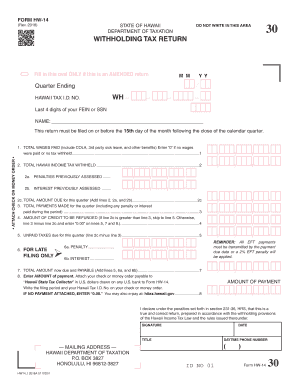
How to fill out the HI DoT HW-14 online

Filing the HI DoT HW-14 withholding tax return is an important process for individuals and businesses in Hawaii. This guide will provide step-by-step instructions to ensure that you complete the form correctly and efficiently.

Follow the steps to accurately fill out the HI DoT HW-14 online.

  1. Click ‘Get Form’ button to obtain the form and open it in the designated editor.
  2. Identify the quarter ending date you are reporting for and fill it in the appropriate field. Ensure the date format is correct.
  3. Enter your Hawaii Tax I.D. Number in the designated field, ensuring that it is accurate to avoid delays.
  4. In the NAME field, provide the name of the person or entity responsible for filing the return.
  5. Complete the TOTAL WAGES PAID section, including any cost of living adjustments, third-party sick leave, and other benefits. If no wages were paid, enter '0'.
  6. Fill in the TOTAL HAWAII INCOME TAX WITHHELD based on the wages reported in the previous section.
  7. If applicable, enter any PENALTIES or INTEREST PREVIOUSLY ASSESSED in their respective fields.
  8. Calculate the TOTAL AMOUNT DUE for the quarter by adding the amounts in the previous sections and enter this total.
  9. Record any TOTAL PAYMENTS MADE during the quarter, including penalties or interest.
  10. Determine the AMOUNT OF CREDIT TO BE REFUNDED or the UNPAID TAXES due for this quarter. Use the appropriate fields based on your calculations.
  11. If applicable, complete the FOR LATE FILING ONLY section with any penalties or interest accrued.
  12. Add the necessary amounts and fill in the TOTAL AMOUNT now due and PAYABLE.
  13. Attach your payment (check or money order) to the form. Ensure to include your filing period and Hawaii Tax I.D. Number on the payment.
  14. Finally, sign and date the form. Review all information for accuracy before submitting.
  15. Save your changes and download, print, or share the completed form as needed.

Complete your HI DoT HW-14 form online to ensure timely and accurate filing.

Get form

Experience a faster way to fill out and sign forms on the web. Access the most extensive library of templates available.

Related content

Withholding Tax – For Employers | Department of...
All withholding taxpayers need to file returns quarterly (due April 15, July 15, October...
Learn more
HW #14 (due 04/28/15) - MP 34.7, 34.14, 34.20...
object at its second focal point Objective. F, which is also the first focal point F₂ of...
Learn more
System Manual AS-Interface system ASIsafe...
Safety Guidelines. This manual contains notices you have to observe in order to ensure...
Learn more

Related links form

CA JV-600 S 2018 CA JV-610 2007 CA JV-610 S 2007 CA JV-611 2007

Questions & Answers

Get answers to your most pressing questions about US Legal Forms API.

Contact support

To acquire a tax ID number, you will need to apply through the IRS for a Federal Employer Identification Number (EIN). You can do this online, and the process is straightforward. For detailed assistance with applying for a tax ID, including understanding the relevance of the HI DoT HW-14 form in the context of your application, uslegalforms is a great resource.

Yes, you can file your Hawaii state tax online. The Hawaii Department of Taxation offers an online filing option that makes it convenient for residents and businesses to submit their tax returns. You can take advantage of this digital service by visiting their website, or for added simplicity and support, uslegalforms can equip you with the right tools and resources for a smooth filing experience.

To apply for a Hawaii general excise tax (GET) license, you must submit a completed application to the Hawaii Department of Taxation. This license allows you to conduct business within Hawaii legally while collecting and remitting the appropriate taxes. Using platforms like uslegalforms can simplify your application process by providing the necessary forms and valuable information.

You can obtain a Hawaii tax ID number by applying through the Hawaii Department of Taxation. This process typically requires you to fill out a specific application form, including your business information and federal tax ID, if applicable. For streamlined assistance, uslegalforms offers detailed guides and resources to help you navigate the application process efficiently.

To register for Hawaii withholding tax, you need to complete the HI DoT HW-14 form and submit it to the Hawaii Department of Taxation. This form allows you to establish your withholding account, which is essential for managing employee tax withholding correctly. You can find resources and support on uslegalforms to guide you through the registration process and ensure you meet all requirements.

The HI DoT HW-14 form, commonly known as the HW-4 form, is used by employees in Hawaii to provide their employers with the necessary information to withhold state income tax from their paychecks. By filling out this form accurately, you ensure that the correct amount of taxes are deducted, which can help you avoid any surprises on your tax return. Understanding the HW-4 form is crucial for effective tax planning and compliance.

The category for box 14 can vary depending on what your employer has reported. Common entries for this box include types of benefits or specific taxes withheld. Always refer to the completed W-2 for exact descriptions and categorize accordingly when filing your taxes. If confusion arises, consider using uslegalforms for clarity on how to properly categorize your box 14 entries.

Box 14 itself does not directly reduce taxable income; rather, it provides supplemental information that may affect your overall tax calculation. Understanding the contents of this box is key to accurately preparing your tax return. It's advisable to consult state-specific guidelines regarding how the information in box 14 interacts with your overall taxable income. Uslegalforms can provide insights into these intricacies.

Yes, you can file a Hawaii tax return electronically. The state of Hawaii supports e-filing for residents, which simplifies the process and allows for quicker refunds. Make sure to utilize authorized e-filing software or services that meet state requirements. For added assistance, uslegalforms offers tools to navigate electronic filing smoothly.

When using TurboTax, enter the information specified by your employer in box 14 of the W-2 form. This may include various withholding amounts related to Hawaii tax regulations. Ensuring that the figures are accurate is essential for correct tax reporting. If you have uncertainties, consider consulting resources available through uslegalforms for detailed instructions.

Get This Form Now!

Use professional pre-built templates to fill in and sign documents online faster. Get access to thousands of forms.
If you believe that this page should be taken down, please follow our DMCA take down processhere.
Get HI DoT HW-14
  • Adoption
  • Bankruptcy
  • Contractors
  • Divorce
  • Home Sales
  • Employment
  • Identity Theft
  • Incorporation
  • Landlord Tenant
  • Living Trust
  • Name Change
  • Personal Planning
  • Small Business
  • Wills & Estates
  • Packages A-Z
  • Affidavits
  • Bankruptcy
  • Bill of Sale
  • Corporate - LLC
  • Divorce
  • Employment
  • Identity Theft
  • Internet Technology
  • Landlord Tenant
  • Living Wills
  • Name Change
  • Power of Attorney
  • Real Estate
  • Small Estates
  • Wills
  • All Forms
  • Forms A-Z
  • Other Templates
  • Legal Hub
  • About Us
  • Help Portal
  • Legal Resources
  • Blog
  • Affiliates
  • Contact Us
  • Delete My Account
  • Site Map
  • Industries
  • Forms in Spanish
  • Localized Forms
  • State-specific Forms
  • Forms Kit
  • Real Estate Handbook
  • All Guides
  • Notarize
  • Incorporation services
  • For Consumers
  • For Small Business
  • For Attorneys
  • USLegal
  • FormsPass
  • pdfFiller
  • signNow
  • altaFlow
  • DocHub
  • Instapage
Form Packages
  • Adoption
  • Bankruptcy
  • Contractors
  • Divorce
  • Home Sales
  • Employment
  • Identity Theft
  • Incorporation
  • Landlord Tenant
  • Living Trust
  • Name Change
  • Personal Planning
  • Small Business
  • Wills & Estates
  • Packages A-Z
Form Categories
  • Affidavits
  • Bankruptcy
  • Bill of Sale
  • Corporate - LLC
  • Divorce
  • Employment
  • Identity Theft
  • Internet Technology
  • Landlord Tenant
  • Living Wills
  • Name Change
  • Power of Attorney
  • Real Estate
  • Small Estates
  • Wills
  • All Forms
  • Forms A-Z
  • Other Templates
Customer Service
  • Legal Hub
  • About Us
  • Help Portal
  • Legal Resources
  • Blog
  • Affiliates
  • Contact Us
  • Delete My Account
  • Site Map
  • Industries
  • Forms in Spanish
  • Localized Forms
  • State-specific Forms
  • Forms Kit
Legal Guides
  • Real Estate Handbook
  • All Guides
Prepared for you
  • Notarize
  • Incorporation services
Our Customers
  • For Consumers
  • For Small Business
  • For Attorneys
Our Sites
  • USLegal
  • FormsPass
  • pdfFiller
  • signNow
  • altaFlow
  • DocHub
  • Instapage
Social Media
Call us now toll free:
+1 833 426 79 33
As seen in:
© Copyright 1999-2026 airSlate Legal Forms, Inc. 17 Station Street, Ste. 203, Brookline, MA 02445
  • Your Privacy Choices
  • Terms of Service
  • Privacy Notice
  • Content Takedown Policy
  • Bug Bounty Program
HI DoT HW-14
This form is available in several versions.
Select the version you need from the drop-down list below.
2022 HI DoT HW-14
Select form
  • 2022 HI DoT HW-14
  • 2019 HI DoT HW-14
  • 2018 HI DoT HW-14
  • 2017 HI DoT HW-14
  • 2014 HI DoT HW-14
  • 2010 HI DoT HW-14
Select form