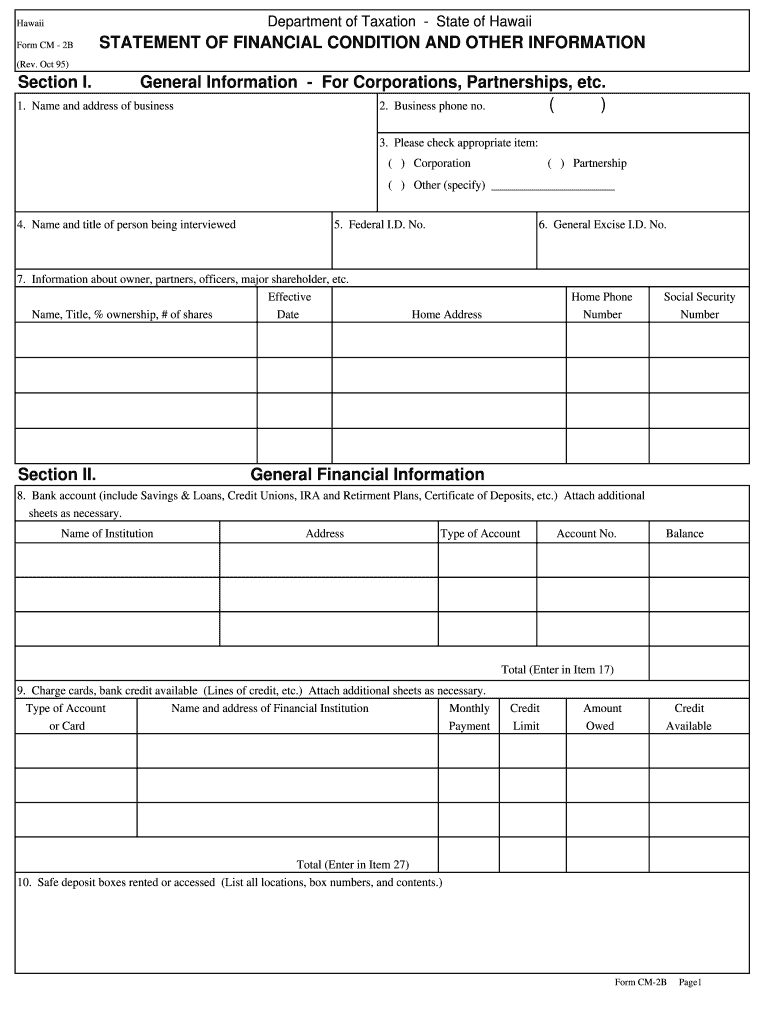
Hips, etc. Name and address of business 2. Business phone no. ( ) 3. Please check appropriate item: ( ) Corporation ( ) Partnership ( ) Other (specify) 4. Name and title of person being interviewed 5. Federal I.D. No. 7. Information about owner, partners, officers, major shareholder, etc. Effective Name, Title, % ownership, # of shares Date Section II. 6. General Excise I.D. No. Home Phone Number Home Address Social Security Number General Financial Information 8.
Loading

Open form follow the instructions

Easily sign the form with your finger

Send filled & signed form or save
How to fill out the HI DoT CM-2B online
The HI DoT CM-2B form is essential for reporting financial conditions for various business entities in Hawaii. This guide provides detailed instructions on how to accurately complete the form online, ensuring you provide all necessary information correctly.
Follow the steps to complete the HI DoT CM-2B online.
- Click 'Get Form' button to access the HI DoT CM-2B form and open it in your editor.
- In Section I, provide the general information for the business, including the name, address, business phone number, and check the appropriate type of entity such as corporation, partnership, or other. Fill in the name and title of the person being interviewed along with the federal I.D. number.
- Next, enter information about the owner, partners, officers, and major shareholders, including their names, titles, percentage of ownership, and the number of shares held along with the effective date.
- In Section II, fill in the General Excise I.D. number, home phone number, home address, and social security number of relevant individuals.
- Detail general financial information regarding bank accounts, including institution name, address, account type, number, and balance. You can attach additional sheets if necessary.
- Provide information about charge cards and bank credit available, listing the type of account, financial institution details, monthly payment, credit limit, amount owed, and available credit.
- List safe deposit boxes rented or accessed, including all locations, box numbers, and contents.
- Describe real and lease property ownership, life insurance details including the company name, policy number, address, type, face amount, and available loan value.
- Complete the securities section detailing ownership, type of securities, and their current value, attaching additional sheets as necessary.
- Provide additional information regarding the financial condition, including any court proceedings, bankruptcies, or asset transfers for less than full value.
- Declare accounts or notes receivable, indicating the name, address, amount due, due date, and current status.
- Proceed to fill out the asset and liability analysis, entering details for each asset type and associated liabilities, along with balances due and amounts of monthly payments.
- Complete the income and expense analysis by detailing income sources and expenses for the specified period, ensuring to include all relevant figures.
- Finally, review all entries for accuracy, then sign and date the form before submitting.
Begin your filing of the HI DoT CM-2B online today to ensure proper record-keeping.
Experience a faster way to fill out and sign forms on the web. Access the most extensive library of templates available.
Related content
2024. CM-2B, Statement of Financial Condition and Other Information – For ... 830...
We tabulate photometric and spectroscopic data for the all objects, and we present an...
Assurez-vous que la fiche reste fixée à l'adaptateur secteur. L'utilisation de la fiche...
Get answers to your most pressing questions about US Legal Forms API.
Where to mail Hawaii N-15?
For mailing your Hawaii N-15 form, refer to the mailing address indicated on the form instructions. Generally, returns that include a payment go to a designated tax payment address. If you're unsure, visiting the Hawaii Department of Taxation's website provides the most current information. Adhering to these details is crucial for compliance with HI DoT CM-2B.
Where do I mail my Hawaii state tax return to?
You need to mail your Hawaii state tax return to the address specified on the tax form. Typically, there are different addresses depending on whether you are including a payment with your return. Be sure to double-check the latest information on their official website to ensure proper delivery. This attention to detail is vital when dealing with HI DoT CM-2B.
How do I file an amended Hawaii tax return?
To file an amended Hawaii tax return, you will use Form N-101A. Ensure that you file within the designated time frame and include any necessary supporting documents to justify your amendments. It's essential to follow the specific guidelines related to HI DoT CM-2B to avoid any future compliance issues. Platforms like uslegalforms can guide you in this process.
What is the difference between G 45 and G 49 in Hawaii?
The G 45 is a transient accommodations tax return for hotels and rentals, while the G 49 is an annual summary of tax information for transient accommodation providers. If you're operating a business, understanding these two forms is crucial to remain compliant with Hawaii tax laws. Utilizing resources like uslegalforms can simplify navigating the complexities of HI DoT CM-2B requirements.
What address do I send my Hawaii state tax return?
You should send your Hawaii state tax return to the address provided on the form. If you are sending a payment with your return, the address will typically be different. Always check the latest instructions on the Hawaii Department of Taxation's website to ensure you're sending it to the correct address. This practice aligns with the HI DoT CM-2B protocols.
Do I have to mail my state tax return?
Yes, you generally need to mail your state tax return unless you choose to file electronically. Mailing your state tax return ensures that it is received by the Hawaii Department of Taxation. Filing by mail can also be beneficial if you prefer to keep a physical copy for your records, especially when adhering to HI DoT CM-2B guidelines.
How do I write a check to the Hawaii state tax collector?
To write a check to the Hawaii state tax collector, begin by ensuring that your check is made payable to the 'Hawaii State Tax Collector.' Include your name, address, and the tax identification number on the check. Don't forget to note the purpose of the payment, such as a specific tax type or tax year, in the memo section. This process relates to compliance with the HI DoT CM-2B requirements.
Who is exempt from Hawaii general excise tax?
Certain organizations and activities may be exempt from the Hawaii general excise tax. This includes non-profits and specific educational institutions. However, it’s important to check with the Hawaii Department of Taxation for current regulations related to the HI DoT CM-2B to ensure compliance.
How to cancel a Hawaii general excise tax license?
To cancel a Hawaii general excise tax license, you need to submit a request to the Hawaii Department of Taxation. You can do this online or via mail, but including all necessary details will speed up the process. If you require assistance sourcing the right forms, consider using uslegalforms, as they provide reliable templates for various tax needs, including those related to the HI DoT CM-2B.
Where can I pick up tax forms?
Tax forms can usually be found at state government offices, libraries, and online. Ensure you verify the availability of specific forms like the HI DoT CM-2B at these locations. You can also print forms directly from the Hawaii Department of Taxation website for added convenience.
Use professional pre-built templates to fill in and sign documents online faster. Get access to thousands of forms.
If you believe that this page should be taken down, please follow our DMCA take down process here.
This form is available in several versions. Select the version you need from the drop-down list below.