Loading

Open form follow the instructions

Easily sign the form with your finger

Send filled & signed form or save
How to fill out the HI DoT BB-1 online
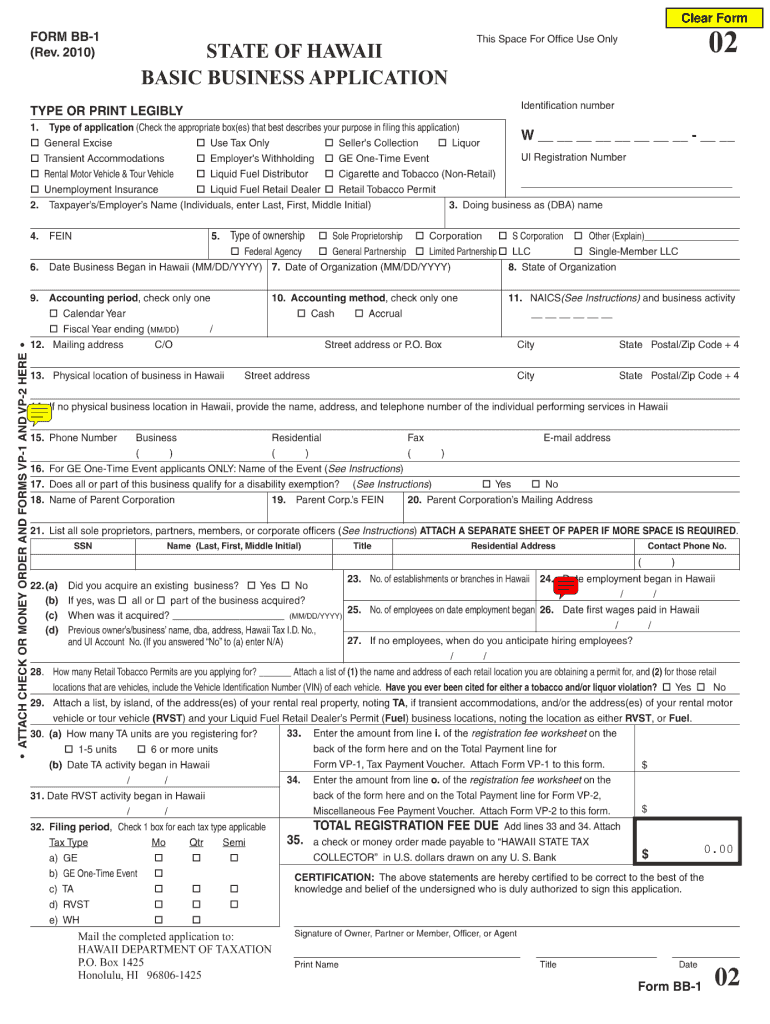
This guide provides a step-by-step approach to filling out the HI DoT BB-1 form, also known as the Basic Business Application. Designed for individuals and organizations looking to establish a business in Hawaii, this guide will help you navigate the online completion of the form with ease.
Follow the steps to successfully fill out the HI DoT BB-1 online.
- Click ‘Get Form’ button to obtain the form and open it in the online editor.
- Begin by selecting the type of application. Check all relevant boxes that describe your purpose in filing this application, such as General Excise/Use or others as applicable.
- Enter the taxpayer’s or employer’s name, ensuring you include the last name, first name, and middle initial.
- If applicable, provide the trade name or doing business as (DBA) name associated with your business.
- Input your Federal Employer Identification Number (FEIN) if you have one. If you are a sole proprietor without one, you may leave this blank.
- Choose the type of ownership by checking the appropriate box, such as Sole Proprietorship, Corporation, or others.
- Enter the date your business began in Hawaii and the date of organization.
- Select your accounting period and method by checking the respective boxes, deciding if you use a calendar year or a fiscal year.
- Provide your business's mailing address, including the street address, city, state, and postal/zip code.
- Indicate the physical location of your business in Hawaii and detail the address accurately.
- If your business services Hawaii without a physical location, include the name, address, and phone number of the person providing those services.
- Add your contact phone numbers, including business, residential, and fax, followed by your email address.
- Complete any additional sections relevant to your business, such as details for specific permits or exemptions.
- Certify the information by providing the required signature of the owner, partner, member, officer, or agent, and include the printed name, title, and date.
- Once you have filled all sections correctly, save your changes, and then proceed to download, print, or share your completed form.
Start your online application and complete the HI DoT BB-1 form today!
Experience a faster way to fill out and sign forms on the web. Access the most extensive library of templates available.
Related content
Jul 1, 2023 — Register for various tax licenses and permits with the Department of...
This program invites managers to unlock their full potential as leaders by targeting their...
Hi-Hat Open Crash Cymbal 1. Hand Clap Hi-Hat Closed. Hi-Hat P edal. Open Rim ... F# G# Bb...
Get answers to your most pressing questions about US Legal Forms API.
Can I pick up tax forms at my local IRS office?
No, local IRS offices do not provide Hawaii tax forms, as they focus primarily on federal tax forms. Instead, you should visit the Hawaii Department of Taxation or designated local offices for state-specific forms. For convenience, the HI DoT BB-1 platform directs you to the right resources for obtaining Hawaii tax forms efficiently.
Where can I get Hawaii tax forms?
You can get Hawaii tax forms online from the Hawaii Department of Taxation website or at local government offices. If you prefer a physical copy, many libraries and tax assistance centers also provide forms. Utilizing the HI DoT BB-1 platform can help streamline your search for tax forms you need.
How do I get a Hawaii general excise tax license?
To obtain a Hawaii general excise tax license, you need to complete an application and submit it to the Hawaii Department of Taxation. This process often includes providing necessary identification and business information. The HI DoT BB-1 resource can assist you in navigating this procedure, ensuring you have all the required documentation.
Do I need to file a Hawaii state tax return?
Yes, if you earn income in Hawaii, you will generally need to file a state tax return. This requirement applies regardless of whether you owe taxes or qualify for refunds. For further insights and guidance on filing requirements, you can consult the HI DoT BB-1 resource, which provides valuable information tailored to your tax situation.
Who is exempt from Hawaii general excise tax?
Certain categories of individuals and organizations may be exempt from Hawaii general excise tax, including non-profit organizations and specific government entities. However, eligibility for this exemption typically depends on meeting specific criteria set forth by the state. You can learn more about these exemptions by exploring the HI DoT BB-1 feature.
Where can I pick up tax forms?
In addition to the Hawaii Department of Taxation offices, you may also find tax forms at local government offices and some retail outlets. It's advisable to check their availability ahead of time to avoid unnecessary trips. Additionally, you can visit HI DoT BB-1 for a comprehensive list of locations offering tax forms in your area.
Where can I pick up tax forms in Hawaii?
You can pick up tax forms at various locations throughout Hawaii, including public libraries and the Hawaii Department of Taxation offices. These offices frequently update their supply of forms, so you can find what you need easily. Referencing HI DoT BB-1 can guide you to the nearest location where you can obtain the necessary tax forms.
How do I cancel my Hawaii general excise tax?
To cancel your Hawaii general excise tax, you must complete the necessary forms and submit them to the Hawaii Department of Taxation. It is important to ensure that you meet all cancellation requirements, as some conditions may apply. Browsing the HI DoT BB-1 resource can provide you with detailed instructions on this process and help simplify your cancellation.
Where to mail Hawaii get tax return?
To mail your Hawaii general excise tax return, you will need to send it to the address specified by the Hawaii Department of Taxation on their official website. Always double-check the address according to the type of return you are submitting, as there may be different mailing addresses based on your situation. Ensuring timely submission is key to avoiding any penalties. For any document preparation needs, consider using the US Legal Forms platform for guidance.
What is MLS form BB-1?
The MLS form BB-1 refers to the same General Excise Tax License application discussed previously but may include specific designations for certain licenses or permits related to multi-line systems. This form is essential for those involved in businesses that require additional licensing beyond the basic GE tax license. It's crucial to check the specific requirements that apply to your industry. If you need assistance with the BB-1 process, US Legal Forms can be a valuable resource.
Use professional pre-built templates to fill in and sign documents online faster. Get access to thousands of forms.
If you believe that this page should be taken down, please follow our DMCA take down process here.
This form is available in several versions. Select the version you need from the drop-down list below.