Loading
Form preview
  • US Legal Forms
  • Form Library
  • Tax Forms
  • Hawaii Tax Forms
  • Hi Dot Bb-1 2014

Get Hi Dot Bb-1 2014

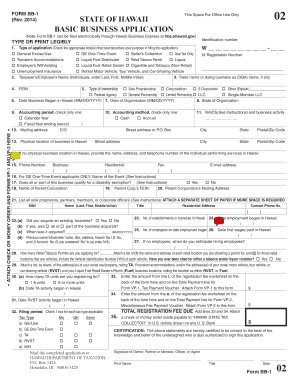
E-Time Event Seller s Collection Use Tax Only UI Registration Number Transient Accommodations Liquid Fuel Distributor Retail Tobacco Permit Liquor Employer s Withholding Liquid Fuel Retail Dealer Cigarette and Tobacco (Non-Retail) Unemployment Insurance Rental Motor Vehicle, Tour Vehicle, and Car-Sharing Vehicle 2. Taxpayer s/Employer s Name (Individuals, enter Last, First, Middle Initial) 3. Trade.

How it works

  1. Open form

    Open form follow the instructions

  2. Easily sign form

    Easily sign the form with your finger

  3. Share form

    Send filled & signed form or save

How to fill out the HI DoT BB-1 online

The HI DoT BB-1 form is essential for individuals and businesses looking to register for various state tax and employer licenses in Hawaii. This guide provides step-by-step instructions to help you complete the form accurately and efficiently.

Follow the steps to accurately complete the HI DoT BB-1 form online.

  1. Click 'Get Form' button to obtain the form and open it in the editor.
  2. Indicate your type of application by checking the appropriate box(es) that reflect your purpose in filing the application. Options include General Excise/Use, GE One-Time Event, and more.
  3. Enter your taxpayer’s or employer’s name in the designated space, including last name, first name, and middle initial if applicable.
  4. If you have a trade name or doing business as (DBA) name, enter it in the corresponding field.
  5. Provide your Federal Employer Identification Number (FEIN) in the appropriate field.
  6. Select your type of ownership by checking the option that best describes your business structure. Options include Sole Proprietorship, Corporation, Limited Liability Company (LLC), and more.
  7. Fill in the date your business began in Hawaii and the date of organization, both in MM/DD/YYYY format.
  8. Provide your accounting period and method by checking one box for each; options include Calendar Year or Fiscal Year for the accounting period, and Cash or Accrual for the method.
  9. Input your mailing address and physical location of your business in Hawaii in the provided fields.
  10. For specific applications, complete additional fields as prompted, such as rental motor vehicle details, number of tobacco permits, and more.
  11. Once all fields are filled, review your information for accuracy, then save changes, download, print, or share the form as needed.

Take the next step and complete your HI DoT BB-1 form online today!

Get form

Experience a faster way to fill out and sign forms on the web. Access the most extensive library of templates available.

Related content

Form BB-1, Rev. 9/2023, State of Hawaii Basic...
Jul 1, 2023 — Register for various tax licenses and permits with the Department of...
Learn more
High Impact Leadership | IE Business School
This program invites managers to unlock their full potential as leaders by targeting their...
Learn more
PSR-S550 Manual do Proprietário
Hi-Hat Open Crash Cymbal 1. Hand Clap Hi-Hat Closed. Hi-Hat P edal. Open Rim ... F# G# Bb...
Learn more

Related links form

CA JV-440 2011 CA JV-441 2011 CA JV-442 2018 CA JV-443 2018

Questions & Answers

Get answers to your most pressing questions about US Legal Forms API.

Contact support

Yes, filing both G45 and G49 forms is often necessary. The G45 is for periodic returns, while the G49 is an annual reconciliation. If you have a business that collects general excise taxes, understanding these forms is crucial. By using resources like uslegalforms, you can simplify your filing process in compliance with HI DoT BB-1.

To cancel your GE tax license in Hawaii, you should submit a written request to the Department of Taxation. Provide your GE tax identification number and state the reason for your cancellation. It's advisable to ensure no pending tax obligations exist before cancellation. You can manage this process easily with guidance from uslegalforms, ensuring you adhere to the requirements of HI DoT BB-1.

You can cancel your Hawaii general excise tax by informing the Department of Taxation in writing. Include your tax identification number and a brief explanation of why you are canceling. This can typically be done through email or by mailing a letter to the local taxation office. Once processed, you will receive confirmation of the cancellation associated with the HI DoT BB-1.

To obtain a Hawaii general excise tax license, you need to complete the application available on the State of Hawaii's Department of Taxation website. You may submit the application online or in person at your local taxation office. Be sure to include any required information regarding your business activities. Once your application is processed, you will receive your license, allowing you to legally conduct business in Hawaii under the guidelines of HI DoT BB-1.

If you are engaging in business activities that generate revenue in Hawaii, you typically need a general excise tax (GE) license. Obtaining this license is crucial to operating legally in the state. You can start the process easily through the BB-1 form, which is designed to guide you through the necessary steps to secure your GE license.

To obtain a copy of your general excise tax license in Hawaii, you can visit the Department of Taxation's website or contact them directly. They can provide you with the necessary steps to request a duplicate. It's helpful to have your information ready, ensuring you complete the process aligned with the HI DoT BB-1 protocol.

You can mail your Hawaii general excise tax return to the Department of Taxation at the specified address on the form. Ensuring that you send it to the correct location helps expedite processing and reduces delays. If you are using the HI DoT BB-1 for related inquiries, make sure to check for any updates or changes on where to send the documents.

The BB-1 form in Hawaii is an essential document related to the state's general excise tax. This form is primarily used by businesses to register for a general excise tax license. Completing the BB-1 form correctly is vital for ensuring compliance with state tax laws, and helps you navigate the process efficiently.

Certain vehicles may be exempt from excise tax in Hawaii, particularly those used for specific purposes such as qualified non-profit organizations. Additionally, vehicles owned by government entities often fall under this exemption. If you have a vehicle in mind, check the Hawaii Department of Taxation website for specific qualifications under the HI DoT BB-1 guidelines.

MLS form BB 1 refers to a specific form used in Hawaii tax submissions. This form relates to certain tax and compliance regulations, which may influence your overall filing. If you encounter HI DoT BB-1 in relation to MLS form BB 1, it indicates a streamlined process for managing your tax obligations. For detailed instructions, consider consulting the HI DoT resources or your tax advisor.

Get This Form Now!

Use professional pre-built templates to fill in and sign documents online faster. Get access to thousands of forms.
If you believe that this page should be taken down, please follow our DMCA take down processhere.
Get HI DoT BB-1
  • Adoption
  • Bankruptcy
  • Contractors
  • Divorce
  • Home Sales
  • Employment
  • Identity Theft
  • Incorporation
  • Landlord Tenant
  • Living Trust
  • Name Change
  • Personal Planning
  • Small Business
  • Wills & Estates
  • Packages A-Z
  • Affidavits
  • Bankruptcy
  • Bill of Sale
  • Corporate - LLC
  • Divorce
  • Employment
  • Identity Theft
  • Internet Technology
  • Landlord Tenant
  • Living Wills
  • Name Change
  • Power of Attorney
  • Real Estate
  • Small Estates
  • Wills
  • All Forms
  • Forms A-Z
  • Form Library
  • Legal Hub
  • About Us
  • Help Portal
  • Legal Resources
  • Blog
  • Affiliates
  • Contact Us
  • Delete My Account
  • Site Map
  • Industries
  • Forms in Spanish
  • Localized Forms
  • State-specific Forms
  • Forms Kit
  • Real Estate Handbook
  • All Guides
  • Notarize
  • Incorporation services
  • For Consumers
  • For Small Business
  • For Attorneys
  • USLegal
  • FormsPass
  • pdfFiller
  • signNow
  • altaFlow
  • DocHub
  • Instapage
Form Packages
  • Adoption
  • Bankruptcy
  • Contractors
  • Divorce
  • Home Sales
  • Employment
  • Identity Theft
  • Incorporation
  • Landlord Tenant
  • Living Trust
  • Name Change
  • Personal Planning
  • Small Business
  • Wills & Estates
  • Packages A-Z
Form Categories
  • Affidavits
  • Bankruptcy
  • Bill of Sale
  • Corporate - LLC
  • Divorce
  • Employment
  • Identity Theft
  • Internet Technology
  • Landlord Tenant
  • Living Wills
  • Name Change
  • Power of Attorney
  • Real Estate
  • Small Estates
  • Wills
  • All Forms
  • Forms A-Z
  • Form Library
Customer Service
  • Legal Hub
  • About Us
  • Help Portal
  • Legal Resources
  • Blog
  • Affiliates
  • Contact Us
  • Delete My Account
  • Site Map
  • Industries
  • Forms in Spanish
  • Localized Forms
  • State-specific Forms
  • Forms Kit
Legal Guides
  • Real Estate Handbook
  • All Guides
Prepared for you
  • Notarize
  • Incorporation services
Our Customers
  • For Consumers
  • For Small Business
  • For Attorneys
Our Sites
  • USLegal
  • FormsPass
  • pdfFiller
  • signNow
  • altaFlow
  • DocHub
  • Instapage
Social Media
Call us now toll free:
+1 833 426 79 33
As seen in:
© Copyright 1999-2026 airSlate Legal Forms, Inc. 17 Station Street, Suite 303, Brookline, MA 02445
  • Your Privacy Choices
  • Terms of Service
  • Privacy Notice
  • Content Takedown Policy
  • Bug Bounty Program
HI DoT BB-1
This form is available in several versions.
Select the version you need from the drop-down list below.
2022 HI DoT BB-1
Select form
  • 2022 HI DoT BB-1
  • 2021 HI DoT BB-1
  • 2019 HI DoT BB-1
  • 2018 HI DoT BB-1
  • 2017 HI DoT BB-1
  • 2015 HI DoT BB-1
  • 2014 HI DoT BB-1
  • 2013 HI DoT BB-1
  • 2010 HI DoT BB-1
  • 2001 HI DoT BB-1
Select form