Loading
Get Hi Dot Bb-1 2017
How it works
-

Open form follow the instructions
-

Easily sign the form with your finger
-

Send filled & signed form or save
How to fill out the HI DoT BB-1 online
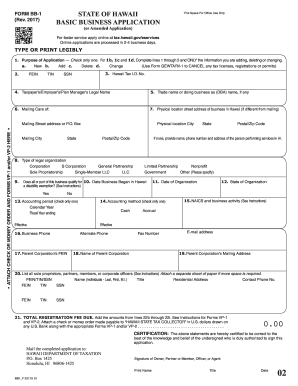
Filling out the HI DoT BB-1 form is an essential step for registering a business in Hawaii. This guide provides a comprehensive overview, ensuring that users understand each section and complete the form correctly and efficiently.
Follow the steps to complete the HI DoT BB-1 form online.
- Press the ‘Get Form’ button to acquire the form and open it in the editor.
- Begin filling out Section 1 by indicating the purpose of your application by selecting one option: New, Add, Delete, or Change. Ensure to complete lines 1 through 5 if you select Add, Delete, or Change.
- In Section 2, provide your Federal Employer Identification Number (FEIN), Tax Identification Number (TIN), or Social Security Number (SSN), depending on your business type. All businesses, except sole proprietorships without employees, must have a FEIN.
- For upcoming applications, leave Section 3 blank, but if you are making changes, enter your Hawaii Tax Identification Number.
- Complete Section 4 by entering your legal business name as it appears on your tax return.
- In Section 5, input your trade name or doing business as (DBA) name, if applicable.
- Fill in Section 6 with your mailing address, making sure it’s clear and legible.
- Enter your physical business location in Section 7 if it differs from your mailing address.
- Select your type of legal organization in Section 8 by checking the appropriate box.
- Complete Section 9 to specify if any part of your business qualifies for a disability exemption and provide supporting documentation if necessary.
- Input the date your business began in Hawaii in Section 10.
- In Section 11, provide the date of organization of your business, followed by the state of organization in Section 12.
- Select the accounting period in Section 13, choosing either Calendar Year or Fiscal Year.
- Indicate your accounting method in Section 14 by selecting either Cash or Accrual.
- In Section 15, list your NAICS code and primary business activity.
- Fill out Section 16 with your business phone number.
- If applicable, include your parent corporation’s FEIN and name in Sections 17 and 18.
- Provide your parent corporation’s mailing address in Section 19.
- In Section 20, list all sole proprietors, partners, or corporate officers. Attach an additional sheet if more space is needed.
- Calculate the total registration fee in Section 21 and include your payment accordingly.
- Complete the certification area, ensuring that the application is signed and dated by an authorized representative.
- Finally, save the changes you made, and choose to download, print, or share the completed form as needed.
Start filling out your HI DoT BB-1 form online today to ensure your business is properly registered in Hawaii.
Get form
Experience a faster way to fill out and sign forms on the web. Access the most extensive library of templates available.
Related links form
Yes, some areas in Hawaii do have an effective tax rate of 4.712%, which includes the state general excise tax and county surcharges. This rate varies by location, so it’s essential to check your specific county’s tax regulations. Staying informed about these rates and their implications for your HI DoT BB-1 will assist in managing your finances effectively.
Get This Form Now!
Use professional pre-built templates to fill in and sign documents online faster. Get access to thousands of forms.