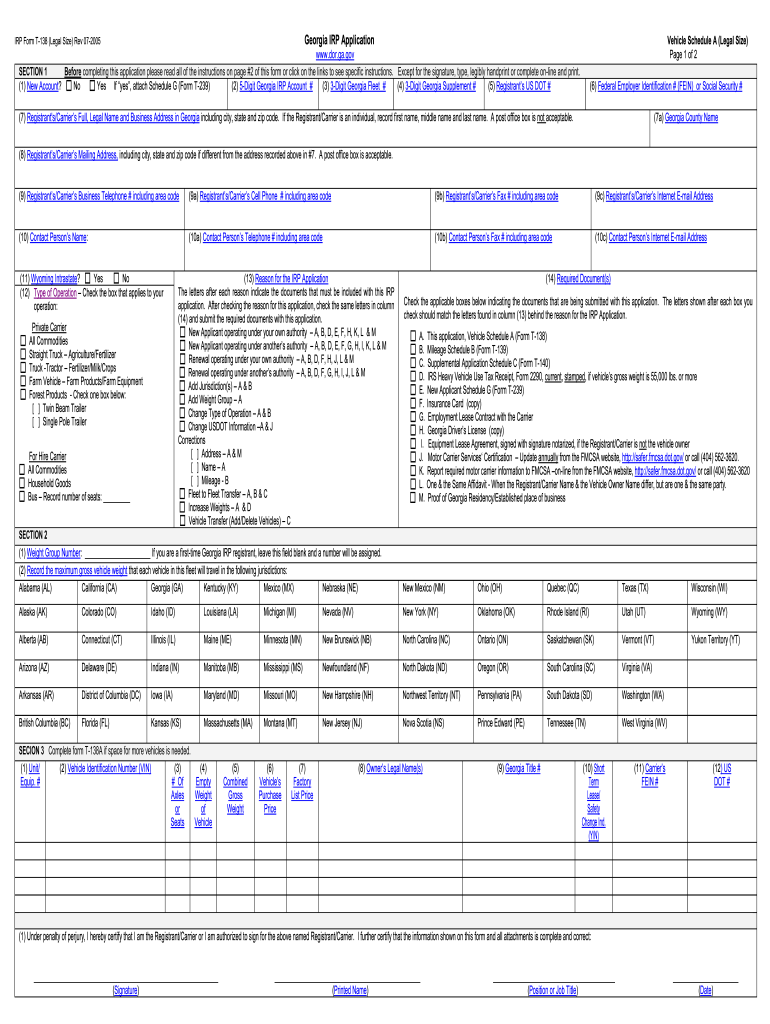
Nalty of perjury, I hereby certify that I am the Registrant/Carrier or I am authorized to sign for the above named Registrant/Carrier. I further certify that the information shown on this form and all attachments is complete and correct: (Signature) (Printed Name) (Position or Job Title) (Date) IRP Form T-138 Instru.
Loading

Open form follow the instructions

Easily sign the form with your finger

Send filled & signed form or save
How to fill out the GA DoR T-138 online
The GA DoR T-138 is an important document for individuals and organizations seeking to register their vehicles in Georgia. This guide provides clear, step-by-step instructions on how to complete the form online, ensuring you provide all necessary information accurately and efficiently.
Follow the steps to successfully complete the GA DoR T-138 online
- Click the ‘Get Form’ button to access the GA DoR T-138 online and open it in your preferred editor.
- Begin by indicating if this is a new account by selecting 'Yes' or 'No'. If selecting 'Yes', be sure to attach Schedule G (Form T-239).
- Enter your 5-digit Georgia IRP Account number. If you are a new registrant, leave this field blank.
- Fill in the 3-Digit Georgia Fleet number, assigning a unique number for your fleet of vehicles.
- Leave the 3-Digit Georgia Supplement number blank, as it will be assigned.
- Provide the Registrant’s US DOT number.
- Record either the Federal Employer Identification Number (FEIN) or the Social Security number.
- Enter the full legal name and business address of the Registrant/Carrier in Georgia, including city, state, and zip code. Do not use a post office box.
- List the Georgia County name where the business address is located.
- If different from the business address, provide the mailing address of the Registrant/Carrier.
- Include a business telephone number for the Registrant/Carrier, and, optionally, their cell phone, fax number, and internet email address.
- Name a contact person for the application and record their contact details.
- Indicate if vehicles in this fleet will operate intrastate in Wyoming.
- Check the box that corresponds to the type of operation applicable to your business.
- Select the reason for submitting the IRP application and ensure you check the necessary documents that correspond with your reason.
- In Section 2, note the weight group number and maximum gross vehicle weights in the applicable jurisdiction boxes.
- In Section 3, provide details for each vehicle in the fleet, including VIN, owner details, and weight information.
- Finally, complete Section 4 by signing the form, printing your name, stating your position or job title, and dating the application.
- Once done, save your changes, and if needed, download, print, or share the completed form as required.
Complete the GA DoR T-138 online today for a seamless registration experience.
Experience a faster way to fill out and sign forms on the web. Access the most extensive library of templates available.
Related content
T-138 IRP Vehicle Schedule A Form T-138 IRP Vehicle Schedule A (PDF, 377.81 KB) Department...
Dec 31, 2021 — Georgia DOR was calendar year (CY) 2019. Therefore, even in cases in...
A TRANE oferece a linha de climatiza- dores. WAVE Doble desenvolvidos para atender...
Get answers to your most pressing questions about US Legal Forms API.
What does 3 allowances mean?
Claiming 3 allowances on the GA DoR T-138 indicates that you have several deductions or dependents you can account for. Each allowance reduces the amount of tax withheld from your paycheck, potentially increasing your take-home income. However, accurately determining your allowances is crucial to avoid owing taxes at year's end. For clarity and support, uslegalforms provides helpful resources to navigate these forms effectively.
Where to put 0 or 1 on W4?
On the W-4 form, you specify 0 or 1 in the section for withholding allowances. Claiming 0 means more tax is withheld, which may result in a refund. Alternatively, claiming 1 allows for less withholding, reflecting your preference for smaller tax deductions throughout the year. For accurate guidance on completing the GA DoR T-138, consider exploring resources from uslegalforms.
How to fill out a withholding allowance form?
To complete the GA DoR T-138, start by entering your personal information, such as your name and Social Security number. Next, follow the instructions to calculate your withholding allowances based on your financial circumstances, exemptions, and dependents. If you need additional help, uslegalforms offers comprehensive templates and guides to assist you.
What should I put for withholding allowance?
When filling out the GA DoR T-138, determining your withholding allowance depends on your financial situation. Generally, consider your expected income, deductions, and tax credits. If you're unsure, it's wise to consult the guidelines provided by the Georgia Department of Revenue or consider using resources like uslegalforms to simplify the process.
Do you have to file a Georgia extension?
Yes, if you cannot meet the tax filing deadline in Georgia, you may need to file for an extension. This extension allows you additional time to gather necessary documents without incurring penalties. The GA DoR T-138 can provide guidance on filing procedures and prolonging your deadline effectively. It’s central to staying compliant with state regulations.
What is the T 8 form Georgia?
The T 8 form in Georgia is a title application form that is essential for registering or transferring vehicle ownership. It provides the necessary details to the Georgia Department of Revenue. Utilizing the GA DoR T-138 can further simplify your process in conjunction with the T 8 form for efficient handling of your title transaction. Don't overlook these important forms during your transfer.
What is required for power of attorney in Georgia?
In Georgia, a valid power of attorney document must include the principal's signature, the agent's information, and specific powers being granted. It’s also advisable to have the document notarized for added security. Using the GA DoR T-138 can help streamline the process of creating a power of attorney tailored for vehicle title transfers. This clarity can prevent future disputes.
Do you need a power of attorney to transfer a car title?
Yes, you may need a power of attorney to transfer a car title if the owner cannot be present during the transfer process. This document allows someone else to act on behalf of the owner. Without it, the title transfer may face complications. Ensure that you have the necessary GA DoR T-138 form completed for a smooth transaction.
Who needs IRP?
Who is required to have IRP and IFTA? An IRP and IFTA account is required for companies that have vehicles crossing state lines that are over 26,000 pounds gross vehicle weight or have 3 or more axles on the power unit.
How do I pay IFTA?
Locate your state's website. If you want to pay your IFTA taxes online, you typically must open an account with the taxation or revenue agency in the state where your business is based. ... Set up a user account. ... Complete your return. ... Enter payment information. ... Print your confirmation.
Use professional pre-built templates to fill in and sign documents online faster. Get access to thousands of forms.
If you believe that this page should be taken down, please follow our DMCA take down process here.
This form is available in several versions. Select the version you need from the drop-down list below.