Loading
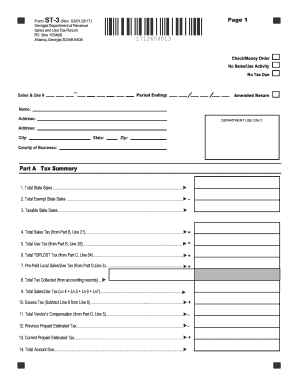
Get Ga Dor St-3 2017
How it works
-

Open form follow the instructions
-

Easily sign the form with your finger
-

Send filled & signed form or save
How to fill out the GA DoR ST-3 online
Filling out the GA DoR ST-3 online can be a straightforward process when you follow the appropriate steps. This guide provides detailed instructions for each section of the form, making it easier for users with various levels of experience.
Follow the steps to effectively complete the GA DoR ST-3 online.
- Click ‘Get Form’ button to obtain the ST-3 form and access it for completion.
- Begin by entering your Sales and Use Tax Number (STN), along with your name and registered address in the designated fields.
- Fill in the 'Period Ending' field with the appropriate date (mm/dd/yy) indicating the end of your reporting period.
- Check the 'Amended Return' box if you are making adjustments to a previously filed return for the same period.
- If there were no taxable sales during the reporting period, check the 'No Tax Due' box. If there was no sales/use tax activity at all, complete and submit the payment voucher only.
- Proceed to Part A - Tax Summary. Record your Total State Sales on Line 1 including all applicable leases and rentals.
- On Line 2, enter the Total Exempt State Sales, including any leases and rentals that are exempt from state sales tax.
- Calculate Taxable State Sales by subtracting the exempt sales (Line 2) from the total sales (Line 1) and record this in Line 3.
- Complete the relevant sections in Part B regarding sales tax collection and subsequent calculations as instructed.
- Follow through Part C concerning TSPLOST sales and use tax if applicable, recording the necessary data in the respective fields.
- Lastly, complete Part D for Vendor’s Compensation and Part E for any bad debt reporting, recording the details as needed.
- Review all entries for accuracy, and upon completion, save your changes. You may then download, print, or share the completed form as required.
Take the next step in filing your documents online to ensure timely compliance!
Get form
Experience a faster way to fill out and sign forms on the web. Access the most extensive library of templates available.
Related links form
The reason code for use tax in Georgia typically relates to items purchased without sales tax that are used within the state. When completing tax forms such as the GA DoR ST-3, individuals should specify the reason for the exemption to ensure compliance. Understanding these codes can help you accurately report your tax obligations and avoid penalties.
Get This Form Now!
Use professional pre-built templates to fill in and sign documents online faster. Get access to thousands of forms.