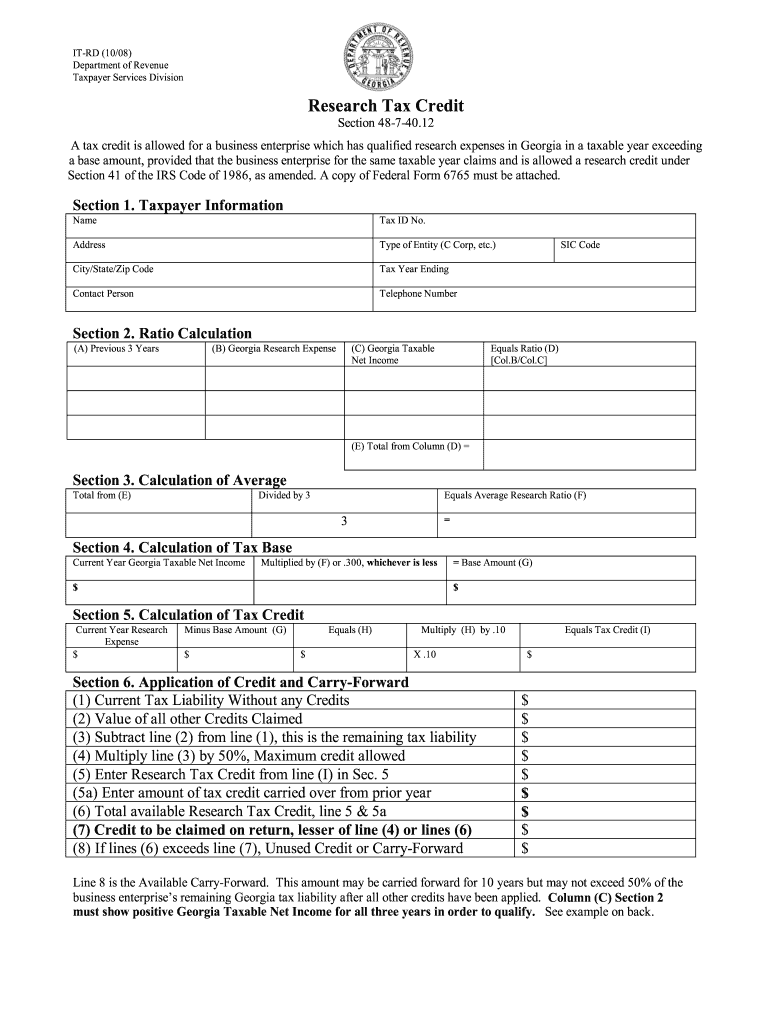
A in a taxable year exceeding a base amount, provided that the business enterprise for the same taxable year claims and is allowed a research credit under Section 41 of the IRS Code of 1986, as amended. A copy of Federal Form 6765 must be attached. Section 1. Taxpayer Information Name Tax ID No. Address Type of Entity (C Corp, etc.) City/State/Zip Code Tax Year Ending Contact Person Telephone Number SIC Code Section 2. Ratio Calculation (A) Previous 3 Years (B) Georgia Research Expens.
Loading

Open form follow the instructions

Easily sign the form with your finger

Send filled & signed form or save
How to fill out the GA DoR IT-RD online
Filling out the GA DoR IT-RD form online is a straightforward process designed to help businesses claim the research tax credit for qualified expenses. This guide provides step-by-step instructions to ensure you accurately complete the form and make the most of the available tax benefits.
Follow the steps to complete the GA DoR IT-RD form online.
- Press the ‘Get Form’ button to access the GA DoR IT-RD form and open it in your preferred editor.
- In Section 1, fill in the taxpayer information. This includes your name, tax identification number, address, type of entity, city, state, zip code, tax year ending, contact person, telephone number, and Standard Industrial Classification (SIC) code.
- Move to Section 2 to perform the ratio calculation. You will need to enter the previous three years of data: Georgia research expenses and Georgia taxable net income for each year. Calculate the ratio by dividing the Georgia research expenses by the Georgia taxable net income for each respective year.
- In Section 3, calculate the average research ratio by totaling the results from Section 2 and dividing by three. This will give you the average research ratio.
- Proceed to Section 4 to calculate the tax base. Multiply the current year's Georgia taxable net income by the average research ratio you computed or by 0.300, whichever amount is lower to establish the base amount.
- In Section 5, calculate the tax credit. Subtract the base amount from the current year's research expense to find the result. Then, multiply that result by 0.10 to determine the tax credit.
- Section 6 involves the application of your credit and the carry-forward calculation. Enter the current tax liability without any credits, the value of all other credits, and then compute the remaining tax liability. Calculate the maximum credit allowed, and combine it with any prior year credit carry-over.
- Finally, review all sections to confirm accuracy. Once you have filled out the form completely, save your changes, download the document, or print it for your records.
Complete your GA DoR IT-RD form online today to take advantage of potential tax credits for your business.
Experience a faster way to fill out and sign forms on the web. Access the most extensive library of templates available.
Related content
Research Tax Credit Form IT-RD 2009.pdf (PDF, 195.2 KB) Department of Revenue How can we...
Sep 22, 2015 — Form: IT-RD. Cost of Utilizing Credit over 2009-2013*: $50,598,766...
Para evitar risco de incêndio ou choque elétrico, não exponha o aparelho à chuva ou à...
Get answers to your most pressing questions about US Legal Forms API.
What is the R&D tax credit in Georgia?
The R&D tax credit in Georgia encourages companies to invest in research and development activities. This credit allows businesses to reduce their state tax liability based on qualified research expenses. Utilizing the GA DoR IT-RD can be beneficial for understanding how to apply for and maximize this credit.
Why did I get a $250 check from the Georgia Department of Revenue?
The $250 check you received from the Georgia Department of Revenue may be part of a tax refund or relief program designed to help residents financially. This could be related to recent legislation aimed at providing financial assistance. For details on the specifics, check the GA DoR IT-RD documentation for clarity on your eligibility.
At what age are you exempt from Georgia state taxes?
While there is no absolute age at which all state tax obligations end in Georgia, individuals 62 and older may qualify for certain tax relief programs. The GA DoR IT-RD can provide insights into exemptions for specific incomes that might apply as you age. This information can help you plan your finances more effectively.
What is GA DoR?
The Georgia Department of Revenue (GA DoR) is the state agency responsible for overseeing tax collection and enforcement. It administers various tax programs, including income, sales, and property taxes. Understanding its resources, like the GA DoR IT-RD, can help you navigate your tax obligations effectively.
Do my property taxes go down when I turn 65 in Georgia?
Property taxes in Georgia may decrease for homeowners aged 65 and older due to various exemptions. The school tax exemption is particularly notable, which provides relief based on age. For comprehensive information regarding these exemptions, check the GA DoR IT-RD guidelines to see how you can benefit.
What is the tax break for seniors in Georgia?
Seniors in Georgia, typically those 65 or older, can enjoy a state income tax exemption on a portion of their income. The GA DoR IT-RD outlines this tax break, allowing seniors to exempt up to $65,000 of their retirement income from state tax. This exemption is designed to provide financial relief for senior citizens.
At what age do you stop paying state taxes in Georgia?
In Georgia, residents do not entirely stop paying state taxes at a certain age. However, individuals aged 65 and older can benefit from tax breaks and exemptions that can significantly reduce their taxable income. It's essential to consult the GA DoR IT-RD resources for specific guidelines on tax liabilities based on age.
Do I claim 0 or 1 on my G4?
When deciding to claim 0 or 1 on your G4 form, consider your overall tax situation. Claiming 0 withholds more tax, while claiming 1 allows for less withholding. Consult the GA DoR IT-RD guidelines to understand the implications of each option, ensuring you make an informed choice based on your financial circumstances.
What do I attach to my Georgia tax return?
When submitting your Georgia tax return, attach relevant documentation such as W-2 forms, 1099 forms, and any additional schedules required by the GA DoR IT-RD. It is essential to ensure that all necessary documents are included to avoid delays in processing. A reliable resource like uslegalforms can help you identify which documents to include.
How to get a GA withholding ID number?
Obtaining a GA withholding ID number involves applying directly through the Georgia Department of Revenue. You can complete this process online via their platform or submit a paper application. By following the guidelines from the GA DoR IT-RD, you can ensure all required information is provided for a smooth application.
Use professional pre-built templates to fill in and sign documents online faster. Get access to thousands of forms.
If you believe that this page should be taken down, please follow our DMCA take down process here.
This form is available in several versions. Select the version you need from the drop-down list below.