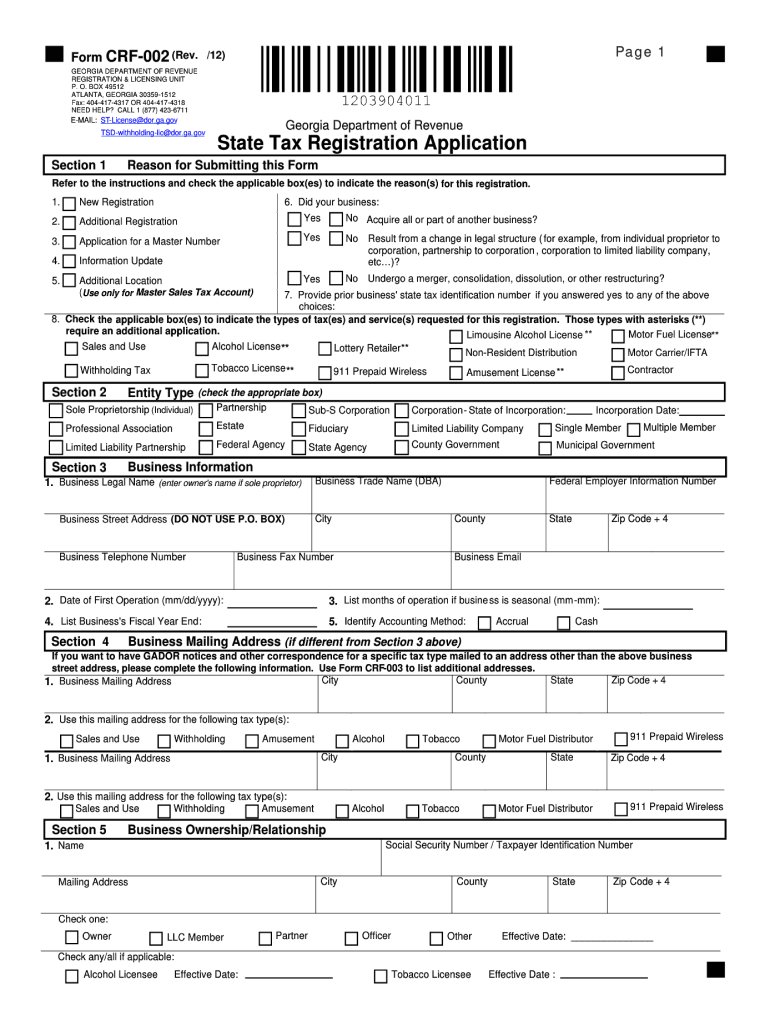
INSTRUCTIONS FOR COMPLETION OF THE STATE TAX REGISTRATION APPLICATION (PLEASE TYPE OR PRINT IN INK) SECTION 1: REASON FOR THE REGISTRATION Check all applicable boxes to indicate the reason(s) for this registration 1. Starting a New Business If you are starting a new business or you have purchased an existing business, check here. 2. Adding an Additional Tax Registration If you are currently registered and have a tax ID number and you are applying for an additional tax registration nu.
Loading

Open form follow the instructions

Easily sign the form with your finger

Send filled & signed form or save
How to fill out the GA DoR CRF-002 online
Filling out the GA DoR CRF-002 is an important step for individuals and businesses registering for state taxes in Georgia. This guide is designed to assist users in navigating each section of the form with clarity and precision for a successful submission.
Follow the steps to complete the GA DoR CRF-002 online.
- Press the ‘Get Form’ button to access the GA DoR CRF-002 and open it for completion.
- In Section 1, indicate your reason for registration by checking the applicable boxes. This could include starting a new business, adding an additional tax registration, or updating information.
- Proceed to Section 2 to select your business' ownership structure. If your business is a corporation, be sure to include the state and date of incorporation.
- In Section 3, fill in your business information, including the legal business name, trade name, Federal Employer Identification number, business address, phone number, fax number, and email address. Also, provide the date of first operation and any seasonal operation months.
- For Section 4, complete the business mailing address if different from the business street address, ensuring all correspondence is directed appropriately.
- In Section 5, provide the necessary information regarding all individuals involved in the business to establish the ownership relationship.
- Section 6 asks for details about your business activities. Indicate your business type, answer questions regarding motor fuel sales, and provide a description of products or services offered along with the NAICS code.
- Complete Section 7 by indicating whether you will have employees and identifying the party responsible for payroll taxes, including the date of your first payroll.
- Finally, sign in Section 8 as an authorized person—this can be an owner, partner, or corporate officer. Ensure your application is complete and accurate before saving changes, downloading, or printing the form.
Begin the online filing process today and ensure your compliance with Georgia state tax regulations.
Experience a faster way to fill out and sign forms on the web. Access the most extensive library of templates available.
Related content
CRF-002. Register Your Business Account with the Department of Revenue Online Through...
Certificado de Regularidade do FGTS - CRF. Início. Mensal (4). Lei nº 8.036, art. 27...
Thank you for buying The Parameter Guide. If you have any questions wi th this manual...
Get answers to your most pressing questions about US Legal Forms API.
How do you qualify for tax exemption?
To qualify for tax exemption in Georgia, you must complete the required application forms and meet the criteria set by the GA DoR. Generally, being a non-profit or making qualifying purchases will help in obtaining exemption. Always keep updated with the latest requirements to ensure compliance.
How is prepayment of sales tax calculated in Georgia?
In Georgia, prepayment of sales tax is calculated based on the expected sales tax liability for upcoming sales periods. Businesses must estimate their sales and apply the corresponding tax rate. For accurate calculations, reference the GA DoR CRF-002 guidelines.
Who is exempt from Georgia sales tax?
Exemptions from Georgia sales tax generally include non-profits, government agencies, and certain types of sales or services. Specific items like food for home consumption and prescription drugs also qualify. Reviewing the GA DoR CRF-002 will provide clarity on your exemption status.
Who qualifies for sales tax exemption in Georgia?
In Georgia, organizations such as non-profits, government entities, and certain educational institutions qualify for sales tax exemption. Additionally, specific purchases for resale may also qualify. It's essential to verify your qualification status through the GA DoR CRF-002 guidelines.
Does a single member LLC need to file a tax return in Georgia?
Yes, a single member LLC in Georgia must file a tax return. However, income generated by the LLC is typically reported on the owner's personal tax return. Ensure you understand the implications of the GA DoR regulations on your filings to avoid penalties.
How to get a sales tax exemption?
To obtain a sales tax exemption in Georgia, you must complete the appropriate form from the GA DoR website and submit it. The form will detail your reasons for the exemption, such as non-profit status or specific purchases. After approval, keep a copy of the authorization for your records.
How do I find my Georgia withholding ID number?
To find your Georgia withholding ID number, visit the GA DoR website and log into your account. If you do not have an account, you can create one easily. Alternatively, you may contact the Georgia Department of Revenue directly for assistance.
How to fill out Georgia G4 form?
To fill out the Georgia G4 form, begin by entering your personal details and filing status. Next, follow the clear steps provided in the GA DoR CRF-002 documentation to accurately represent your allowances and exemptions. Completing the form accurately ensures that your employer can withhold the correct amount of taxes from your paycheck.
How to apply for GA withholding number?
Applying for a Georgia withholding number is a straightforward process. You can either complete the application online or download the necessary forms from the GA DoR website. Be sure to follow the instructions related to the GA DoR CRF-002, as these contain critical information on what you need to include for a successful application.
How to fill out a withholding allowance form?
To fill out a withholding allowance form, gather your financial information, income levels, and deductions. Then, carefully follow the steps outlined in the GA DoR CRF-002, indicating the appropriate number of allowances you are eligible for. This process clarifies your tax responsibilities and helps you manage your earnings effectively.
Use professional pre-built templates to fill in and sign documents online faster. Get access to thousands of forms.
If you believe that this page should be taken down, please follow our DMCA take down process here.