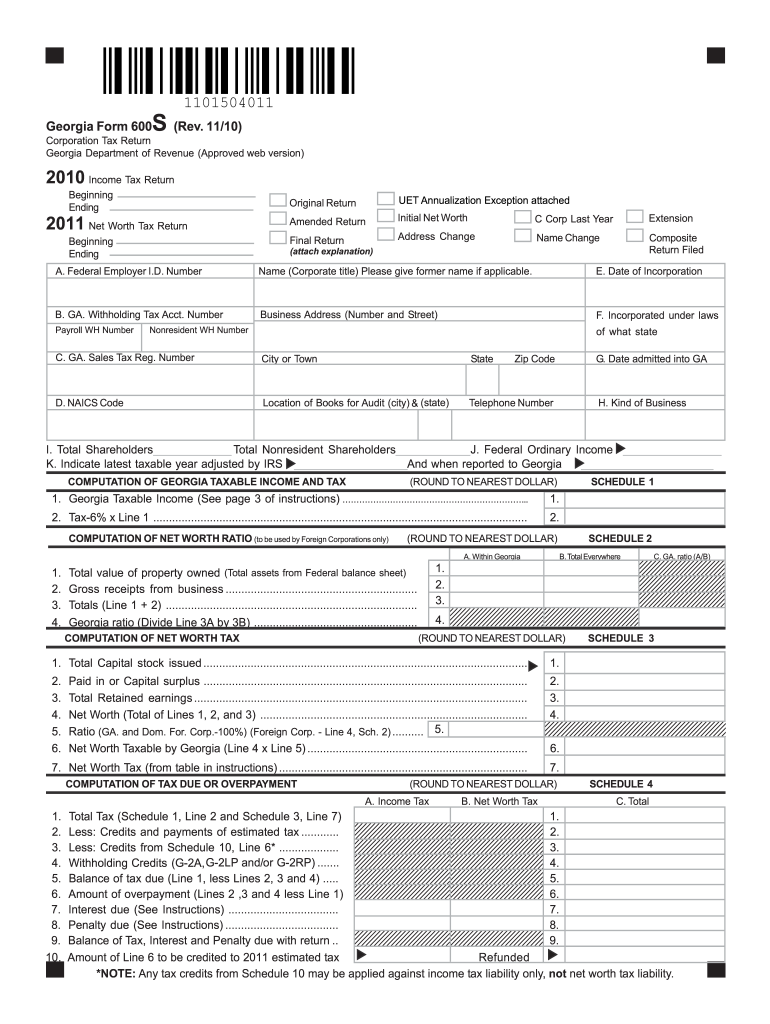
Th Tax Return Beginning Ending UET Annualization Exception attached Amended Return Initial Net Worth C Corp Last Year Extension Final Return Address Change Name Change Composite Return Filed (attach explanation) A. Federal Employer I.D. Number Name (Corporate title) Please give former name if applicable. E. Date of Incorporation B. GA. Withholding Tax Acct. Number Business Address (Number and Street) F. Incorporated under laws Payroll WH Number Nonresident WH Number of what st.
Loading

Open form follow the instructions

Easily sign the form with your finger

Send filled & signed form or save
How to fill out the GA DoR 600S online
The GA DoR 600S form is essential for corporations in Georgia to report their income and net worth tax obligations. This guide provides detailed, step-by-step instructions on how to complete the form easily and accurately, ensuring that all relevant information is included. It aims to assist users, regardless of their legal expertise, in navigating the online form confidently.
Follow the steps to complete the GA DoR 600S form online
- Press the ‘Get Form’ button to access the GA DoR 600S form and open it in the online editor.
- Enter your Federal Employer Identification Number (FEIN) in the designated field.
- Complete the 'Name' field with your corporation’s name, noting any former names if applicable.
- Input your corporation's address, including number and street, city or town, state, and zip code.
- Indicate the date of incorporation in the specified area.
- Provide the business address and contact telephone number for your corporation.
- Fill in the GA withholding tax account number and GA sales tax registration number if applicable.
- Complete the NAICS code box by providing the appropriate code that corresponds to your business activities.
- In the computation sections, carefully enter all required income and tax figures as specified, rounding to the nearest dollar.
- Review all sections to ensure accuracy and completeness before proceeding.
- Once all fields are filled, save your changes and download or print the form for your records.
- Submit the completed form following the instructions provided in the online editor.
Begin completing your GA DoR 600S form online today to meet your filing requirements!
Experience a faster way to fill out and sign forms on the web. Access the most extensive library of templates available.
Related content
600S Corporation Tax Return. Complete, save and print the form online using your browser...
Subchapter 'S' corporations shall use Form 600S-CA. A Subchapter 'S' corporation that has...
This beast produces 200 watts into 8 ohms, 400 watts into 4 ohms from each monoblock, and...
Get answers to your most pressing questions about US Legal Forms API.
Will I get a W-2 if I made less than $600?
If you earned less than $600, it’s unlikely you will receive a W-2. Employers typically issue W-2s for earnings of $600 or more. Regardless, you are responsible for reporting all income to the IRS, even if it falls below that threshold, using form GA DoR 600S.
How do I submit power of attorney to Georgia Department of Revenue?
To submit power of attorney to the Georgia Department of Revenue, you need to fill out the appropriate form, such as the Form POA. This form designates someone to act on your behalf regarding tax matters. Once completed, you can submit it through their online platform or by mailing the form.
Can I file taxes if I made $500?
Yes, you can and should file taxes if you made $500. While you may not need to file a 1099-MISC for that amount, utilizing form GA DoR 600S allows you to report all earnings accurately. This ensures that you remain compliant with tax regulations.
How do I file taxes under 600?
Filing taxes under $600 generally involves reporting your income, even if it does not meet the threshold for a 1099-MISC. You can use form GA DoR 600S to accurately report your earnings. Remember to keep all records of your income for reference when filing.
How do I report income under $600?
If your income is under $600, you generally do not need to file a 1099-MISC. However, you should report all income, including amounts less than $600, when filing your taxes using form GA DoR 600S. Accurate reporting helps maintain transparency and compliance with tax laws.
Can I set up an S corp myself?
Yes, you can set up an S corporation yourself in Georgia. You will need to complete the necessary forms, including filing GA DoR 600S when required. It is essential to follow state regulations closely and ensure you meet all requirements for S corp status.
What is the $600 tax rule?
The $600 tax rule refers to the requirement for reporting income that exceeds $600 to the IRS. Often, businesses must issue a Form 1099-MISC to contractors or freelancers for payments made. Understanding this rule can help you comply with tax obligations related to form GA DoR 600S.
Where do I file form 600S in Georgia?
You can file form GA DoR 600S directly with the Georgia Department of Revenue. This can be done online through their e-filing system or by mailing a physical copy to the appropriate address. Make sure you have all necessary documents and information ready before submission to ensure a smooth filing process.
Who must file Georgia form 600?
Filing Georgia form 600 is necessary for corporations doing business in Georgia or utilizing the state's resources. This includes C corporations that are not classified as S corporations. If you are required to comply with state tax matters, understanding the GA DoR 600S can provide clarity on your obligations.
What is Georgia form 600S?
Georgia form 600S is specifically designed for S corporations to report their income and tax information. This form helps ensure that S corporations comply with state tax regulations. Utilizing this form accurately will ease your filing process, especially when linked with your GA DoR 600S obligations.
Use professional pre-built templates to fill in and sign documents online faster. Get access to thousands of forms.
If you believe that this page should be taken down, please follow our DMCA take down process here.
This form is available in several versions. Select the version you need from the drop-down list below.