Under penalty of perjury, I declare that I have examined this return, including accompanying schedules and statements, and to the best of my knowledge and belief it is true, correct and complete.
Loading

Open form follow the instructions

Easily sign the form with your finger

Send filled & signed form or save
How to fill out the GA DoR 500 online
This guide provides a comprehensive walkthrough for users filling out the Georgia Department of Revenue Form 500 online. Whether you are completing your tax return for the first time or simply looking for guidance, this resource aims to support you with clear instructions tailored to your needs.
Follow the steps to complete your GA DoR 500 online application.
- Click the ‘Get Form’ button to access the GA DoR 500 online form and open it in your editor.
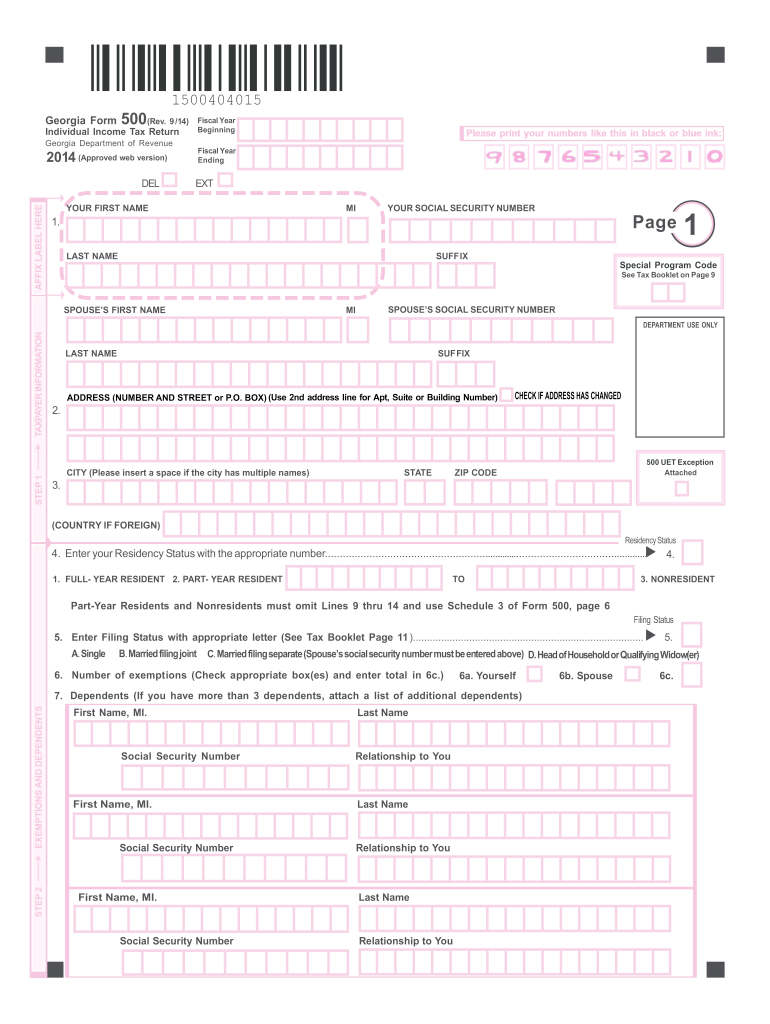
- Begin with the taxpayer information section. Fill in your first name, middle initial, last name, suffix, and social security number. If this tax return includes a spouse, provide their details as well.
- In the address section, enter your full mailing address including city, state, and zip code. If your address has changed, check the corresponding box.
- Specify your residency status by selecting the appropriate option: Full-year resident, Part-year resident, or Nonresident.
- Choose your filing status from the options provided: Single, Married filing jointly, Married filing separately (include spouse's SSN), or Head of Household.
- Indicate the number of exemptions by checking the relevant box for yourself, your spouse, and any dependents. List dependents if applicable.
- Proceed to the income section and input your federal adjusted gross income. Include any necessary adjustments from the provided schedules as required.
- Enter your deductions, choosing between the standard deduction or itemized deductions based on your eligibility.
- Calculate your Georgia taxable income by applying any deductions and credits. Ensure to review the tax booklet for guideline references.
- Finalize your submission by reviewing all fields for accuracy, then save your changes, and select options to download, print, or share the completed form.
Complete your GA DoR 500 form online today to ensure timely and accurate filing.
Experience a faster way to fill out and sign forms on the web. Access the most extensive library of templates available.
Related content
500 Individual Income Tax Return. Complete, save and print the form online using your...
IMPORTANT GENERAL POINTS TO REMEMBER: • If you file a Federal nonresident income tax...
Verificando Isolamento do motor. • Utilize um megôhmetro de 500 V. (mínimo). • Medir...
Get answers to your most pressing questions about US Legal Forms API.
Who must file Georgia form 501?
Georgia form 501 must be filed by any taxpayer who needs to report income from business, rental, or other non-wage sources. This form helps you accurately declare all your income streams to ensure compliance with state tax laws. If you are uncertain about your filing responsibilities, consider consulting uslegalforms for guidance on how to prepare and submit this form correctly.
Will your retirement income be excluded from taxes?
In many cases, your retirement income can be excluded from Georgia state taxes if you meet the eligibility requirements for the retirement income exclusion. By properly filing the necessary forms, such as the GA DoR 500, you can reduce or eliminate your state tax obligation on retirement income. Ensure that you verify your eligibility to benefit from these tax breaks.
What is considered excluded income?
Excluded income in Georgia includes certain types of retirement income such as pensions, annuities, and Social Security benefits, among others. The state specifies amounts that can be excluded, ensuring you maximize your savings. It's crucial to review the specific types of retirement income that qualify, as this can significantly impact your tax liability.
Who is eligible for retirement exclusion in Georgia?
Eligibility for the retirement exclusion in Georgia applies to residents aged 62 and older, as well as disabled individuals receiving retirement income. It is essential to ensure that your income meets the state's criteria for exclusion. This exclusion can lead to substantial savings on state taxes, making it advantageous for qualifying individuals in Georgia.
Who qualifies for Georgia retirement income exclusion?
To qualify for the Georgia retirement income exclusion, taxpayers must be at least 62 years old or disabled. This exclusion allows eligible individuals to exclude a certain amount of their retirement income from Georgia state taxes, providing significant savings. If you fall into this category, you can take advantage of this beneficial tax provision to lessen your tax responsibility.
What is Georgia form 500 NOL for?
Georgia form 500 NOL is used to report net operating losses, allowing taxpayers to carry these losses forward to offset future taxable income. When you file a form 500 NOL with your tax return, you can potentially reduce your tax burden in subsequent years. This form is essential for those who have incurred losses in past years and want to maximize their tax benefits.
What is the $500 Georgia tax refund?
The $500 Georgia tax refund, often referred to as the GA DoR 500, is a one-time payment provided to eligible Georgia taxpayers. It serves as a financial relief option as the state seeks to return surplus revenue. If you filed a return for the tax year 2021 and meet the criteria, you can benefit from this refund when it’s issued.
Who can use Georgia form 500?
Georgia form 500 is used by individuals and businesses filing their state income tax return. If you earn income in Georgia, this form applies to you, especially if you're claiming deductions or credits related to the GA DoR 500. For thorough guidance on how to fill out this form, consider utilizing resources from US Legal Forms.
Is GA giving 500 dollars?
Georgia has provided financial relief programs in the past, and specific details can change each year. Often, taxpayers may refer to forms like the GA DoR 500 to understand their eligibility for any state credits. Keeping an eye on updates from the Georgia Department of Revenue will provide the latest information on any direct payments.
Where can I pick up tax booklets?
You can pick up tax booklets at various locations, including public libraries, post offices, and local government offices. However, for the most convenient access to forms like the GA DoR 500, visiting an online platform such as US Legal Forms can save you time and ensure you have all necessary documents.
Use professional pre-built templates to fill in and sign documents online faster. Get access to thousands of forms.
If you believe that this page should be taken down, please follow our DMCA take down process here.
This form is available in several versions. Select the version you need from the drop-down list below.