Get Ga Dor 500 2015
How it works
-

Open form follow the instructions
-

Easily sign the form with your finger
-

Send filled & signed form or save
How to fill out the GA DoR 500 online
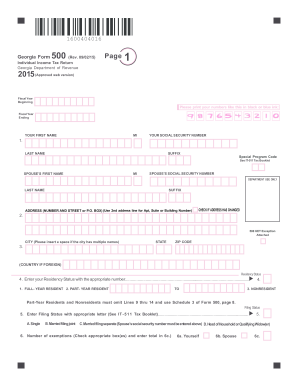
Filling out the GA DoR 500 form online can seem daunting, but with this guide, you'll find clear and supportive instructions to help you through the process. This form is essential for individuals filing their Georgia individual income tax return, and ensuring accuracy is key to minimizing tax liabilities.
Follow the steps to successfully complete your GA DoR 500 online.
- Click ‘Get Form’ button to obtain the form and open it in the online editor.
- Begin filling out your personal information. Enter your first name, middle initial, last name, suffix, and social security number in the designated fields.
- Provide your address on the next line, including your street number, street name or P.O. Box, and select whether your address has changed.
- Indicate your residency status by entering the appropriate number from the options provided: 1 for full-year resident, 2 for part-year resident, or 3 for nonresident.
- Select your filing status by entering the corresponding letter that describes your situation: A for single, B for married filing jointly, C for married filing separately, or D for head of household.
- Complete the exemptions section by checking the appropriate boxes for yourself, your spouse, and any dependents.
- Enter the federal adjusted gross income from your federal form and any adjustments from schedule 1.
- Calculate your Georgia adjusted gross income by adding or subtracting the adjustments from your federal form.
- Determine your standard deduction or itemized deductions and enter the appropriate totals.
- Follow through with the calculation of your Georgia taxable income and proceed to complete the tax table, entering all necessary figures based on the instructions.
- After filling out all required fields, ensure that all information is accurate and complete before saving your work.
- Finally, you can save your changes, download, print, or share the form to complete the filing process.
Take the first step towards filing your taxes by completing the GA DoR 500 form online today.
Get form
Related links form
The Georgia surplus tax refund is typically available to taxpayers who filed their returns and meet specific income requirements. This initiative ensures that everyone experiences a form of tax relief when the state sees budget surpluses. Understanding whether you're eligible for this refund can enhance your tax planning strategy. For precise details and support, consult with USLegalForms.