Get Ga 500ez 2014
How it works
-

Open form follow the instructions
-

Easily sign the form with your finger
-

Send filled & signed form or save
How to fill out the GA 500EZ online
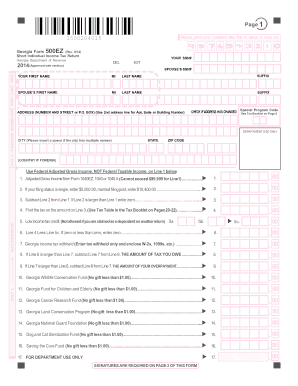
The Georgia Form 500EZ is a short individual income tax return designed for users with straightforward tax situations. This guide will provide clear instructions on how to complete the form accurately and efficiently, ensuring compliance with Georgia tax regulations.
Follow the steps to fill out the GA 500EZ online effectively.
- Click ‘Get Form’ button to access the GA 500EZ document and open it in your preferred online editing tool.
- In the taxpayer information section, fill in your social security number (SSN) and your spouse's SSN if applicable. Also, provide your address, including city, state, and zip code.
- Enter your first name, middle initial, last name, and any suffix. Do the same for your spouse if filing jointly.
- Indicate if your address has changed by checking the appropriate box.
- Proceed to the tax computation section. Enter your federal adjusted gross income from your tax return on Line 1, ensuring it does not exceed $99,999.
- On Line 2, input the allowed amounts based on your filing status: $5,000 if single, or $10,400 if married filing jointly.
- Subtract Line 2 from Line 1 on Line 3. If Line 2 is greater than Line 1, enter zero.
- Determine your tax by referencing the tax table in the tax booklet, and enter this amount on Line 4.
- If eligible, enter any low-income tax credit amounts on Lines 5a, 5b, and 5c.
- On Line 6, subtract Line 5c from Line 4. If the amount is zero or negative, enter zero.
- Enter any Georgia income tax withheld on Line 7, and make sure to enclose required documents such as W-2s.
- Determine if you owe taxes by subtracting Line 7 from Line 6. Enter the result on Line 8.
- Alternatively, if Line 7 exceeds Line 6, enter the overpayment amount on Line 9.
- Fill in Lines 10 to 16 for optional contributions to various Georgia funds, entering the total on Line 18.
- Calculate and indicate total amounts owed or refund due on Lines 19 and 20, and choose a deposit option for your refund.
- Finally, sign and date the form where indicated, and ensure all necessary fields are completed. Save any changes made, download, print, or share the completed form as needed.
Complete your GA 500EZ form online today to ensure a smooth tax filing process.
Get form
Related links form
Georgia form 500 Nol is used to report Net Operating Losses (NOL) that can be applied against taxes owed in future years. If you experienced a loss in a prior tax year, you may benefit from carrying that loss forward to offset future taxable income. Understanding how to correctly file this form can significantly impact your overall tax liability. For detailed guidance, US Legal Forms can provide the assistance you need to navigate these complexities.