481013 Health Care & Social Assistance (62) Arts, Entertainment, & Recreation (71) Accommodation & Food Services (72) Other Services (81) Public Administration (92) Aviation Gasoline/Jet Fuel Section C: Withholding Tax Every employer having employees earning wages in SC must register for withholding. Other types of payments also require state tax withholding. See instructions for more information. 20. Check the box that applies to your business: 02 Resident business: Principal place .
Loading

Open form follow the instructions

Easily sign the form with your finger

Send filled & signed form or save
How to fill out the SC DoR SCDOR-111 (Formerly SCTC-111) online
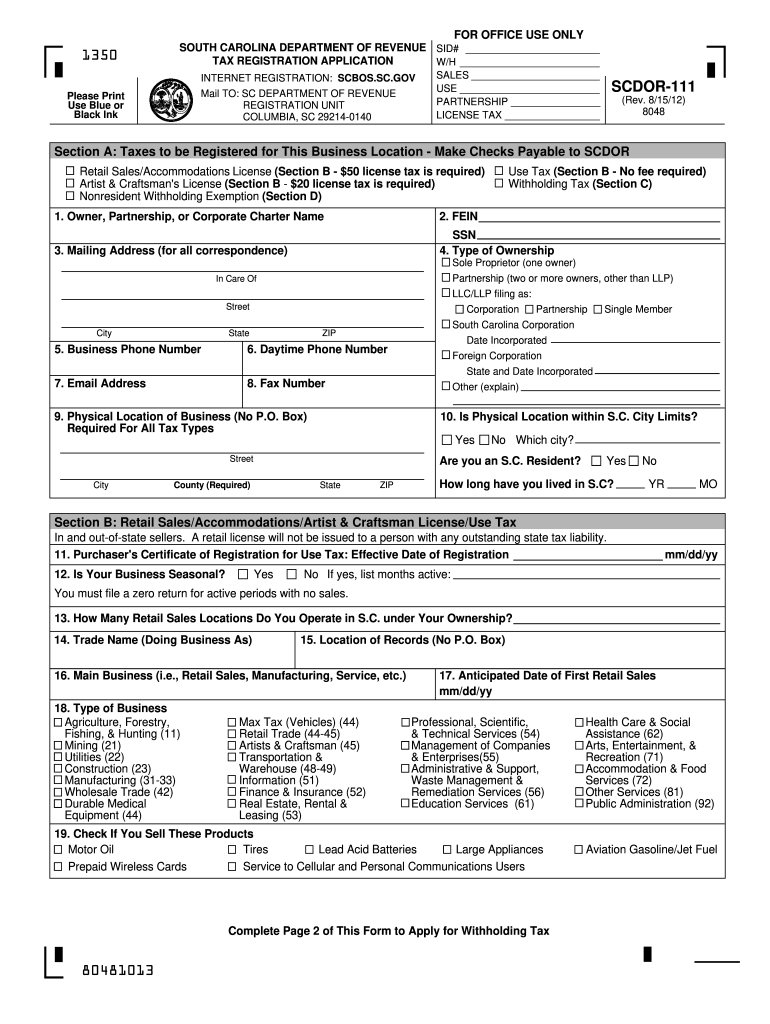
Filling out the SC DoR SCDOR-111 (Formerly SCTC-111) online is a crucial step for users registering their business in South Carolina. This guide will provide you with clear instructions on each section of the form, ensuring you complete it accurately and efficiently.
Follow the steps to complete the SC DoR SCDOR-111 online.
- Click ‘Get Form’ button to obtain the form and open it for completion.
- Begin with Section A, where you will select the types of taxes for which you are registering your business location. Be sure to check all relevant boxes for retail sales, use tax, and any applicable licenses, and note any associated fees.
- In Section A, provide your business ownership details including the owner's name, Federal Employer Identification Number (FEIN), mailing address, and phone numbers. Ensure all information is printed clearly.
- Continue to enter details in Section B about your retail sales activities, including the anticipated date of first sales and if your business operates seasonally. Report your last Certificate of Registration date if applicable.
- Navigate to Section C to declare your status as either a resident or nonresident business, and select your filing frequency for tax returns. Indicate the anticipated first payroll date if applicable.
- Section D requires you to check any appropriate exemptions from withholding requirements and understand your obligations regarding taxes.
- Move to Section E where you will provide personal information of business owners, general partners, or corporate officers, including their Social Security numbers and percentage of ownership.
- After completing both pages of the form, sign and date the application to certify that all information is accurate. Ensure the signature section is filled out by the appropriate individuals.
- Finally, review all your entries for accuracy, then save your changes, download, print the form, or share it as needed.
Start completing your SC DoR SCDOR-111 online today and ensure your business is properly registered.
Experience a faster way to fill out and sign forms on the web. Access the most extensive library of templates available.
Related content
111 – PLASTICS AND RUBBER MANUFACTURERS CREDIT ... Credit amount: 0.5% of total...
by S Carolina · 2011 — (Form SCTC-111) may be obtained from one of the Department of...
Get answers to your most pressing questions about US Legal Forms API.
How do I register for payroll withholding in SC?
Registering for payroll withholding in South Carolina involves submitting an application to the SC Department of Revenue. You'll need to provide details about your business and its employees to ensure compliance with state tax laws. Using the SC DoR SCDOR-111 (Formerly SCTC-111) form is beneficial in this registration process. If you want to ensure that all your bases are covered, uslegalforms offers helpful tools to guide you through each step of payroll registration.
How to get SCDOR file number?
To get your SCDOR file number, you must complete the business registration with the South Carolina Department of Revenue. This process involves filling out forms with your business details and submitting them through their online portal. The issuance of your file number will follow once your application is approved. If you want to simplify this procedure, uslegalforms provides user-friendly resources to assist with the registration.
Where can I find my state withholding number?
You can find your state withholding number on the documents you received when you registered your business with the SC Department of Revenue. This number may also appear on tax documents submitted in previous years. If you are unable to locate it, do not hesitate to contact the Department directly, as they can help you retrieve your withholding number. For further clarity on state tax matters, consider referring to information available through uslegalforms.
What is SC state ID number?
The SC state ID number is a unique identifier assigned to your business by the South Carolina Department of Revenue. This number is essential for tax reporting and conducting business activities within the state. Keeping your SC DoR SCDOR-111 (Formerly SCTC-111) form handy will help you manage your tax obligations efficiently. If you have questions about acquiring this number, uslegalforms offers resources that can assist you.
How do I get a SC sales tax number?
To acquire a sales tax number in South Carolina, you must register through the SC Department of Revenue’s online portal. This registration allows you to collect and remit sales tax properly. Completing the SC DoR SCDOR-111 (Formerly SCTC-111) form can facilitate this process. If you feel uncertain about the requirements, consider using uslegalforms to streamline your application.
How do I get a SCDOR file number?
Obtaining a SCDOR file number is a straightforward process. You need to register your business with the South Carolina Department of Revenue, which will issue you a file number upon completion. Make sure to provide all required documentation, as any missing information could delay your application. If you prefer, you can also explore the services offered by uslegalforms, which can assist you with the registration and ensure all steps are followed correctly.
Where's my refund SC phone number?
To inquire about your SC tax refund, you can contact the South Carolina Department of Revenue at their dedicated phone number. This number is available for answering queries regarding the status of your refund, such as delays or issues with processing. Remember to have your tax return information on hand to expedite the process. Using the SC DoR SCDOR-111 (Formerly SCTC-111) form may help in addressing specific concerns about your refund.
How do I get a SC tax ID number?
Obtaining a SC tax ID number can be accomplished through the South Carolina Department of Revenue's website. By filling out the necessary forms online, you can easily apply for your SC tax ID number related to the SC DoR SCDOR-111 (Formerly SCTC-111). This identifier is essential for all your tax-related activities.
What is the R&D tax credit in South Carolina?
The R&D tax credit in South Carolina is designed to stimulate research and development activities in the state. Companies that qualify can receive a credit on their taxes, encouraging innovation and growth. For detailed regulations and how this pertains to the SC DoR SCDOR-111 (Formerly SCTC-111), consult the SC Department of Revenue's guidelines.
How do I know if I get a SC rebate check?
To confirm if you are set to receive an SC rebate check, you can visit the South Carolina Department of Revenue website. By using their online tool to enter your details, you can check your rebate status directly linked to the SC DoR SCDOR-111 (Formerly SCTC-111). This can provide reassurance regarding your eligibility.
Use professional pre-built templates to fill in and sign documents online faster. Get access to thousands of forms.
If you believe that this page should be taken down, please follow our DMCA take down process here.
This form is available in several versions. Select the version you need from the drop-down list below.