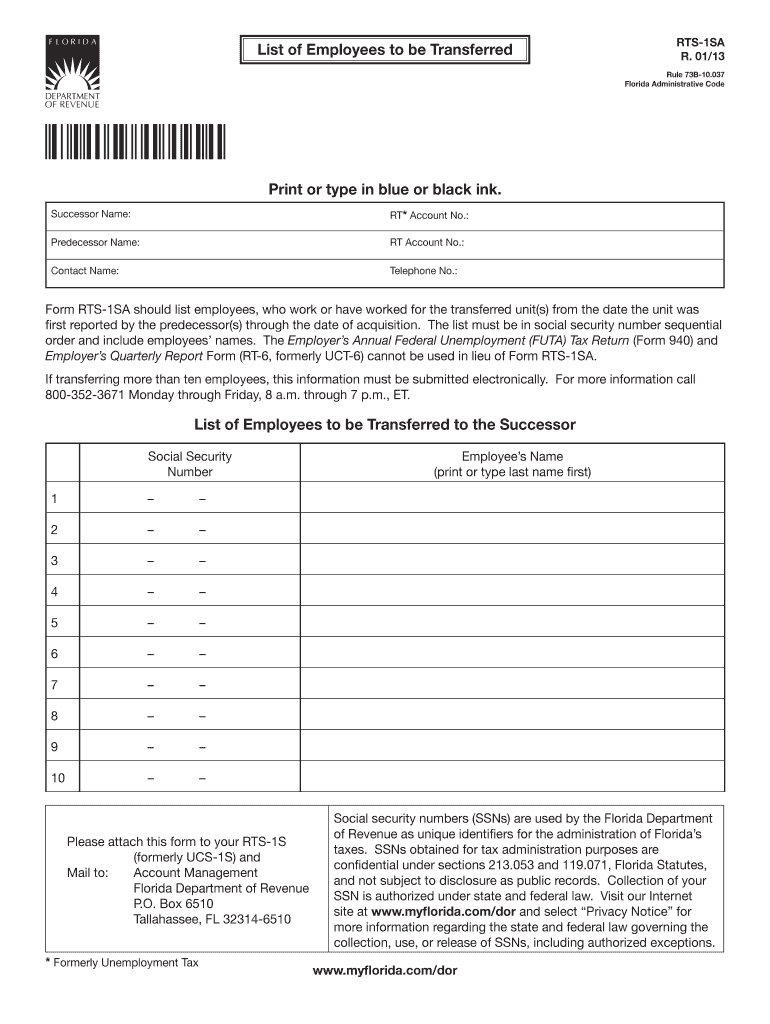
No.: Contact Name: Telephone No.: Form RTS-1SA should list employees, who work or have worked for the transferred unit(s) from the date the unit was first reported by the predecessor(s) through the date of acquisition. The list must be in social security number sequential order and include employees names. The Employer s Annual Federal Unemployment (FUTA) Tax Return (Form 940) and Employer s Quarterly Report Form (RT-6, formerly UCT-6) cannot be used in lieu of Form RTS-1SA. If transf.
Loading

Open form follow the instructions

Easily sign the form with your finger

Send filled & signed form or save
How to fill out the FL RTS-1SA online
The FL RTS-1SA form is essential for reporting employees being transferred during business changes. This guide will provide clear instructions on how to complete the form online effectively.
Follow the steps to fill out the FL RTS-1SA form online.
- Click ‘Get Form’ button to obtain the FL RTS-1SA document and open it in your preferred editor.
- Enter the successor name in the designated field to identify the organization assuming responsibility for the transferred employees.
- Provide the RT* Account Number associated with the successor organization to maintain accurate records.
- Input the predecessor name in the specified field to indicate the previous organization that employed the workers.
- Fill in the RT Account Number linked to the predecessor organization.
- Include a contact name, whom the Florida Department of Revenue can reach for questions or clarifications related to this form.
- List the telephone number of the contact person to ensure effective communication if needed.
- Sequentially list the employees' names, starting with their last name, followed by their first name. Please ensure the names are accurate and legible.
- Enter the social security numbers in the designated fields provided, ensuring they are in sequential order as required by the form.
- If transferring more than ten employees, ensure this information is submitted electronically as per the regulations.
- After completing all required fields, review the form for accuracy before proceeding to save your changes.
- Once confirmed, download, print, or share the completed FL RTS-1SA form as necessary following your organizational processes.
Complete your FL RTS-1SA form online to ensure a smooth employee transfer process.
Experience a faster way to fill out and sign forms on the web. Access the most extensive library of templates available.
Related content
by L Wood · 2019 · Cited by 13 — We describe the development of a cell-based assay...
If 10 or more employees were transferred, filing of the RTS-1SA must be by electronic...
The FL'IT_I_)Iccontrol c£1ntll)t be used to operate the TX-8511 it"the SYSTEM swift h is...
Get answers to your most pressing questions about US Legal Forms API.
Does Florida have state unemployment tax?
Yes, Florida does impose a state unemployment tax on employers to fund unemployment compensation. This tax helps maintain the unemployment insurance program within the state. If you are an employer, understanding the implications of the FL RTS-1SA will aid you in fulfilling your tax obligations efficiently.
How to get a 220 insurance license in Florida?
To get a 220 insurance license in Florida, you must complete the required pre-licensing education and then pass the state exam. After passing the exam, submit your application and fees to the Florida Department of Financial Services. Utilizing resources such as the FL RTS-1SA can help you navigate the overall licensing process effectively.
How do I get an RT number in Florida?
To get an RT number in Florida, you need to register with the Florida Department of Revenue. Usually, you can complete this registration online or by submitting paper forms. Understanding the FL RTS-1SA can greatly help in grasping the nuances of your reemployment tax responsibilities, guiding you throughout the registration process.
Do you get a W2 for unemployment benefits?
No, unemployment benefits are reported on a 1099-G, not a W-2. This form summarizes the total benefits you received during the tax year and is crucial for your tax filings. When filing your taxes, ensure to include your 1099-G along with any relevant FL RTS-1SA information for accurate reporting. If you have any questions, consulting with a tax professional can be beneficial.
How to get a Florida tax ID number?
You can obtain a Florida tax ID number by applying through the Florida Department of Revenue's website. The process typically involves completing an online application that requires basic information about your business. Once you submit your application, you will receive your tax ID number, which is crucial for tax compliance including any required FL RTS-1SA forms.
How do I get a reemployment tax ID in Florida?
To acquire a reemployment tax ID in Florida, you will need to register your business with the Florida Department of Revenue. This process can usually be completed online through their official website. For individuals seeking reemployment assistance, the FL RTS-1SA is a valuable resource that may help your understanding of necessary taxation requirements.
Can I file taxes without my 1099-G from unemployment?
Filing taxes without your 1099-G from unemployment can be challenging, but it is possible. You can reconstruct your income by using your payment history available on the Florida Department of Economic Opportunity’s website. While doing this, ensure you correctly report any unemployment benefits you received. Consider obtaining the FL RTS-1SA form to facilitate your tax filing process.
How to get unemployment tax form in Florida?
To obtain your unemployment tax form in Florida, you can visit the Florida Department of Economic Opportunity's website. Alternatively, you may contact your local unemployment office for assistance. The FL RTS-1SA form may also be available through online resources or official state portals. It is essential to gather your W-2s and 1099s for accurate reporting.
How do I find my reemployment tax number in Florida?
To find your reemployment tax number in Florida, you can check your previous tax filings or correspondence from the Florida Department of Revenue. Additionally, you may contact the department directly for assistance in locating your number. With the help of USLegalForms, you can streamline your reemployment tax processes and access various services related to the FL RTS-1SA.
Is Florida reemployment tax the same as unemployment tax?
Florida reemployment tax and unemployment tax are related but serve different purposes. The reemployment tax, also known as the unemployment tax, funds the reemployment assistance program for eligible individuals. When you understand the distinctions between these taxes, it becomes easier to manage your responsibilities, especially when filing forms like the FL RTS-1SA.
Use professional pre-built templates to fill in and sign documents online faster. Get access to thousands of forms.
If you believe that this page should be taken down, please follow our DMCA take down process here.
This form is available in several versions. Select the version you need from the drop-down list below.