Loading
Get Irs 941-pr 2020
This website is not affiliated with IRS
How it works
-

Open form follow the instructions
-

Easily sign the form with your finger
-

Send filled & signed form or save
How to fill out the IRS 941-PR online
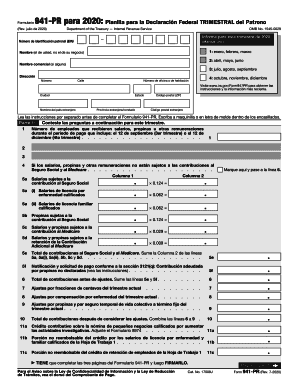
The IRS Form 941-PR is essential for employers to report quarterly federal payroll taxes. This guide provides a clear and supportive approach to filling out the form online, ensuring you have the information you need to complete it accurately.
Follow the steps to fill out the IRS 941-PR online effectively.
- Click ‘Get Form’ button to obtain the form and open it in the online editor.
- Begin by entering your employer identification number (EIN) at the top of the form. This is crucial for identifying your business.
- Next, input your name in the appropriate field—this should reflect your personal name and not the business name.
- If applicable, provide your business name in the designated area.
- Fill out your complete address, ensuring you include your street address, city, state, and ZIP code.
- In Part 1, list the number of employees who received wages, tips, or other compensation during the quarter.
- Complete the columns under the wage section, ensuring you provide accurate figures for social security and Medicare contributions.
- Add any adjustments for fractions of cents, sick leave, or any other adjustments as prompted on the form.
- Calculate the combined total contributions after adjustments and record this in the appropriate line.
- For any credits, complete sections 11a to 11d as required, providing supporting documentation where necessary.
- In Part 2, address your tax obligation and inform the IRS about your deposit schedule.
- Complete any additional questions regarding your business operations, especially if there have been changes during the quarter.
- After finishing all three pages of the form, ensure that you sign and date it to validate your submission.
- Once completed, save changes to the form, and you may choose to download, print, or share it as needed.
Take the first step in maintaining your payroll compliance—fill out and file your IRS 941-PR online today.
Get form
Experience a faster way to fill out and sign forms on the web. Access the most extensive library of templates available.
The IRS requires that all businesses file Form 941 online through an approved e-file provider or on IRS-authorized paper forms. You can e-file Form 941, Employer's Quarterly Federal Tax Return, online to the IRS with ExpressIRSForms. To e-file IRS Form 941, simply: Create an ExpressIRSForms account.
Get This Form Now!
Use professional pre-built templates to fill in and sign documents online faster. Get access to thousands of forms.