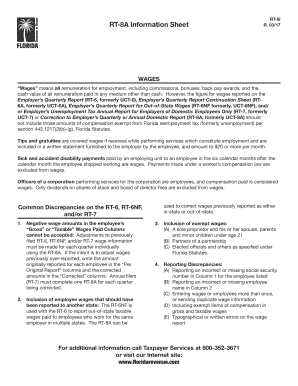
RT8A Information SheetRT8i R. 03/17WAGES Wages means all remuneration for employment, including commissions, bonuses, back pay awards, and the cash value of all remuneration paid in any medium other.
Open form follow the instructions
Easily sign the form with your finger
Send filled & signed form or save
How to fill out the FL RT-8i online
The FL RT-8i is an essential form for employers in Florida to correct previously filed employer wage reports. This guide will provide you with comprehensive and step-by-step instructions to successfully complete the form online.
Follow the steps to accurately fill out the FL RT-8i form online.
- Click the ‘Get Form’ button to access the FL RT-8i and open it in your document editor.
- Identify the sections requiring attention. Begin with the 'Employer Information' section, where you will enter your business details, including name, address, and employer identification number.
- Proceed to the 'Employee Information' section. Here, enter the employee's social security number and name accurately, as this information is crucial for correct reporting.
- Next, navigate to the 'Wage Information' section. You will report the wages originally submitted and the corrected amounts. Make sure to differentiate between taxable and non-taxable wages according to Florida statutes.
- If you are correcting previously reported wages, refer back to the 'Per Original Report' columns to accurately record the amounts that need adjustment.
- Review the entire form to ensure that there are no typographical errors or missing information. Pay special attention to social security numbers and the spelling of names.
- Once you have filled in all the necessary information, save your changes. You will then have the option to download, print, or share the completed FL RT-8i form.
Take the next step in managing your employer wage reports by completing the FL RT-8i online today.
Experience a faster way to fill out and sign forms on the web. Access the most extensive library of templates available.
Related content
by ML O'Sullivan · 2012 · Cited by 298 — We identify the FLRT family of leucine-rich...
An employer who is approved must report wages and pay taxes annually by filing Form RT-7...
Todas as tomadas de áudio digital são compatíveis com as frequências de amostragem de...
Get answers to your most pressing questions about US Legal Forms API.
How do I get an RT account number in Florida?
To secure an RT account number in Florida, register your business with the Florida Department of Revenue. The application process can be completed online and is essential for businesses engaging in sales activities. Once registered, you will receive your FL RT-8i number, streamlining your tax processes.
How do I get a Florida tax ID number?
Getting a Florida tax ID number requires you to apply online through the Florida Department of Revenue. During this process, you will be asked to provide various business details. After submission, you will receive your FL RT-8i number, which you will use for all tax-related obligations.
How do I close my Florida reemployment account?
If you need to close your Florida reemployment account, you should contact the Florida Department of Economic Opportunity directly. Provide the necessary information about your account, and they will guide you through the closure process. It's important to confirm that all obligations related to your FL RT-8i account are settled prior to closure.
How to apply for a Florida UI number?
To apply for a Florida UI number, visit the Florida Department of Economic Opportunity's website. By completing the application process online, you will receive your UI number, necessary for processing unemployment claims. This number is particularly important for employers and employees alike.
How do I apply for a Florida RT number?
Applying for a Florida RT number involves filling out the necessary forms available on the Florida Department of Revenue's website. This process is essential for businesses engaging in taxable activities. Once your application is processed, you will receive your FL RT-8i number for tax compliance.
How do I get a Florida sales tax number?
Obtaining a Florida sales tax number is straightforward. You can apply online via the Florida Department of Revenue's website. Upon successful registration, you will receive your FL RT-8i number, enabling you to collect and remit sales tax effectively for your business.
How do I set up an employer unemployment account in Florida?
To establish an employer unemployment account in Florida, you need to register online through the Florida Department of Revenue's website. After providing the required business information, you will receive your FL RT-8i registration confirmation. This account will allow you to manage unemployment insurance for your employees efficiently.
How to get a tax ID number in Florida?
To obtain a tax ID number in Florida, start by completing the FL RT-8i registration form through the Florida Department of Revenue. This form requires important information about you and your business. Once registered, you will receive your tax ID number, which is crucial for conducting business in the state.
How do I get my Florida unemployment tax form?
You can get your Florida unemployment tax form by visiting the Florida Department of Revenue's website. Look for the specific section on unemployment tax forms, where you may also find the FL RT-8i application if you're registering a business. Ensure to download the correct form for your needs.
How do I get my RT number?
If you need to retrieve your RT number, you should contact the Florida Department of Revenue directly. They can verify your information and provide assistance in locating your RT number associated with your business. Keeping your records organized will also help in resolving this quickly.
Use professional pre-built templates to fill in and sign documents online faster. Get access to thousands of forms.
If you believe that this page should be taken down, please follow our DMCA take down process here.
This form is available in several versions. Select the version you need from the drop-down list below.