Loading
Get Me Rew-3 2021-2026
How it works
-

Open form follow the instructions
-

Easily sign the form with your finger
-

Send filled & signed form or save
How to fill out the ME REW-3 online
Filling out the ME REW-3 form is essential for ensuring proper tax withholding during the transfer of real estate in Maine. This guide provides a detailed, step-by-step approach to complete the form accurately and efficiently.
Follow the steps to successfully complete the ME REW-3 form online.
- Click ‘Get Form’ button to obtain the form and open it in your preferred online editor.
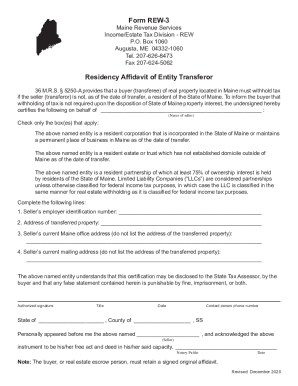
- In the section for the seller's name, enter the full name of the seller as it appears on official documents.
- Check the appropriate box or boxes that apply to the seller's entity type, indicating whether they are a resident corporation, estate, trust, or partnership.
- Provide the seller's employer identification number in the designated field.
- Enter the address of the transferred property accurately, making sure to include all relevant details.
- Fill in the seller's current Maine office address, which should not be the address of the transferred property.
- Complete the field for the seller's current mailing address, ensuring this is also not the transferred property address.
- The authorized person must sign the form, provide their title, and indicate the date of signing.
- Include the contact person's phone number in the designated area for future communication.
- If required, a notary public must witness the signature and fill in their information along with the date.
- Review all entered information to ensure accuracy and completeness before proceeding to save your changes, download, or print the completed form.
Complete your ME REW-3 form online today to ensure a smooth real estate transaction.