Loading
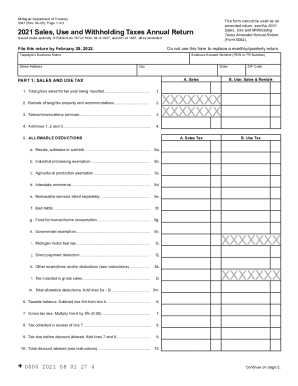
Get Mi 5081 2021-2026
How it works
-

Open form follow the instructions
-

Easily sign the form with your finger
-

Send filled & signed form or save
How to fill out the MI 5081 online
Filling out the MI 5081 form online can be a straightforward process with the right guidance. This guide will provide step-by-step instructions for completing the form accurately and efficiently, ensuring you meet your tax obligations.
Follow the steps to complete the MI 5081 form online.
- Click ‘Get Form’ button to obtain the MI 5081 and open it in your browser.
- Complete the Taxpayer’s Business Name field with the official name of your business. Ensure accuracy to avoid issues with your filing.
- Enter your Business Account Number (FEIN or TR Number) in the designated field to identify your business.
- Fill in the Street Address, City, State, and ZIP Code fields to provide your business's physical location.
- In Part 1, enter total gross sales for the tax year being reported, including all relevant sales data.
- List allowable deductions, using lines 5a through 5l to detail any exemptions that apply to your business.
- Calculate the taxable balance by subtracting the total allowable deductions from the gross sales.
- Determine the gross tax due by multiplying the taxable balance by the applicable tax rate.
- Proceed to Part 2 and report any purchases for which no tax was paid, ensuring compliance with use tax regulations.
- Complete Part 3 with details related to withholding tax, including the gross Michigan payroll and total Michigan income tax withheld.
- In Part 4, summarize the total sales, use, and withholding tax due, and report total payments and credits.
- Finally, complete the signature section, ensuring that the taxpayer or official representative reviews and certifies the information provided.
- After filling out the form, you can save changes, download, print, or share the completed MI 5081.
Complete your MI 5081 form online today to ensure timely and accurate tax submissions.