Loading
Get Ok Otc 904 Schedule 3 2021-2026
How it works
-

Open form follow the instructions
-

Easily sign the form with your finger
-

Send filled & signed form or save
How to fill out the OK OTC 904 Schedule 3 online
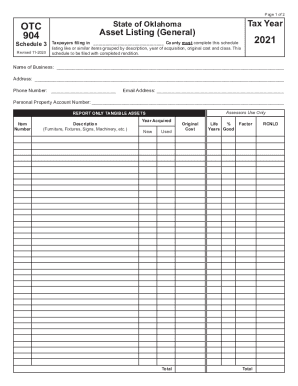
Filling out the OK OTC 904 Schedule 3 is a crucial step for taxpayers in Oklahoma, allowing you to report your tangible assets accurately. This guide provides you with straightforward, step-by-step instructions to complete the form online with confidence.
Follow the steps to accurately complete the OK OTC 904 Schedule 3.
- Click ‘Get Form’ button to access the OK OTC 904 Schedule 3 and open it in your preferred online editor.
- Begin by entering the tax year and the county where you are filing. Ensure that this information is accurate as it pertains to your filing requirements.
- Provide the name of your business, along with your address, phone number, and email address, in the designated fields.
- Enter your personal property account number in the corresponding section. This number is vital for identifying your account accurately.
- For each item you are reporting, begin with the item number. This will help keep your asset listing organized.
- In the description field, detail the type of asset you are reporting, such as furniture, fixtures, signs, or machinery.
- Indicate the year the asset was acquired. Make sure to specify if it was new or used in the respective section.
- Fill in the total original cost of the asset in the field provided. This should reflect the amount you initially paid for it.
- State the expected useful life of the asset in years in the designated field.
- Complete any necessary calculations to determine the relevant factors and totals as required by the form.
- Review all entered information for accuracy and completeness to ensure proper filing.
- Once all sections are complete, you can save your changes, download a copy of the form, print it, or share it as needed.
Take the next step and fill out your OK OTC 904 Schedule 3 online today to ensure compliance.