Loading
Get Ok Otc 901 2021-2026
How it works
-

Open form follow the instructions
-

Easily sign the form with your finger
-

Send filled & signed form or save
How to fill out the OK OTC 901 online
The OK OTC 901 form is essential for businesses in Oklahoma to report their personal property assets annually. This guide will provide step-by-step instructions to assist users in filling out this important document online accurately and efficiently.
Follow the steps to complete your OK OTC 901 online.
- Press the ‘Get Form’ button to access the OK OTC 901 form and open it in the online editor.
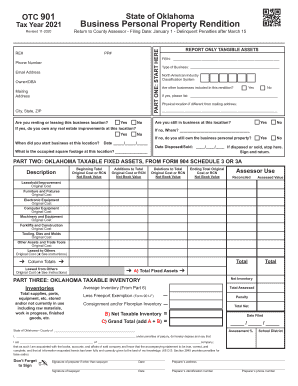
- In Part One, begin by filling in your RE# and PP#. Next, provide your contact details, including phone number, email address, and the name of the owner or doing business as (DBA). Enter the mailing address along with city, state, and ZIP code.
- Input your Federal Employer Identification Number (FEIN) and select the type of business you operate. Then provide the North American Industry Classification System (NAICS) code. Indicate whether you have other businesses included in this rendition by checking ‘Yes’ or ‘No’.
- If you answered ‘Yes’ to having other businesses, list them as requested. Also, indicate the physical location if it differs from your mailing address, confirm if you are still in business at this location, and whether you are renting or leasing the property.
- Answer the questions regarding the ownership of real estate improvements and when the business started at this location. Also, report any tangible assets as necessary.
- Moving to Part Two, provide a breakdown of your taxable fixed assets including original cost or replacement cost new for each asset category listed, such as leasehold improvements, furniture and fixtures, electronic equipment, among others. Be sure to follow the instructions regarding reporting these assets.
- In Part Three, denote your average inventory and report all categories of inventory as outlined. This includes total supplies, parts, and equipment stored, and take note of any applicable exemptions.
- Proceed to fill out Parts Four, Five, and Six by detailing any additions or deletions to your assets during the reporting year and provide necessary inventory data.
- Finally, complete any declaration sections near the end of the form, ensuring that it is signed and dated by the appropriate parties. Save your changes and prepare to download, print, or share the completed document as needed.
Complete your OK OTC 901 form online now to ensure your business's compliance with state requirements.